


NANY 2010 Entry Information
| Application Name | Crush MCP |
| Version | V1.01 |
| Short Description | Check running processes (because of its heavy system-influence: use it on your own risk - with running it you agree that I´m not responsible for any damages resulting from the usage) |
| Supported OSes | Windows Vista & Windows 7 |
| Web Page | - |
| Download Link | Crush MCP V1.01.zip (1.5 MB) |
| System Requirements |
|
| Version History |
|
| Author | Crush |
| Screencast |

Description
The Master Control Program is a small tool running in the background that monitors all tasks and programs.
After making a snapshot of all running processes new ones will be terminated and tracked in a deletion list.
So you can see and get protected if a virus or other unknown programs are automatically starting in the background without your permission to raise your security while working.
I recommend only experienced users to start this tool!
Features
- check for new tasks
- track, kill & autokill processes
- flashing infoscroller in the tasklist when new processes appear
- multiselection for most functions supported
- create and activate a whitelist - all other tasks will be terminated
- whitelist is protected against manipulation
- backups of the whitelist
- check for information of the tasks on different processwebsites
- edit/add/remove own infosites
Planned Features
- more speed & less CPU usage
- loaded modules information on processes
- file read/write behaviour controlling
- updated files of processes are treated like new processes
- checking for illegal processes of spyware/addware/viruses
- send to antivirus/antispyware processes
- direct showing/editing the whitelist
- creating a blacklist
- checking the process files for changes
- process hooking for faster reaction
- optional filechecking (big speedup boost)
- save or print the message and process window
- soft-termination by the windows messaging system
- forced termination after a timespan if soft-termination isn´t working
Screencast
Usage
Installation
Only run the .exe file
!!! ATTENTION !!! : Don´t set the whitelist-checkbutton without inserting the most important tasks into it!!! The result will be a total process-environment termination and restart
Using the Application
You can select one or more tasks from the tasklist and kill, add and remove them to/from the whitelist. Activate the whitelist by setting the checkbutton.
Taking a look on the process read/write behaviour and relaunches helps you to find suspicious ones.
If the whitelist has been illegal modified or is corrupted the program will show a message and quit. So first try to replace it with the backup (.bup) file. If nothing works you only have to delete it - so a new one will be created.
Uninstallation
Only delete the files and folder
Known Issues
At the moment it´s only working on Windows Vista and Windows 7. Windows XP seems to have problems in checking the processes correct but there are users that have no problems with it on XP. It seems to be like russian roulette.
Screenshot
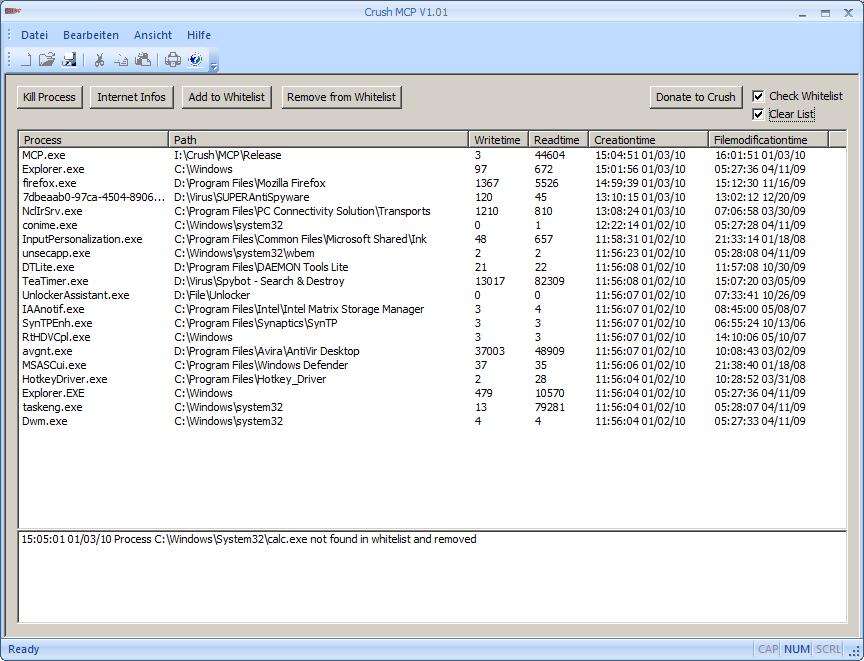


 who don´t know what they´re doing. Something that influences your system like this one should only be used by experienced users. The most important things you must take care of I wrote with a big !!! ATTENTION !!! and that´s all I can do until now. Perhaps later I include a function to add the most important processes on the first startup and autoactivation of the whitelist. This could also be a high security risk because quick automatic whitelistening can only take care of the filename and not other informations at this state of the program.