DonationCoder.com forum
 
Read-only archive. This is a static copy of the DonationCoder.com forum. Reading and searching work as before; logging in, posting and private messages do not.
Archive of 2026-10-21 · About this archive · Main site

Author Topic: displayed captured image looks like it is softened  (Read 6,016 times)

masu

  • Member
  • Joined in 2006
  • **
  • Posts: 401
displayed captured image looks like it is softened
« on: January 14, 2006, 09:49 AM »
displayed captured image looks like it is soften

is there a way to display the captured image in SC without softening
Find+Run Robot 2.90.01
Windows 7

mouser

  • First Author
  • Administrator
  • Joined in 2005
  • *****
  • Posts: 40,931
    • Gathering Badge
    • Plugin Coding Medal
    • Participated in NANY Challenge Seventeen Times
    • Cody Award
    • Coding Snacks
    • Volunteers/Staff
Re: displayed captured image looks like it is softened
« Reply #1 on: January 14, 2006, 02:29 PM »
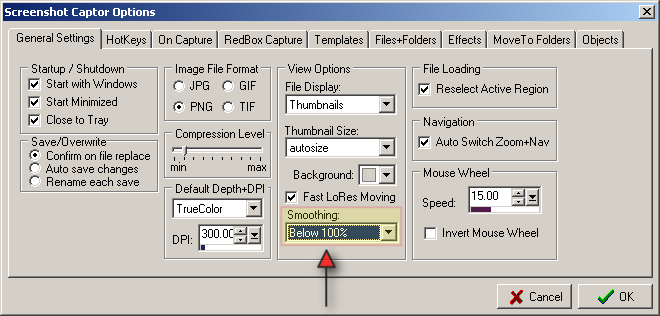
try changing this option to "Never" and see if that's what you want:

smoothing.png

masu

  • Member
  • Joined in 2006
  • **
  • Posts: 401
Re: displayed captured image looks like it is softened
« Reply #2 on: January 14, 2006, 03:14 PM »
thanks now it works
Find+Run Robot 2.90.01
Windows 7

Original address: https://www.donationcoder.com/forum/index.php?topic=2115.0