DonationCoder.com forum
 
Read-only archive. This is a static copy of the DonationCoder.com forum. Reading and searching work as before; logging in, posting and private messages do not.
Archive of 2026-10-21 · About this archive · Main site

Author Topic: Bug: blank file when using "grab selected region" capture  (Read 11,821 times)

superboyac

  • Is your software in my list?
  • Charter Member
  • Joined in 2005
  • ***
  • Posts: 6,347
Bug: blank file when using "grab selected region" capture
« on: December 12, 2009, 06:06 AM »
mouser, when I use the grab selected region capture method, I am getting blank captures.  The dimensions of the box is correct, but it's just blank white.

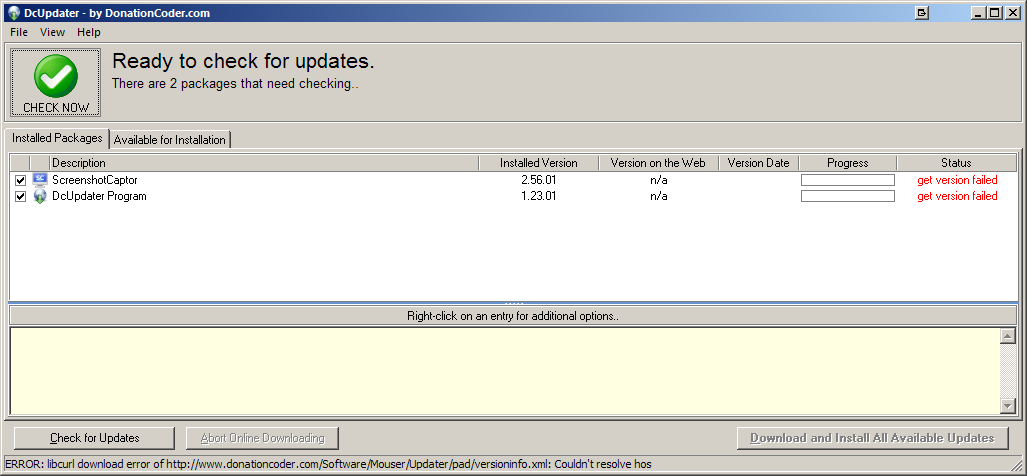
Also, i tried updating using DCUpdater, but it fails.  But it might be on my end, I can't tell:
Screenshot_20091211220440.png

mouser

  • First Author
  • Administrator
  • Joined in 2005
  • *****
  • Posts: 40,931
    • Gathering Badge
    • Plugin Coding Medal
    • Participated in NANY Challenge Seventeen Times
    • Cody Award
    • Coding Snacks
    • Volunteers/Staff
Re: Bug: blank file when using "grab selected region" capture
« Reply #1 on: December 12, 2009, 06:35 AM »
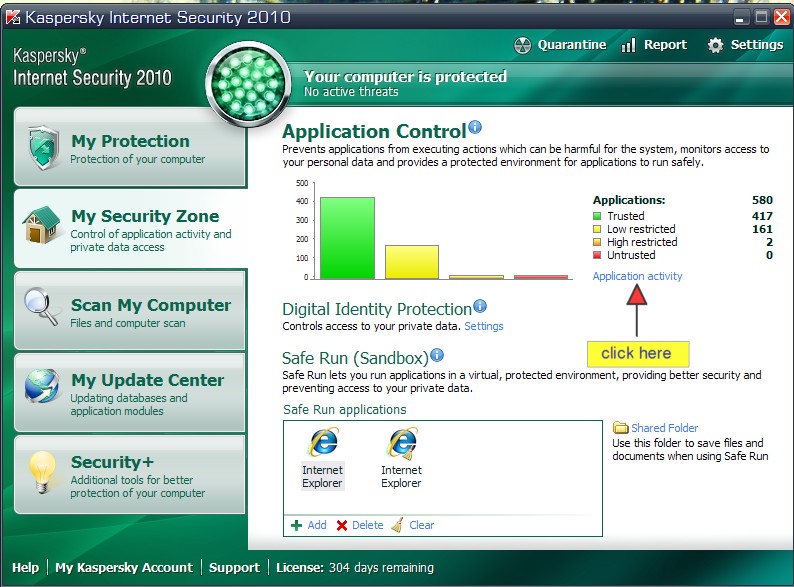
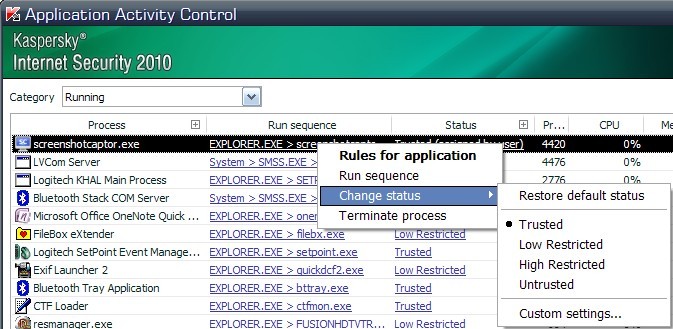
This is going to seem strange but.. Do you happen to use Kaspersky Internet Security?

I exchanged emails with someone recently who tracked down the problem to that program.  Here's how he demonstrated he fixed it:

Kaspersky 2010 Security-App Control.jpg
Kaspersky 2010 Security-App Contro 2l.jpg
« Last Edit: December 12, 2009, 02:33 PM by mouser »

superboyac

  • Is your software in my list?
  • Charter Member
  • Joined in 2005
  • ***
  • Posts: 6,347
Re: Bug: blank file when using "grab selected region" capture
« Reply #2 on: December 12, 2009, 06:53 AM »
Yes!  I do have KIS.  All fixed!  Thank you.

I love Kaspersky, but sometimes...it just drives me nuts.

AAT

  • Supporting Member
  • Joined in 2011
  • **
  • Posts: 3
Re: Bug: blank file when using "grab selected region" capture
« Reply #3 on: March 09, 2011, 10:42 AM »
I had a similar problem.
I got blank shots when I tried to capture pictures from googleusercontent.com (strange!). Then I had to reboot in order to have ScreenShot Captor working properly.
I think (and hope) that I solved the problem permanently by changing the settings of Zone Alarm Extreme Security (from ?, ?, ?, ?, ? to II, v, v, v, v -> see the attached picture)

[attach]

AAT

  • Supporting Member
  • Joined in 2011
  • **
  • Posts: 3
Re: Bug: blank file when using "grab selected region" capture
« Reply #4 on: April 25, 2011, 06:30 PM »
Finally, I think that the problem is not Zone Alarm or any other firewall program.

I noticed that there are websites that use security servers (such as banks etc) or other tricks that block any picture that may be taken (for security reasons obviously).

The main problem is that after I visit such a website, then I must restart the computer so that ScreenShot Captor can work again.
Hence, if other people face the same problem, it might be useful to have a routine that will "refresh/reload (or whatever)" the ScreenShot Captor without the nead of a reboot.

oxo

  • Participant
  • Joined in 2014
  • *
  • Posts: 7
Re: Bug: blank file when using "grab selected region" capture
« Reply #5 on: February 27, 2014, 09:25 AM »
I have the bank program Trusteer Rapport installed also, and have turned them all off in attempt to find if they are causing the problem of the black screen,
but the same happens.

Looks like Screenshot captor is not for me. :o


mouser

  • First Author
  • Administrator
  • Joined in 2005
  • *****
  • Posts: 40,931
    • Gathering Badge
    • Plugin Coding Medal
    • Participated in NANY Challenge Seventeen Times
    • Cody Award
    • Coding Snacks
    • Volunteers/Staff
Re: Bug: blank file when using "grab selected region" capture
« Reply #6 on: July 14, 2014, 07:32 PM »
Webroot has a faq entry for how to allow a screenshot tool:
https://community.webroot.com/t5/Webroot-SecureAnywhere-Complete/How-to-allow-a-trusted-screen-capture-program/ta-p/10498

Original address: https://www.donationcoder.com/forum/index.php?topic=20962.0