DonationCoder.com forum
 
Read-only archive. This is a static copy of the DonationCoder.com forum. Reading and searching work as before; logging in, posting and private messages do not.
Archive of 2026-10-21 · About this archive · Main site

Author Topic: Circle Dock won't start at Startup  (Read 9,472 times)

Haani_Echad

  • Participant
  • Joined in 2009
  • *
  • Posts: 13
Circle Dock won't start at Startup
« on: December 02, 2009, 07:26 AM »
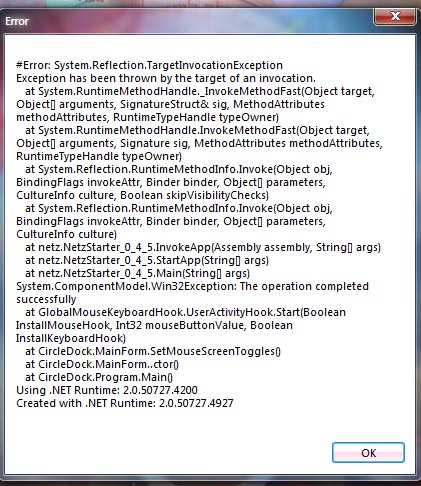
I am new her and I just want to say first thanks for the guys that continue to build on the Circle Dock program.  I am just having a problem running it.  I am running Vista Home Premium Laptop with 2 GB RAM.  The only way for me to run Circle dock is if I "Run as Administrator" and I put it in the StartUp folder and Vista blocks the program and if I run it normally it runs some error which is too much to remember or write down.  I wish I could show you the error put I don't know how to take a piture of my desktop.  I hope you can help me.
"To traverse the sea of the mind, is to go beyond the threshold of time"

Haani_Echad

  • Participant
  • Joined in 2009
  • *
  • Posts: 13
Re: Circle Dock won't start at Startup
« Reply #1 on: December 03, 2009, 06:57 PM »
To put this clearer I got the picture of the error which is attached.  Whenever I try to run Circle Dock normally this error comes up.  But when I run it as an administrator everything works fine.  The problem is when I put it in the Startup folder Windows blocks the program from starting because of its elevated status.  Any help will me most appreciated.
"To traverse the sea of the mind, is to go beyond the threshold of time"

Markham

  • Honorary Member
  • Joined in 2009
  • **
  • Posts: 404
Re: Circle Dock won't start at Startup
« Reply #2 on: December 04, 2009, 03:56 AM »
You don't need to put Circle Dock in your startup folder. There's an option in General Settings which will run Circle Dock on System start.


Mark

Haani_Echad

  • Participant
  • Joined in 2009
  • *
  • Posts: 13
Re: Circle Dock won't start at Startup
« Reply #3 on: December 04, 2009, 06:19 PM »
I did as you instructed and it still won't run without administrator approval and with administrator approval when the computer starts up it blocks it. Is there any way to run it without adminstrator approval?
"To traverse the sea of the mind, is to go beyond the threshold of time"

Original address: https://www.donationcoder.com/forum/index.php?topic=20818.0