DonationCoder.com forum
 
Read-only archive. This is a static copy of the DonationCoder.com forum. Reading and searching work as before; logging in, posting and private messages do not.
Archive of 2026-10-21 · About this archive · Main site

Author Topic: Waking up stand-by windows computer on Lan?  (Read 8,264 times)

kartal

  • Supporting Member
  • Joined in 2008
  • **
  • Posts: 1,529
Waking up stand-by windows computer on Lan?
« on: November 21, 2009, 02:42 AM »
Hi

Does anyone know of any tool that would let me wake up a standby computer on the lan? I changed the bios and network card settings under windows. I tried various modes and none seemed to work. Either computer goes in to standby and comes back in 10 seconds or never wakes up


thanks

Shades

  • Member
  • Joined in 2006
  • **
  • Posts: 2,954
Re: Waking up stand-by windows computer on Lan?
« Reply #1 on: November 21, 2009, 02:57 AM »
Now I know that AMD has made software with which you can easily "wake-up" PC's on a LAN/WAN. I even downloaded the software.

Now I found a link:
http://www.amd.com/us-en/assets/content_type/utilities/magic_pkt.exe
The easy path is usually downhill...
« Last Edit: November 21, 2009, 03:07 AM by Shades »

kartal

  • Supporting Member
  • Joined in 2008
  • **
  • Posts: 1,529
Re: Waking up stand-by windows computer on Lan?
« Reply #2 on: November 21, 2009, 03:01 AM »
Shades, I have seen the mentions about either from Amd or from Intel butnone are available :(

4wd

  • Pedantic Old Bastard
  • Supporting Member
  • Joined in 2006
  • **
  • Posts: 5,652
    • Coding Snacks
Re: Waking up stand-by windows computer on Lan?
« Reply #3 on: November 21, 2009, 03:27 AM »
WOLcmd - worked for me when I used it.

Netscan also has a WOL manager under the Options menu.

Wake-On-LAN Introduction has a list of utilities, (including the AMD one), to facilitate WOL, eg. ActiveX control for embedding in a web page, perl scripts, etc

If you want to do it remotely, there's also Wake-On-LAN Online.
"I will not follow where the path may lead, but I will go where there is no path, and I will leave a trail." - Muriel Strode, 1903
« Last Edit: November 21, 2009, 03:36 AM by 4wd »

Stoic Joker

  • Honorary Member
  • Joined in 2008
  • **
  • Posts: 6,652
    • Cody Award
    • Participated in NANY Challenge Five Times
Re: Waking up stand-by windows computer on Lan?
« Reply #4 on: November 21, 2009, 04:08 AM »
In a nutshell WOL is a UDP packet containing the target machine's MAC address 16 times sent to port 9
« Last Edit: November 21, 2009, 04:11 AM by Stoic Joker »

kartal

  • Supporting Member
  • Joined in 2008
  • **
  • Posts: 1,529
Re: Waking up stand-by windows computer on Lan?
« Reply #5 on: November 21, 2009, 04:10 AM »
hey thanks for all the replies. I am trying Netscan right now.

Stoic thanks for simplfying it. I was wondering waht the magic packet was :)

bscott

  • Supporting Member
  • Joined in 2007
  • **
  • Posts: 21
Re: Waking up stand-by windows computer on Lan?
« Reply #6 on: March 18, 2010, 03:38 PM »
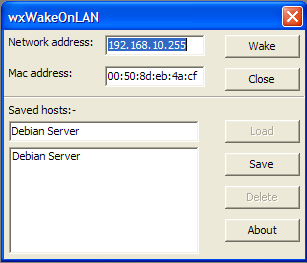
I have been revisiting C++ after many years absence and wrote this Wake On Lan program as an exercise.

To install, just unzip the two files in the attached zip file to a location of your choice.

It is Windows only at the moment (I have tried it on XP and Windows 7) but I am working on a Linux version.

There is no help at the moment but all that is required is to enter the network broadcast adress eg 192.168.1.255 and a MAC address in the format 00:50:8d:eb:4a:cf then click on Wake.

You can also save and reload host settings.

It works for me, I hope it works for you.

[attach]

Original address: https://www.donationcoder.com/forum/index.php?topic=20706.0