DonationCoder.com forum
 
Read-only archive. This is a static copy of the DonationCoder.com forum. Reading and searching work as before; logging in, posting and private messages do not.
Archive of 2026-10-21 · About this archive · Main site

Author Topic: Auto close tags  (Read 7,132 times)

rgdot

  • Supporting Member
  • Joined in 2009
  • **
  • Posts: 2,197
Auto close tags
« on: November 17, 2009, 09:51 PM »
Continuing my ongoing pointless questions

Does anybody know of a freeware html or text editor that has support for automatically inserting closing tags?
I type the h1 tag for example, add the text and then the closing tag is added automatically. Vim I believe does that using Ctrl+X+O, are there any free software that do the same or similar?

Target

  • Honorary Member
  • Joined in 2006
  • **
  • Posts: 1,840
    • Coding Snacks
Re: Auto close tags
« Reply #1 on: November 17, 2009, 10:15 PM »
can't comment on the editor side of things (HTML Kit may be worth a look) but you could certainly do this with a 'hotstrings' tool that replaces typed occurrences with the full string (ie opening and closing tags)
Alcohol is photoshop, bottled
Askhole - someone who ask for advice, then ignores it
"Look wise, say nothing, and grunt. Speech was given to conceal thought" - Sir William Osler

rgdot

  • Supporting Member
  • Joined in 2009
  • **
  • Posts: 2,197
Re: Auto close tags
« Reply #2 on: November 17, 2009, 10:36 PM »
Currently I am doing something somewhat crude, sending keys using powerpro, it's like pre-saving some common closing tags and pasting them with a click when one is needed. Regarding HTML-Kit, I tried this but it didn't work on my machine, not really sure why.

Target

  • Honorary Member
  • Joined in 2006
  • **
  • Posts: 1,840
    • Coding Snacks
Re: Auto close tags
« Reply #3 on: November 17, 2009, 11:05 PM »
what i'd probably suggest (if you can't find an editor with this functionality built in) is an autotext type utility that will replace one typed string with another, eg typing <table> would trigger the script to replace that entry with <table></table>

There are any number of these available, or you could use an AHK script (you would need to provide a list of the common tags) 
Alcohol is photoshop, bottled
Askhole - someone who ask for advice, then ignores it
"Look wise, say nothing, and grunt. Speech was given to conceal thought" - Sir William Osler

Shades

  • Member
  • Joined in 2006
  • **
  • Posts: 2,954
Re: Auto close tags
« Reply #4 on: November 17, 2009, 11:07 PM »
NotePad++ does automagically close tags...but only for XML (by default). Maybe it's worth to take a look at their plug-ins.
The easy path is usually downhill...

Lashiec

  • Member
  • Joined in 2006
  • **
  • Posts: 2,374
Re: Auto close tags
« Reply #5 on: November 17, 2009, 11:27 PM »
Notepad2 auto closes HTML and XML tags, if you enable it under "Settings" -> "Auto close HTML/XML"

Target

  • Honorary Member
  • Joined in 2006
  • **
  • Posts: 1,840
    • Coding Snacks
Re: Auto close tags
« Reply #6 on: November 17, 2009, 11:31 PM »
as does notepad++ (under TextFX -> TextFX Settings -> Autoclose XHTML/XML tags)
Alcohol is photoshop, bottled
Askhole - someone who ask for advice, then ignores it
"Look wise, say nothing, and grunt. Speech was given to conceal thought" - Sir William Osler
« Last Edit: November 17, 2009, 11:33 PM by Target »

rgdot

  • Supporting Member
  • Joined in 2009
  • **
  • Posts: 2,197
Re: Auto close tags
« Reply #7 on: November 17, 2009, 11:56 PM »
So many options I should have already known about :-[

Thank you everybody :)

sri

  • Honorary Member
  • Joined in 2006
  • **
  • Posts: 689
Re: Auto close tags
« Reply #8 on: November 18, 2009, 04:34 AM »
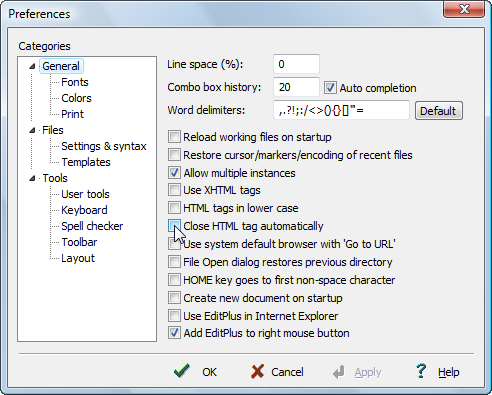
EditPlus can do as well.

[attachimg=#]

Original address: https://www.donationcoder.com/forum/index.php?topic=20650.0