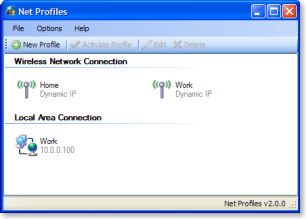
after having to switch back and forth manually, i found this freeware that allows one to switch between network settings. Net Profiles works on a profile basis, basically create a profile and key-in a set of values pertaining to the network that you want to be connected. among the options you can alter with a profile are IP addresses (dhcp or manual), proxy settings, default browser homepage, mapped drives, screen resolution, wallpapers and even activate Wireless SSID based on different profiles.
[attach=#]
in the changelog there is a note saying, "Completely rewritten in .NET 2.0" so .NET 2.0 runtime might be needed but i can't verify since i already have .NET 3.5 on my system.
• http://code.google.com/p/netprofiles/
[attach=#]
Quote from: "website"
With Net Profiles, mobile computing becomes a whole lot easier. It eliminates the need to manually reconfigure your network settings when you move your desktop/laptop computer to another location. Once a profile is created, Net Profiles can configure your IP settings, proxy settings, mapped drives, default printer, wallpaper, and screen resolution with a click of a button; as well as run any number of user-defined applications upon activation of a profile.
in the changelog there is a note saying, "Completely rewritten in .NET 2.0" so .NET 2.0 runtime might be needed but i can't verify since i already have .NET 3.5 on my system.
• http://code.google.com/p/netprofiles/