DonationCoder.com forum
 
Read-only archive. This is a static copy of the DonationCoder.com forum. Reading and searching work as before; logging in, posting and private messages do not.
Archive of 2026-10-21 · About this archive · Main site

Author Topic: text editor question  (Read 10,373 times)

kalos

  • Member
  • Joined in 2006
  • **
  • Posts: 1,824
text editor question
« on: October 28, 2009, 11:19 AM »
hello

I want to search with regex for specific text and select all the instances and copy them to paste them in another text file

I don't know how to do it, emeditor does not offer that option

any idea?

thanks

mwb1100

  • Supporting Member
  • Joined in 2006
  • **
  • Posts: 1,645
Re: text editor question
« Reply #1 on: October 28, 2009, 02:26 PM »
UltraEdit can do this - in the Find dialog select the "List Lines Containing String" option.  The resulting dialog will contain a list of matching strings that can be copied to the clipboard.

Of course, for this type of operation I'd normally use a command-line grep too and just pipe the output to a file.

mouser

  • First Author
  • Administrator
  • Joined in 2005
  • *****
  • Posts: 40,931
    • Gathering Badge
    • Plugin Coding Medal
    • Participated in NANY Challenge Seventeen Times
    • Cody Award
    • Coding Snacks
    • Volunteers/Staff
Re: text editor question
« Reply #2 on: October 28, 2009, 03:00 PM »
I use LineByter, free for personal use, made by a DonationCoder member. more info here:
http://www.donationcoder.com/forum/index.php?topic=14381.0

It may be a bit of overkill for your needs -- it's quite powerful and perfect for extracting regular expression matched strings from a file (like email addresses, etc.).

AbteriX

  • Member #520
  • Charter Honorary Member
  • Joined in 2005
  • ***
  • Posts: 1,150
Re: text editor question
« Reply #3 on: October 28, 2009, 03:12 PM »
Hi kalos,

EmEditor can't do that? I was thinking this is an such common task every editor should be able to do that?

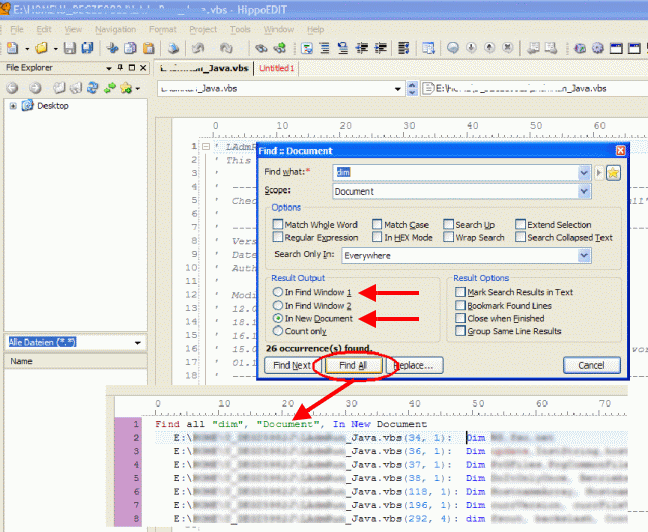
I use www.HippoEDIT.com and he does it (see picture).
You can collect to "Output pane" or to an new document.
Find_and_Collect01_c200.png

Well, there is room for improvement, but the author knows and will do this.
If you have more question you can ask there in the forum too (without he hassle to register first.)
Greetings, Stefan.

kalos

  • Member
  • Joined in 2006
  • **
  • Posts: 1,824
Re: text editor question
« Reply #4 on: October 28, 2009, 04:09 PM »
I downloaded hippoedit, while it has "find all" it doesn't allow me to "select all" and copy all selected

or do I miss something?

mwb1100

  • Supporting Member
  • Joined in 2006
  • **
  • Posts: 1,645
Re: text editor question
« Reply #5 on: October 28, 2009, 06:59 PM »
BareGrep is another free tool that'll do the trick, though it wasn't 100% intuitive (at least for me).  Get the search you want then go to the "File/Export..." menu item and use that dialog to configure exactly what you want to be put onto the clipboard (or sent to a file).

mouser

  • First Author
  • Administrator
  • Joined in 2005
  • *****
  • Posts: 40,931
    • Gathering Badge
    • Plugin Coding Medal
    • Participated in NANY Challenge Seventeen Times
    • Cody Award
    • Coding Snacks
    • Volunteers/Staff
Re: text editor question
« Reply #6 on: October 28, 2009, 07:12 PM »
you should really give linebyter a try :)
download from http://www.softpedia.com/progDownload/LineByter-Download-106558.html

kalos

  • Member
  • Joined in 2006
  • **
  • Posts: 1,824
Re: text editor question
« Reply #7 on: October 28, 2009, 08:29 PM »
you should really give linebyter a try :)
download from http://www.softpedia.com/progDownload/LineByter-Download-106558.html

I downloaded, there is no GUI for that? I run the .exe and an empty cmd window appeared

mouser

  • First Author
  • Administrator
  • Joined in 2005
  • *****
  • Posts: 40,931
    • Gathering Badge
    • Plugin Coding Medal
    • Participated in NANY Challenge Seventeen Times
    • Cody Award
    • Coding Snacks
    • Volunteers/Staff
Re: text editor question
« Reply #8 on: October 28, 2009, 08:50 PM »
certainly not, its a full setup program and then the application itself has a very nice gui (see http://www.donationcoder.com/forum/index.php?topic=14381.0 )

Tuxman

  • OMG not him again!
  • Supporting Member
  • Joined in 2006
  • **
  • Posts: 2,522
    • Participated in NANY Challenge Seven Times
Re: text editor question
« Reply #9 on: October 28, 2009, 11:36 PM »
I presume Vim could also do it ...  :D
I bet when Cheetahs race and one of them cheats, the other one goes "Man, you're such a Cheetah!" and they laugh & eat a zebra or whatever.

AbteriX

  • Member #520
  • Charter Honorary Member
  • Joined in 2005
  • ***
  • Posts: 1,150
Re: text editor question
« Reply #10 on: October 29, 2009, 07:55 AM »
I downloaded hippoedit, while it has "find all" it doesn't allow me to "select all" and copy all selected
As i show you in my above post: you can redirect all found lines to an new document/tab.
There you can select all (CTRL+A) and copy it to the clipboard (CTRL+C).

Right now the file name and position where this content was found is included in the output too.
But here one can simple do an rectangle block selection and delete this before CTRL+A/C.
Greetings, Stefan.

kalos

  • Member
  • Joined in 2006
  • **
  • Posts: 1,824
Re: text editor question
« Reply #11 on: October 29, 2009, 02:27 PM »
certainly not, its a full setup program and then the application itself has a very nice gui (see http://www.donationcoder.com/forum/index.php?topic=14381.0 )

clicking the link at the bottom of this webpage, it downloads a 227KB instead of the 880KB file, can you inform the author about this? (I hope it is not a virus...)

PS: I tested it, it works nice, but it is sooo slow, while emeditor instantly highlights (with green) the found matches (unfortunately it doesn't select them)
« Last Edit: October 29, 2009, 03:31 PM by kalos »

Original address: https://www.donationcoder.com/forum/index.php?topic=20427.0