DonationCoder.com forum
 
Read-only archive. This is a static copy of the DonationCoder.com forum. Reading and searching work as before; logging in, posting and private messages do not.
Archive of 2026-10-21 · About this archive · Main site

Last post Author Topic: Breevy - Text replacer / expander and program / website launcher.  (Read 39,979 times)

maohbao

  • Typing Assistant team
  • Participant
  • Joined in 2008
  • *
  • Posts: 22
Re: Breevy - Text replacer / expander and program / website launcher.
« Reply #25 on: April 22, 2010, 12:13 PM »
Hi, I am Typing Assistant author. Thanks for trying our program.

Thanks to rjbull to let me know users are discuss the issue of IME compatibility. The truth is that Typing Assistant works with IME very early. It is incredible if Typing Assistant can't work with IME because it is designed for China user initially. Typing Assistant even has a "Keyboard Layout Manage" option for the user to define in which keyboard layouts Typing Assistant is enabled or disabled. By default, East Asian IME are disabled for Typing Assistant.

To mwang: Thanks for trying Typing Assistant. Do you notice the "Keyboard Layout Manage" option in Custom Settings?

Please email our product support if anyone has any problem. Thanks.
Typing Assistant team <br/>
http://www.sumitsoft.com

mwang

  • Supporting Member
  • Joined in 2007
  • **
  • Posts: 205
Re: Breevy - Text replacer / expander and program / website launcher.
« Reply #26 on: April 22, 2010, 12:45 PM »
Typing Assistant even has a "Keyboard Layout Manage" option for the user to define in which keyboard layouts Typing Assistant is enabled or disabled. By default, East Asian IME are disabled for Typing Assistant.

To mwang: Thanks for trying Typing Assistant. Do you notice the "Keyboard Layout Manage" option in Custom Settings?

Yes, I did see the option, but it's only for the "real-time suggestion" function (which, of course, makes sense). My previous posts should make it clear, however, that I'm trying to find a text expander (the "auto-expand" function in Typing Assistant) that works when an IME is on. Disabling Typing Assistant (the "auto-expand" part) when an IME is on kind of defeats the purpose, don't you think?

rjbull

  • Charter Member
  • Joined in 2005
  • ***
  • Posts: 3,217
Re: Breevy - Text replacer / expander and program / website launcher.
« Reply #27 on: April 22, 2010, 09:07 PM »
Another small issue with Typing Assistant as a text expander is the lack of flexibility. E.g., you can't organize text replacement pairs into groups, making them harder to manage.

I'm talking of things I don't understand (again); as I only use English, I didn't even know about IME before...  :-[  But what do you mean about grouping?  You can sort Typing Assistant's lists by Shorthand or by Full Text, but you meant something more than that?
mwang

  • Supporting Member
  • Joined in 2007
  • **
  • Posts: 205
Re: Breevy - Text replacer / expander and program / website launcher.
« Reply #28 on: April 23, 2010, 02:49 AM »
But what do you mean about grouping?  You can sort Typing Assistant's lists by Shorthand or by Full Text, but you meant something more than that?

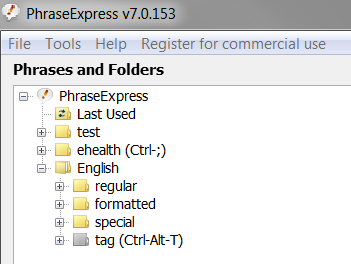
By "grouping" I mean organizing text-expanding definitions into folders to ease management. PhraseExpress does it best currently (but most others have something similar). See screenshot below:
[attachthumb]
« Last Edit: April 23, 2010, 02:50 AM by mwang »

maohbao

  • Typing Assistant team
  • Participant
  • Joined in 2008
  • *
  • Posts: 22
Re: Breevy - Text replacer / expander and program / website launcher.
« Reply #29 on: April 23, 2010, 05:20 AM »
Yes, I did see the option, but it's only for the "real-time suggestion" function (which, of course, makes sense). My previous posts should make it clear, however, that I'm trying to find a text expander (the "auto-expand" function in Typing Assistant) that works when an IME is on. Disabling Typing Assistant (the "auto-expand" part) when an IME is on kind of defeats the purpose, don't you think?

No, "real-time suggestion" includes Auto-Expand part. Let me make an example: If user works in American keyboard layout(just like rjbull) and types "usa", Typing Assistant will expand it to "United States of America" automatically. If user works in a disabled East Asian IME and types "usa"(usually these three keystrokes mean certain East Asian character), Typing Assistant will not expand it to "United States of America". Everyone who installed East Asian IME can try this.

But if you use "Alt+Left" to browse Auto-Expand dictionary, Typing Assistant is enabled whether it works in IME or not. We just designed so. Because Auto-Expand function is also required if user works in IME. Typing Assistant supports all language characters in Auto-Expand full text, not just English letters. For example, when user works in IME, he can press "Alt+Left" to browse Auto-Expand entries, select shorthand "cn" and expand it to "中华人民共和国". Then it is not right to absolutely disable the suggestions even if works in IME. This is a basic issue for expander software, we have considered it years ago.


Typing Assistant team <br/>
http://www.sumitsoft.com

mwang

  • Supporting Member
  • Joined in 2007
  • **
  • Posts: 205
Re: Breevy - Text replacer / expander and program / website launcher.
« Reply #30 on: April 23, 2010, 09:43 AM »
No, "real-time suggestion" includes Auto-Expand part.

Thanks for your reply, and I apologize for misunderstanding the option. One reason why I misunderstood is my main Chinese IME (Yahoo奇摩輸入法) is already on the "DISABLED" list, but "real-time suggestion" remains "enabled" (i.e., "real-time suggestion" prompt keeps popping up even when the IME is on). I therefore thought the option was only pertinent to the "Auto-Complete" function. A bug perhaps?

(A side note: "Keyboard Layout Manage"--the title for the section where this option is found--is an odd phrase, for "manage" is a verb. You may want to use "management" instead.)

Now, let's assume the option works as expected. IOW, "real-time suggestion" is disabled when my IME is on. That would defeat the purpose of using a text-expander for me. Yes, I can still use "alt-left" to bring up the Auto-Expand list, but that's much less useful for it requires two extra keystrokes. When the list get longer, moreover, choosing the right one gets harder. To me, the best part about the "real-time suggestion" function is the constant surprises it gives me (ah-ha, I had this phrase defined). No such luck if one can only use alt-left to use the Auto-Expand function.

Due to the bug (assuming it's a bug, not another of my misunderstandings) mentioned above, currently "real-time suggestion" does keep giving me prompt when my IME is on. But then there's the other issue I described earlier:

Quote
When I hit the trigger key, Typing Assistant would issue a series of backspace to remove the abbreviation. And yet when typing with an IME on, the key strokes wouldn't generate output to the application immediately; they are held in a buffer. Instead of wiping out the abbreviation, as a result, Typing Assistant ends up deleting text that should be kept.

I hope that makes myself clear. I want a text expander that does text replacement ("Auto-Expand" with "real-time suggestion" in Typing Assistant terminology) properly when my IME is on, without any of the problems I mentioned earlier in this thread. It's a tall order, I know. That's why I was pleasantly surprised when I first saw Breevy accomplishing it.

Original address: https://www.donationcoder.com/forum/index.php?topic=20413.0