DonationCoder.com forum
 
Read-only archive. This is a static copy of the DonationCoder.com forum. Reading and searching work as before; logging in, posting and private messages do not.
Archive of 2026-10-21 · About this archive · Main site

Author Topic: What's required for Aero in Win7?  (Read 19,386 times)

tranglos

  • Supporting Member
  • Joined in 2006
  • **
  • Posts: 1,081
    • Participated in NANY Challenge Twice
What's required for Aero in Win7?
« on: October 22, 2009, 09:48 PM »
Microsoft Windows 7 Upgrade Advisor is telling me my graphics adapter won't support Aero. I have Nvidia GeForce 880 GTS with 640 MB onboard RAM. It's not two years old and I bought it specifically to run Bioshock at full res and quality - and it does. It runs Dead Space at full throttle, too - but it won't do for Aero?

My upgrade plans have just been postponed indefinitely. Good deal, Microsoft!

(I ran Vista Upgrade Advisor some time ago, and it okayed me for Aero then. Now I feel old :-)

JavaJones

  • Review 2.0 Designer
  • Charter Member
  • Joined in 2005
  • ***
  • Posts: 2,739
    • Participated in NANY Challenge Once
Re: What's required for Aero in Win7?
« Reply #1 on: October 22, 2009, 09:55 PM »
That does *not* seem right. Do you have the latest graphics drivers? Are you perhaps running beta drivers or some other non-standard (e.g. Omega) drivers?

- Oshyan

MilesAhead

  • Supporting Member
  • Joined in 2009
  • **
  • Posts: 7,736
    • Coding Snacks
Re: What's required for Aero in Win7?
« Reply #2 on: October 22, 2009, 10:00 PM »
Hmmmmm, I wonder if there's an option to manually force it after install? The only machine I had that refused to run Aero was an HP with the Intel onboard graphics chips that used system ram for video(no dedicated video memory whatsoever.)  Just dragging windows around on the screen even in XP and the frames would jitter on that thing!!  Not sorry to say I put that one out to the curb!!  :)

I would try the video card manufacturer site for a forum.  Somebody prolly has it running Aero on W7 and may be able to tell you the trick to forcing it.

Josh

  • Charter Honorary Member
  • Joined in 2005
  • ***
  • Posts: 3,411
    • Gathering Badge
    • Official Forum Clown
    • Coding Snacks
    • Plugin Coding Medal
    • Volunteers/Staff
    • Military Service Badge - US Army
    • Furry Fandom Badge - Furry Fandom
    • Linux User
Re: What's required for Aero in Win7?
« Reply #3 on: October 22, 2009, 10:01 PM »
It might be that it does not support DX11 aero effects. It should still support the DX10 functionality which is a majority of aero. I could be wrong, just my thoughts.
Strength in Knowledge

JavaJones

  • Review 2.0 Designer
  • Charter Member
  • Joined in 2005
  • ***
  • Posts: 2,739
    • Participated in NANY Challenge Once
Re: What's required for Aero in Win7?
« Reply #4 on: October 22, 2009, 10:29 PM »
Mmm, Josh's idea sounds like a likely possibility. I know that your card is certainly just fine for Aero on Vista, no reason it shouldn't be for Win7, but since it's not DX11 if there are advanced Aero capabilities enabled by DX11 it would make sense. Still, are there even new DX11-based effects?

- Oshyan

Innuendo

  • Charter Member
  • Joined in 2005
  • ***
  • Posts: 2,266
Re: What's required for Aero in Win7?
« Reply #5 on: October 22, 2009, 10:46 PM »
Something is wrong somewhere. My video card is only DX9-capable and it can run the Aero effects in Windows 7 no problem. I think I would chalk it up to a glitch in the Advisor and move on.

bgd77

  • Supporting Member
  • Joined in 2007
  • **
  • Posts: 203
Re: What's required for Aero in Win7?
« Reply #6 on: October 23, 2009, 06:46 AM »
To confirm Innuendo's supposition, I heard that the "Upgrade Advisor" has some "false positives" (and it was related to the video card, too). Unfortunately I can't find the site...

bgd77

  • Supporting Member
  • Joined in 2007
  • **
  • Posts: 203
Re: What's required for Aero in Win7?
« Reply #7 on: October 23, 2009, 06:48 AM »
To confirm Innuendo's supposition, I heard that the "Upgrade Advisor" has some "false positives" (and it was related to the video card, too). Unfortunately I can't find the site...

As it always happen, I found the site after I have put the post. Here it is:
http://www.ghacks.net/2009/10/21/windows-7-upgrade-advisor/

f0dder

  • [Well, THAT escalated quickly!]
  • Charter Honorary Member
  • Joined in 2005
  • ***
  • Posts: 9,153
    • Participated in NANY Challenge Once
Re: What's required for Aero in Win7?
« Reply #8 on: October 23, 2009, 08:18 AM »
A 88xx series GF not being able to run Aero? That sounds quite like a glitch in the upgrade advisor :)

I have a 512meg 8800GT, which works like a charm, DX11 supported too.
- carpe noctem

Lashiec

  • Member
  • Joined in 2006
  • **
  • Posts: 2,374
Re: What's required for Aero in Win7?
« Reply #9 on: October 23, 2009, 04:28 PM »
Looks compatible enough to me ;D

Eóin

  • O'Callaghan
  • Charter Member
  • Joined in 2006
  • ***
  • Posts: 1,401
Re: What's required for Aero in Win7?
« Reply #10 on: October 23, 2009, 06:22 PM »
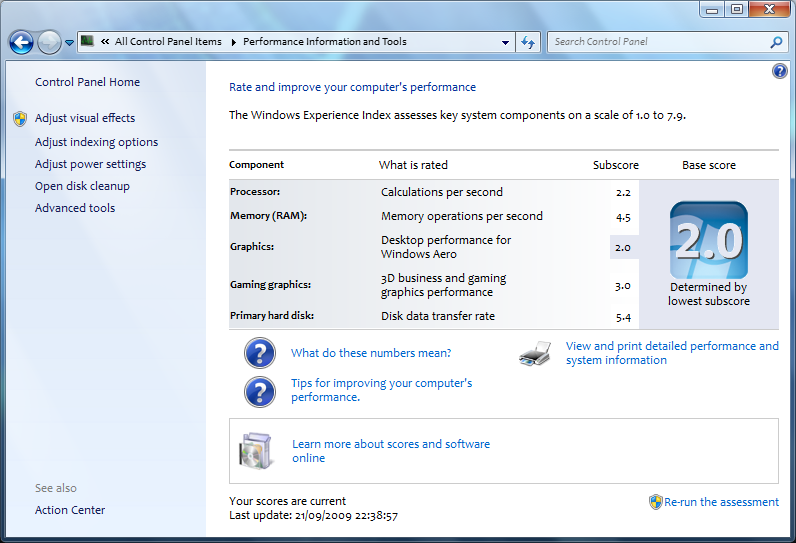
Well Aero glass runs fine on my EeePC, a 1005HA with just integrate Intel graphics, so your card must definitely work.

[attachthumb=#]
Interviewer: Is there anything you don't like?
Bjarne Stroustrup: Marketing hype as a substitute for technical argument. Thoughtless adherence to dogma. Pride in ignorance.

myarmor

  • Supporting Member
  • Joined in 2007
  • **
  • Posts: 82
Re: What's required for Aero in Win7?
« Reply #11 on: October 23, 2009, 07:48 PM »
The advisor said the same for my Asus Radeon HD4890 1GB (EAH4890), so I guess the advisor is seriously mistaken..
It doesn't support DX11, but it supports DX10.1 at least.

I tested using the 9.9 drivers (the day before I updated them to 9.10).
« Last Edit: October 23, 2009, 07:51 PM by myarmor »

tranglos

  • Supporting Member
  • Joined in 2006
  • **
  • Posts: 1,081
    • Participated in NANY Challenge Twice
Re: What's required for Aero in Win7?
« Reply #12 on: October 25, 2009, 02:02 AM »
Thanks everyone for your thoughts. The drivers were indeed rather old, but after updating to the latest version (September 09) Upgrade Advisor still says the same thing. And I really don't want to replace that nvidia card. I'll just assume the advisor is wrong :)


tranglos

  • Supporting Member
  • Joined in 2006
  • **
  • Posts: 1,081
    • Participated in NANY Challenge Twice
Re: What's required for Aero in Win7?
« Reply #13 on: October 25, 2009, 02:06 AM »
Looks compatible enough to me ;D

Great find, thanks!

(Given the amount of time I've been using MS software, which is pretty much every day for the last 19 years, I'm surprised how rarely I visit any MS site!)

CleverCat

  • Cat's Are Fun!
  • Supporting Member
  • Joined in 2006
  • **
  • Posts: 1,164
Re: What's required for Aero in Win7?
« Reply #14 on: October 25, 2009, 06:27 AM »
Can u believe - Upgrade Advisor says my Microsoft Life Cam not compatible with W7?
If you need help - JUST ASK!

Stoic Joker

  • Honorary Member
  • Joined in 2008
  • **
  • Posts: 6,652
    • Cody Award
    • Participated in NANY Challenge Five Times
Re: What's required for Aero in Win7?
« Reply #15 on: October 26, 2009, 05:07 PM »
Can u believe - Upgrade Advisor says my Microsoft Life Cam not compatible with W7?
Sure, it did it to me too. But the updated lifecam software showed up automagically around the end of the upgrade install.

CleverCat

  • Cat's Are Fun!
  • Supporting Member
  • Joined in 2006
  • **
  • Posts: 1,164
Re: What's required for Aero in Win7?
« Reply #16 on: October 27, 2009, 05:54 AM »
Good to know!  :Thmbsup:
If you need help - JUST ASK!

Original address: https://www.donationcoder.com/forum/index.php?topic=20345.0