DonationCoder.com forum
 
Read-only archive. This is a static copy of the DonationCoder.com forum. Reading and searching work as before; logging in, posting and private messages do not.
Archive of 2026-10-21 · About this archive · Main site

Author Topic: Can't copy actual email addresses from Outlook.  (Read 18,301 times)

superboyac

  • Is your software in my list?
  • Charter Member
  • Joined in 2005
  • ***
  • Posts: 6,347
Can't copy actual email addresses from Outlook.
« on: October 06, 2009, 04:14 PM »
Outlook always finds more ways to piss the living tar out of me.  I'm trying to copy a bunch of email addresses to use in another program.  All the recipients are already on one of my Outlook emails.  It's a mix of people on our Exchange server addressbook and other outsiders.  But if the person is in your addressbook already, there's no email address shown, only the name (since Outlook will process it later).  For the outsiders that are not in an addressbook, the full email is shown.  Now, I'm trying to copy all the email addresses to another program, so the name does me no good.  I need the actual flippin' email address.  Is there anyway to copy it easily using ctrl-c?  NO!!  I hate this shitty program.

First, I try to right-click and see if there are any convenient shortcuts there.  Nope.
Second, I double-click the name to see the address in the contact window.  It's there....but you can't ctrl-c copy it (because of the way it's selected).
The only way I've found it to work is to right-click the name in an existing email, choose "send mail", and copy the address shown...but you have to do it fast before it recognizes the address and converts it back to a name.

This program is the worst thing.  I used to rail on the system we had before (Novell Groupwise) but Outlook is worse. 

AndyM

  • Charter Member
  • Joined in 2006
  • ***
  • Posts: 616
Re: Can't copy actual email addresses from Outlook.
« Reply #1 on: October 06, 2009, 05:24 PM »
Not sure if all you need is just a list of email addresses, and I don't use Outlook, but...

could you export the address book to some kind of text file, maybe delimited so you could just load it in a spreadsheet and copy the relevant column?

superboyac

  • Is your software in my list?
  • Charter Member
  • Joined in 2005
  • ***
  • Posts: 6,347
Re: Can't copy actual email addresses from Outlook.
« Reply #2 on: October 06, 2009, 05:55 PM »
Not sure if all you need is just a list of email addresses, and I don't use Outlook, but...

could you export the address book to some kind of text file, maybe delimited so you could just load it in a spreadsheet and copy the relevant column?
I guess so, but that's a lot of work for just copying a few addresses.  I mean, sometimes i just want one address, but it's nowhere to be found even in the stupid addressbook.  Here, let me show you how stupid this ass-turd of a program is:
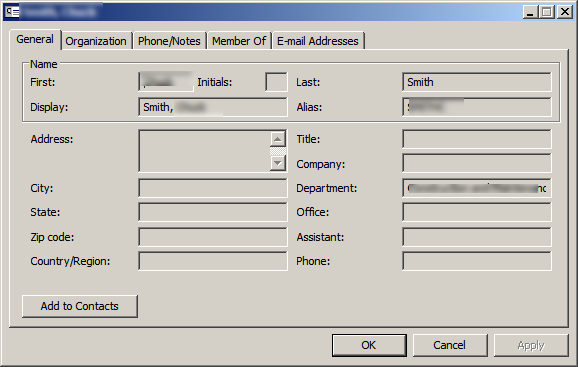
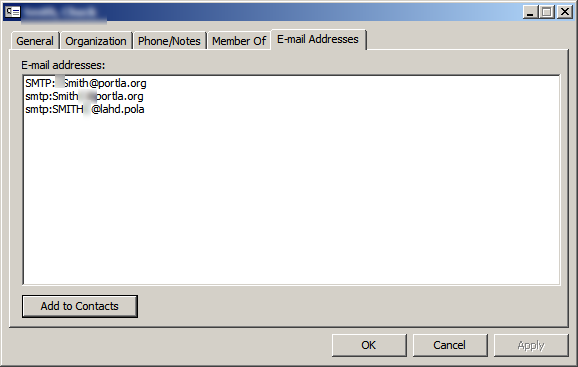
Here is an address from the Exchange server.  I open up the contact to see the details.  Now keep in mind that this is an EMAIL program.  So you would expect the email address to be prominently displayed somewhere in the contact details menu:
screenshot_20091006105141.png
screenshot_20091006105154.png

What the hell is that?!  In the far corner of the contact details, there is very unclear, odd way of showing the email address.  And it's not selectable, by the way.  You can't select the email and copy/paste it.  Just a stupid, crappy, shitty program.  
« Last Edit: October 06, 2009, 08:35 PM by superboyac »

Carol Haynes

  • Waffles for England (patent pending)
  • Global Moderator
  • Joined in 2005
  • *****
  • Posts: 8,073
    • Cody Award
    • Furry Fandom Badge - Furry Fandom
Re: Can't copy actual email addresses from Outlook.
« Reply #3 on: October 06, 2009, 06:41 PM »
Try creating an email to the person (you don't need to send it) and then in the To line right click and look at the properties. It should have the email addess listed but you can never tell with Outhouse.

Update: I am using Outlook 2007 and the email addresses are clearly shown on the Contact forms and are selectable.
« Last Edit: October 06, 2009, 06:45 PM by Carol Haynes »

Stoic Joker

  • Honorary Member
  • Joined in 2008
  • **
  • Posts: 6,652
    • Cody Award
    • Participated in NANY Challenge Five Times
Re: Can't copy actual email addresses from Outlook.
« Reply #4 on: October 06, 2009, 07:02 PM »
You forgot to blur the caption bar in your screen shots.

superboyac

  • Is your software in my list?
  • Charter Member
  • Joined in 2005
  • ***
  • Posts: 6,347
Re: Can't copy actual email addresses from Outlook.
« Reply #5 on: October 06, 2009, 08:34 PM »
Try creating an email to the person (you don't need to send it) and then in the To line right click and look at the properties. It should have the email addess listed but you can never tell with Outhouse.

Update: I am using Outlook 2007 and the email addresses are clearly shown on the Contact forms and are selectable.
Yeah, but are you using the global address list from Exchange?  That is where the root of all evil is.

superboyac

  • Is your software in my list?
  • Charter Member
  • Joined in 2005
  • ***
  • Posts: 6,347
Re: Can't copy actual email addresses from Outlook.
« Reply #6 on: October 06, 2009, 08:36 PM »
You forgot to blur the caption bar in your screen shots.
Crap!  Thanks.  He might kill me!  (fixed).

Carol Haynes

  • Waffles for England (patent pending)
  • Global Moderator
  • Joined in 2005
  • *****
  • Posts: 8,073
    • Cody Award
    • Furry Fandom Badge - Furry Fandom
Re: Can't copy actual email addresses from Outlook.
« Reply #7 on: October 06, 2009, 08:55 PM »
Yeah, but are you using the global address list from Exchange?  That is where the root of all evil is.

No - so the problem isn't actually in Outlook. It is in Exchange ??

Stoic Joker

  • Honorary Member
  • Joined in 2008
  • **
  • Posts: 6,652
    • Cody Award
    • Participated in NANY Challenge Five Times
Re: Can't copy actual email addresses from Outlook.
« Reply #8 on: October 06, 2009, 09:49 PM »
Try creating an email to the person (you don't need to send it) and then in the To line right click and look at the properties. It should have the email addess listed but you can never tell with Outhouse.

Update: I am using Outlook 2007 and the email addresses are clearly shown on the Contact forms and are selectable.
Yeah, but are you using the global address list from Exchange?  That is where the root of all evil is.
All the addresses listed are SMTP, no MAPI/X400 or LDAP addresses listed ... hence no Exchange server

superboyac

  • Is your software in my list?
  • Charter Member
  • Joined in 2005
  • ***
  • Posts: 6,347
Re: Can't copy actual email addresses from Outlook.
« Reply #9 on: October 06, 2009, 09:52 PM »
Yeah, but are you using the global address list from Exchange?  That is where the root of all evil is.

No - so the problem isn't actually in Outlook. It is in Exchange ??
Well, yeah.  But I equate the two.

superboyac

  • Is your software in my list?
  • Charter Member
  • Joined in 2005
  • ***
  • Posts: 6,347
Re: Can't copy actual email addresses from Outlook.
« Reply #10 on: October 06, 2009, 09:52 PM »
Try creating an email to the person (you don't need to send it) and then in the To line right click and look at the properties. It should have the email addess listed but you can never tell with Outhouse.

Update: I am using Outlook 2007 and the email addresses are clearly shown on the Contact forms and are selectable.
Yeah, but are you using the global address list from Exchange?  That is where the root of all evil is.
All the addresses listed are SMTP, no MAPI/X400 or LDAP addresses listed ... hence no Exchange server
Really?  I don't know where else they would come from.

Stoic Joker

  • Honorary Member
  • Joined in 2008
  • **
  • Posts: 6,652
    • Cody Award
    • Participated in NANY Challenge Five Times
Re: Can't copy actual email addresses from Outlook.
« Reply #11 on: October 06, 2009, 11:20 PM »
*Shrug* maybe it's just broken ... but if there was an Exchange server on the other end you should have an x400: address entry that uses an LDAP DN (like) syntax. i.e. X400:c=US;a= ;p=DomainName;o=Exchanges;s=LName;g=FName;i=Mi;

...Or that's the best I could do for a detail-less version of what my office Email address entry looks like.

Curt

  • Supporting Member
  • Joined in 2006
  • **
  • Posts: 7,565
Re: Can't copy actual email addresses from Outlook.
« Reply #12 on: October 09, 2009, 01:05 PM »
Office 2003 Outlook > Files > Import and Export > Export to a file > choose output file type > mark folder 'Contacts' > 'save as...' > "following actions will be executed:..."

sri

  • Honorary Member
  • Joined in 2006
  • **
  • Posts: 689
Re: Can't copy actual email addresses from Outlook.
« Reply #13 on: October 13, 2009, 01:53 AM »
In your 3rd post you see the 'Add to Contacts' button in the screenshot? Click on it and you can copy the email address from the resulting window.

vixay

  • ViXaY
  • Supporting Member
  • Joined in 2006
  • **
  • Posts: 140
    • Coding Snacks
Re: Can't copy actual email addresses from Outlook.
« Reply #14 on: October 20, 2009, 05:52 AM »
...I'm trying to copy a bunch of email addresses to use in another program.  All the recipients are already on one of my Outlook emails.  .... there's no email address shown, only the name (since Outlook will process it later).  For the outsiders that are not in an addressbook, the full email is shown.  Now, I'm trying to copy all the email addresses to another program, so the name does me no good.  I need the actual flippin' email address.  Is there anyway to copy it easily using ctrl-c?  NO!!  I hate this shitty program.

I had the exact same problem, being a tinkerer i wrote a simple macro/vb to get that functionality. see below
/EDIT: I realized i've done this only for a distribution list.... i.e. when i wanted to export the distribution list to another program....etc. It could be modified with some research to work with the active email.

Code: (vb)
Sub CopyCSVEmail()
'This puts a comma seperated email list for a distribution list on the clipboard
Dim myDistList As DistListItem
Dim j As Integer
Dim iOutFormat As Integer
Dim iPos As Integer
Dim sOutput As String
    'Check type of object in current view
    If TypeName(Application.ActiveInspector.CurrentItem) <> "DistListItem" Then Exit Sub
    'Assign it to a typed variable
    Set myDistList = Application.ActiveInspector.CurrentItem
    iOutFormat = 1
    sOutput = InputBox("Please Choose a MODE: " & vbCrLf _
    & "1 = Address,.." & vbCrLf _
    & "2 = Name (Address),.." & vbCrLf _
    & "3 = Name <Address>,..", "Mode", "1")
    On Error Resume Next
    iOutFormat = CInt(sOutput)
    On Error GoTo 0
'    If (MsgBox("Do you want the addersses with names?", vbQuestion + vbYesNo, "With names?") = vbYes) Then
'        iOutFormat = 2
'    End If
    'do what you want
    sOutput = ""
    For j = 1 To myDistList.MemberCount
        If iOutFormat = 1 Then
            sOutput = sOutput & myDistList.GetMember(j).Address & ", "
        ElseIf iOutFormat = 2 Then
            sOutput = sOutput & myDistList.GetMember(j).Name & ", " '" <" & myDistList.GetMember(j).Address & ">, "
        ElseIf iOutFormat = 3 Then
            iPos = InStr(1, myDistList.GetMember(j).Name, "(") - 1
            If iPos < 0 Then iPos = Len(myDistList.GetMember(j).Name)
            sOutput = sOutput & Trim(Left(myDistList.GetMember(j).Name, iPos)) & " <" & myDistList.GetMember(j).Address & ">, "
        Else
            sOutput = "Error: Incorrect Mode specified"
        End If
    Next j
    sOutput = Left(sOutput, Len(sOutput) - 2) 'Trim last two characters
    'MsgBox sOutput
    InputBox "Copy (Press Ctrl+C) the following line to wherever you want.", "Email Address(es)", sOutput
    'PutOnClipboard (sOutput)
    'reset vars
    Set myDistList = Nothing
End Sub

Google how to add macros in outlook to see where you can paste this.
"Drunk on the Nectar of Life!" -me
« Last Edit: October 20, 2009, 05:55 AM by vixay »

Original address: https://www.donationcoder.com/forum/index.php?topic=20186.0