DonationCoder.com forum
 
Read-only archive. This is a static copy of the DonationCoder.com forum. Reading and searching work as before; logging in, posting and private messages do not.
Archive of 2026-10-21 · About this archive · Main site

Last post Author Topic: IDEA: Toggle Switch with a Global Hotkey to change Power schemes?  (Read 59,772 times)

briandr67

  • A Software Junky
  • Supporting Member
  • Joined in 2008
  • **
  • Posts: 29
Re: IDEA: Toggle Switch with a Global Hotkey to change Power schemes?
« Reply #25 on: September 28, 2009, 11:10 AM »
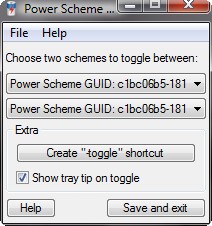
SKwire, I just downloaded the v1.0.4 version and I have the same problem. I am running Vista Business SP2 on a Compaq V6306 laptop
[attach]

skwire

  • I eat Coding Snacks for breakfast...
  • Global Moderator
  • Joined in 2005
  • *****
  • Posts: 5,297
    • Participated in NANY Challenge Seventeen Times
    • Coding Snacks
    • Superboy Coder
    • Cody Award
    • Volunteers/Staff
    • Gathering Badge
Re: IDEA: Toggle Switch with a Global Hotkey to change Power schemes?
« Reply #26 on: September 28, 2009, 11:35 AM »
Please post the output of the following command:  powercfg /list

briandr67

  • A Software Junky
  • Supporting Member
  • Joined in 2008
  • **
  • Posts: 29
Re: IDEA: Toggle Switch with a Global Hotkey to change Power schemes?
« Reply #27 on: September 28, 2009, 12:16 PM »
skwire, I would love to but the window only stays open for a few milliseconds and I can't find an output file anywhere. Brian
briandr67

  • A Software Junky
  • Supporting Member
  • Joined in 2008
  • **
  • Posts: 29
Re: IDEA: Toggle Switch with a Global Hotkey to change Power schemes?
« Reply #28 on: September 28, 2009, 12:20 PM »
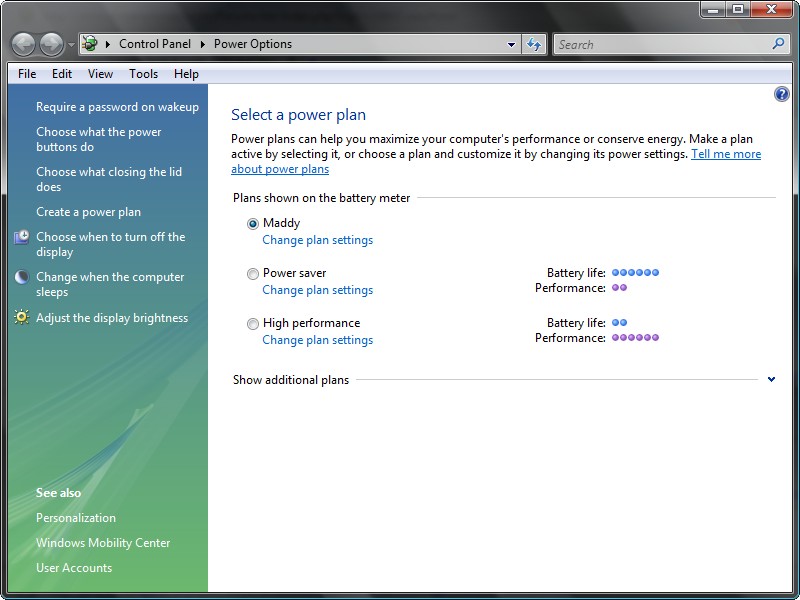
skwire, just thought about it, does this help? Brian
[attach]

lanux128

  • Global Moderator
  • Joined in 2005
  • *****
  • Posts: 6,277
    • Coding Snacks
    • Volunteers/Staff
    • Gathering Badge
    • Participated in NANY Challenge Once
    • Linux User
Re: IDEA: Toggle Switch with a Global Hotkey to change Power schemes?
« Reply #29 on: September 28, 2009, 12:22 PM »
skwire, I would love to but the window only stays open for a few milliseconds and I can't find an output file anywhere. Brian

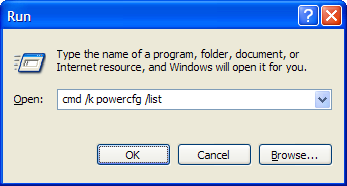
or you can run the command like this (see pic), then copy the result.

powercfg-list-001.png

skwire

  • I eat Coding Snacks for breakfast...
  • Global Moderator
  • Joined in 2005
  • *****
  • Posts: 5,297
    • Participated in NANY Challenge Seventeen Times
    • Coding Snacks
    • Superboy Coder
    • Cody Award
    • Volunteers/Staff
    • Gathering Badge
Re: IDEA: Toggle Switch with a Global Hotkey to change Power schemes?
« Reply #30 on: September 28, 2009, 12:42 PM »
skwire, I would love to but the window only stays open for a few milliseconds and I can't find an output file anywhere. Brian

Click Start, Run, type: cmd (and click OK).  A command prompt will pop up.  Please run the command in there and paste the output here.  Thanks.

briandr67

  • A Software Junky
  • Supporting Member
  • Joined in 2008
  • **
  • Posts: 29
Re: IDEA: Toggle Switch with a Global Hotkey to change Power schemes?
« Reply #31 on: September 28, 2009, 12:45 PM »
Thanx skwire. Here's the output. Brian
[attach]

skwire

  • I eat Coding Snacks for breakfast...
  • Global Moderator
  • Joined in 2005
  • *****
  • Posts: 5,297
    • Participated in NANY Challenge Seventeen Times
    • Coding Snacks
    • Superboy Coder
    • Cody Award
    • Volunteers/Staff
    • Gathering Badge
Re: IDEA: Toggle Switch with a Global Hotkey to change Power schemes?
« Reply #32 on: September 28, 2009, 12:57 PM »
Hmmmm...that seems to be the same as the Vista VM i test on (not that I expected any different).  Two things, please:

1) Do the entries in the PST's drop-downs correspond to the GUIDs you see in that output?
2) Please run the following from the Run box:  powercfg /list > c:\output.txt

Attach the output.txt file to your post.  Thanks.

briandr67

  • A Software Junky
  • Supporting Member
  • Joined in 2008
  • **
  • Posts: 29
Re: IDEA: Toggle Switch with a Global Hotkey to change Power schemes?
« Reply #33 on: September 28, 2009, 01:06 PM »
skwire, I keep getting the message "Access Is Denied". Brian

skwire

  • I eat Coding Snacks for breakfast...
  • Global Moderator
  • Joined in 2005
  • *****
  • Posts: 5,297
    • Participated in NANY Challenge Seventeen Times
    • Coding Snacks
    • Superboy Coder
    • Cody Award
    • Volunteers/Staff
    • Gathering Badge
Re: IDEA: Toggle Switch with a Global Hotkey to change Power schemes?
« Reply #34 on: September 28, 2009, 01:10 PM »
You're getting that message where and when?

briandr67

  • A Software Junky
  • Supporting Member
  • Joined in 2008
  • **
  • Posts: 29
Re: IDEA: Toggle Switch with a Global Hotkey to change Power schemes?
« Reply #35 on: September 28, 2009, 01:17 PM »
skwire, when I try it from the run box I had the command window pop up for about 3ms. and no file was output, so I ran it in a command window and that's the message I recieved.

lanux128

  • Global Moderator
  • Joined in 2005
  • *****
  • Posts: 6,277
    • Coding Snacks
    • Volunteers/Staff
    • Gathering Badge
    • Participated in NANY Challenge Once
    • Linux User
Re: IDEA: Toggle Switch with a Global Hotkey to change Power schemes?
« Reply #36 on: September 28, 2009, 01:21 PM »
if you're on Vista, run the command in a console window like this: powercfg /list | clip. this way, the output will be saved onto your clipboard.

skwire

  • I eat Coding Snacks for breakfast...
  • Global Moderator
  • Joined in 2005
  • *****
  • Posts: 5,297
    • Participated in NANY Challenge Seventeen Times
    • Coding Snacks
    • Superboy Coder
    • Cody Award
    • Volunteers/Staff
    • Gathering Badge
Re: IDEA: Toggle Switch with a Global Hotkey to change Power schemes?
« Reply #37 on: September 28, 2009, 01:24 PM »
skwire, when I try it from the run box I had the command window pop up for about 3ms. and no file was output, so I ran it in a command window and that's the message I recieved.

Are you running with administrator rights?  I don't have much experience with Vista and the whole UAC thing...

briandr67

  • A Software Junky
  • Supporting Member
  • Joined in 2008
  • **
  • Posts: 29
Re: IDEA: Toggle Switch with a Global Hotkey to change Power schemes?
« Reply #38 on: September 28, 2009, 01:33 PM »
skwire, yes it is an admin account, but under Vista it is still a limited rights account. Anything that needs admin rights you have to right click Run As Administrator or set it up permenantly by checking a checkbox in the apps. properties dialogue page. The Run box can't be elevated for some reason. Tried powercfg /list | clip and no go. Brian

briandr67

  • A Software Junky
  • Supporting Member
  • Joined in 2008
  • **
  • Posts: 29
Re: IDEA: Toggle Switch with a Global Hotkey to change Power schemes?
« Reply #39 on: September 28, 2009, 01:37 PM »
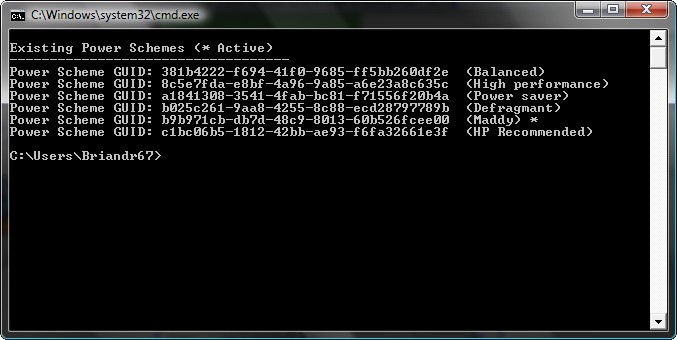
I tried it in a command window and it worked. Here is the output.
Existing Power Schemes (* Active)
-----------------------------------
Power Scheme GUID: 381b4222-f694-41f0-9685-ff5bb260df2e  (Balanced)
Power Scheme GUID: 8c5e7fda-e8bf-4a96-9a85-a6e23a8c635c  (High performance)
Power Scheme GUID: a1841308-3541-4fab-bc81-f71556f20b4a  (Power saver)
Power Scheme GUID: b025c261-9aa8-4255-8c88-ecd28797789b  (Defragmant)
Power Scheme GUID: b9b971cb-db7d-48c9-8013-60b526fcee00  (Maddy) *
Power Scheme GUID: c1bc06b5-1812-42bb-ae93-f6fa32661e3f  (HP Recommended)

skwire

  • I eat Coding Snacks for breakfast...
  • Global Moderator
  • Joined in 2005
  • *****
  • Posts: 5,297
    • Participated in NANY Challenge Seventeen Times
    • Coding Snacks
    • Superboy Coder
    • Cody Award
    • Volunteers/Staff
    • Gathering Badge
Re: IDEA: Toggle Switch with a Global Hotkey to change Power schemes?
« Reply #40 on: September 28, 2009, 01:39 PM »
Do you have PST installed under your Program Files directory?  If so, move it out of there and try it somewhere else e.g. c:\apps\pst (or something). 

@Lanux: Are you running Vista?  Does PST work for you?  It works for Paarkhi (he's running Vista) and it works for me under a Vista VM.

briandr67

  • A Software Junky
  • Supporting Member
  • Joined in 2008
  • **
  • Posts: 29
Re: IDEA: Toggle Switch with a Global Hotkey to change Power schemes?
« Reply #41 on: September 28, 2009, 01:48 PM »
Installed it in Program Files and it works. I was using it from my C:\Users\Briandr67\Downloads\DC Program Setups folder. Bloody temperimental Vista. Thanx skwire, Brian

skwire

  • I eat Coding Snacks for breakfast...
  • Global Moderator
  • Joined in 2005
  • *****
  • Posts: 5,297
    • Participated in NANY Challenge Seventeen Times
    • Coding Snacks
    • Superboy Coder
    • Cody Award
    • Volunteers/Staff
    • Gathering Badge
Re: IDEA: Toggle Switch with a Global Hotkey to change Power schemes?
« Reply #42 on: September 28, 2009, 01:58 PM »
Phew.  :)  I was testing everything I could think of in my VM.  However, this is no reason it shouldn't have worked from your original directory (unless it's some Vista-specific crap).  I even made the exact same folder path you were trying and it worked fine.  Odd.  At any rate, I'm glad you got it working.  :Thmbsup:
« Last Edit: September 28, 2009, 02:02 PM by skwire »

briandr67

  • A Software Junky
  • Supporting Member
  • Joined in 2008
  • **
  • Posts: 29
Re: IDEA: Toggle Switch with a Global Hotkey to change Power schemes?
« Reply #43 on: September 28, 2009, 02:10 PM »
So am I Jody. Thanks for all your help and your patience. Brian

:Thmbsup: :Thmbsup: DC ROCKS  :Thmbsup: :Thmbsup:

Original address: https://www.donationcoder.com/forum/index.php?topic=19847.0