DonationCoder.com forum
 
Read-only archive. This is a static copy of the DonationCoder.com forum. Reading and searching work as before; logging in, posting and private messages do not.
Archive of 2026-10-21 · About this archive · Main site

Author Topic: FARR Hogging RAM?  (Read 5,442 times)

siouxdax

  • Lather. Rinse. Repeat.
  • Supporting Member
  • Joined in 2006
  • **
  • Posts: 247
FARR Hogging RAM?
« on: September 07, 2009, 01:48 PM »
Hello all:
I just noticed that FARR is running with more RAM than usual. It's showing that the virtual size is 103,000K and the working set is at 25,000K. I should mention that I only use that terminology (virtual size, working set) because that's what Process Explorer shows, so throwing more five dollar tech words won't mean much to me. LOL. I do, however, understand (for the most part) what those two numbers mean.

At any rate, is this normal or is something a bit wonky? As usual, any help or suggestions are very much appreciated!
Kind Regards,
Daniel in Tulsa
AKA siouxdax

Visit my tumblog!

f0dder

  • [Well, THAT escalated quickly!]
  • Charter Honorary Member
  • Joined in 2005
  • ***
  • Posts: 9,153
    • Participated in NANY Challenge Once
Re: FARR Hogging RAM?
« Reply #1 on: September 07, 2009, 03:26 PM »
That sounds pretty normal - after just booting my system and doing a FARR search, I've got Virtual Size of 138MB and Working Set of 22MB. The figures in ProcExp you should be most interested in are the "private parts" (:-[), since that's the "meat" of the memory allocations.
- carpe noctem

lanux128

  • Global Moderator
  • Joined in 2005
  • *****
  • Posts: 6,277
    • Coding Snacks
    • Volunteers/Staff
    • Gathering Badge
    • Participated in NANY Challenge Once
    • Linux User
Re: FARR Hogging RAM?
« Reply #2 on: September 08, 2009, 04:31 AM »
procexp shows almost the same figures on my pc. but i always believed in giving Farr copious amounts of memory. :)

Process Explorer Screenshot - 08_09_2009.png


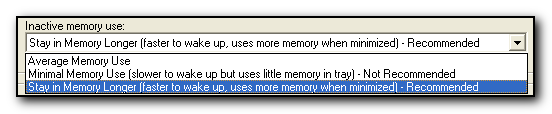
however if you want to reduce the memory usage, you can go to Options > General and change the "Inactive Memory Usage" settings.

FindAndRunRobot.exe Screenshot - 08_09_2009.png

siouxdax

  • Lather. Rinse. Repeat.
  • Supporting Member
  • Joined in 2006
  • **
  • Posts: 247
Re: FARR Hogging RAM?
« Reply #3 on: September 08, 2009, 02:49 PM »
lanux128:
Thanks for pointing out that option. Much appreciated!
Kind Regards,
Daniel in Tulsa
AKA siouxdax

Visit my tumblog!

Original address: https://www.donationcoder.com/forum/index.php?topic=19832.0