DonationCoder.com forum
 
Read-only archive. This is a static copy of the DonationCoder.com forum. Reading and searching work as before; logging in, posting and private messages do not.
Archive of 2026-10-21 · About this archive · Main site

Author Topic: IDEA: Small HTML color swatch  (Read 6,061 times)

Coeluh

  • Family Guy ^^
  • Supporting Member
  • Joined in 2007
  • **
  • Posts: 273
IDEA: Small HTML color swatch
« on: August 25, 2009, 03:55 PM »
Hi there,

I wonder if there is an app which alows me to pick some colors, display them in a table, each 20x20 pixels, and when I click it I get the code copied (like #717171). When you click an empty one, you can pick one in a color panel, or add one manually. This app should have with 2 rows of each 10 spots for a color. Always on top function aswel.

skwire

  • I eat Coding Snacks for breakfast...
  • Global Moderator
  • Joined in 2005
  • *****
  • Posts: 5,297
    • Participated in NANY Challenge Seventeen Times
    • Coding Snacks
    • Superboy Coder
    • Cody Award
    • Volunteers/Staff
    • Gathering Badge
Re: IDEA: Small HTML color swatch
« Reply #1 on: August 25, 2009, 11:43 PM »
I use ColorPic for jobs like this.  http://www.iconico.com/colorpic/

app103

  • That scary taskbar girl
  • Global Moderator
  • Joined in 2006
  • *****
  • Posts: 5,888
    • Participated in NANY Challenge Six Times
    • Coding Snacks
    • Gathering Badge
    • Cody Award
    • Volunteers/Staff
Re: IDEA: Small HTML color swatch
« Reply #2 on: August 26, 2009, 01:07 AM »
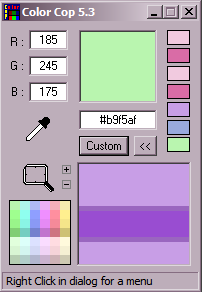
One of my favorites...ColorCop

It packs a whole lot into a tiny little window.

  • Stays always on top.
  • Displays RGB for current color on the left.
  • Displays recently used colors on the right.
  • Can pick up colors from anything on your screen with a dropper.
  • Contains a magnifier to zoom in for more accurate color picking.
  • Can display HTML hex for color as well as for popular programming languages such as Delphi, VB, Visual C++, etc.
  • Can be configured to autocopy hex to clipboard.
  • Can be configured to omit # symbol and/or use UPPERCASE.
  • Use standard Windows color picker to create custom colors. (you can also save custom colors there)

SNAG-00116.png

Original address: https://www.donationcoder.com/forum/index.php?topic=19669.0