DonationCoder.com forum
 
Read-only archive. This is a static copy of the DonationCoder.com forum. Reading and searching work as before; logging in, posting and private messages do not.
Archive of 2026-10-21 · About this archive · Main site

Author Topic: Deciphering Win7 Upgrades: The Official Chart  (Read 10,963 times)

zridling

  • Friend of the Site
  • Charter Member
  • Joined in 2005
  • ***
  • Posts: 3,299
Deciphering Win7 Upgrades: The Official Chart
« on: August 05, 2009, 06:43 AM »
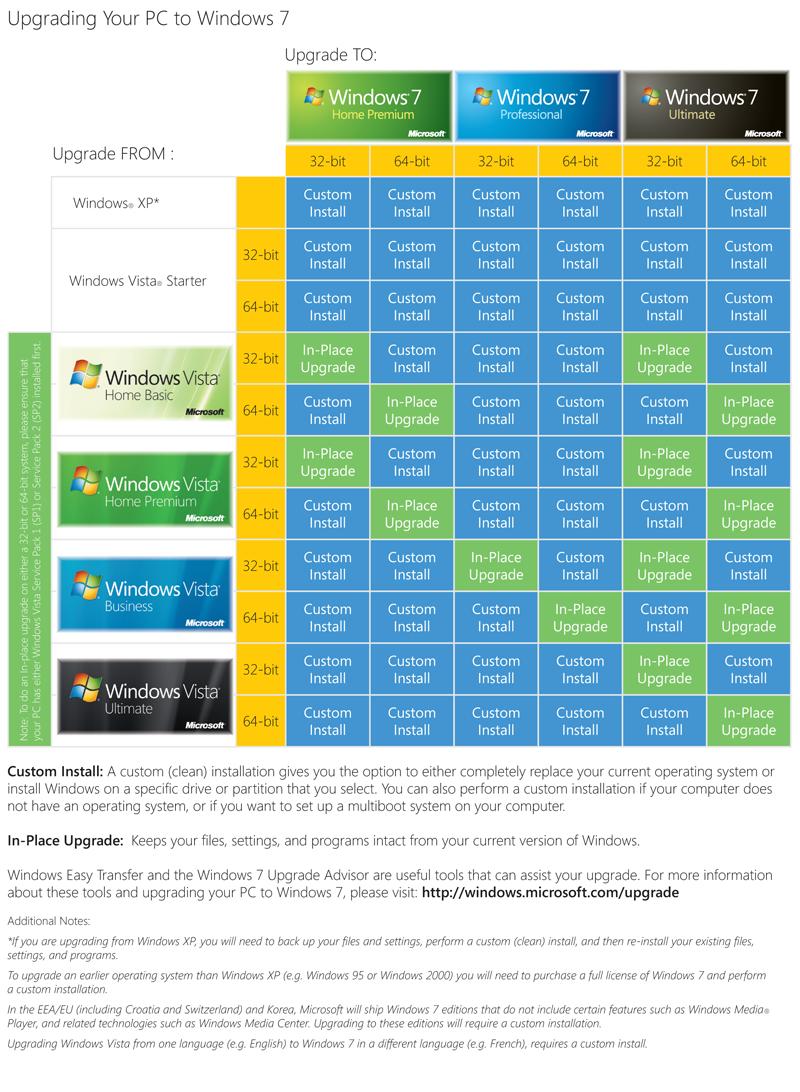
Walt Mossberg asked, and Microsoft created a nifty upgrade path chart:

Over the past two weeks, in my Personal Technology columns, here and here, I’ve explained some of the challenges and limitations that will be involved in upgrading an existing Windows XP or Windows Vista PC to the forthcoming Windows 7 operating system, due out October 22. Several readers asked me to publish a chart showing which current versions of Windows could be easily upgraded to which planned versions of Windows 7, and which couldn’t. So I asked Microsoft to supply such a chart we could publish, and the company graciously did so. It is reproduced below, unaltered.

[attach]
- zaine

Innuendo

  • Charter Member
  • Joined in 2005
  • ***
  • Posts: 2,266
Re: Deciphering Win7 Upgrades: The Official Chart
« Reply #1 on: August 05, 2009, 03:07 PM »
Not much to add to this but to add that the in-place upgrade procedure is sweet. Microsoft has done a lot of work on this part of the installer and it shows. There's none of the flakiness of previous upgrade install routines.

I've done a few in-place upgrades on some Vista systems and every one of them has come out of the process as if Win7 had been cleanly installed on a formatted hard drive & then the applications and games installed after.

Microsoft should be very proud of this accomplishment.

mouser

  • First Author
  • Administrator
  • Joined in 2005
  • *****
  • Posts: 40,931
    • Gathering Badge
    • Plugin Coding Medal
    • Participated in NANY Challenge Seventeen Times
    • Cody Award
    • Coding Snacks
    • Volunteers/Staff
Re: Deciphering Win7 Upgrades: The Official Chart
« Reply #2 on: August 05, 2009, 03:46 PM »
I still always prefer to do a clean install.. It's just a good opportunity to learn how to backup stuff you need and get rid of the stuff you don't.
If you can afford it, I still think the ideal solution is to upgrade PCs when you upgrade your OS, and keep your old machine as is.

Josh

  • Charter Honorary Member
  • Joined in 2005
  • ***
  • Posts: 3,411
    • Gathering Badge
    • Official Forum Clown
    • Coding Snacks
    • Plugin Coding Medal
    • Volunteers/Staff
    • Military Service Badge - US Army
    • Furry Fandom Badge - Furry Fandom
    • Linux User
Re: Deciphering Win7 Upgrades: The Official Chart
« Reply #3 on: August 05, 2009, 03:49 PM »
Mousey, I couldn't agree more. I will be buying a new PC upon my return from deployment. That will be my Windows 7 machine. That said, I will be "upgrading" my wife's machine from Vista to 7. I absolutely loved vista and had no issues with it. UAC was a great tool which helped my wife learn when a program was doing something it shouldn't be. Usually that would result in a call to me which would result in saved time by her not installing spyware or some unneeded application.

I will be doing a clean install, hence the quoted "upgrading" comment, as I feel that upgrading an OS is really not a good idea for compatibility reasons. But yes, I cannot wait to get my new XPS system with Win7 in it :)
Strength in Knowledge

zridling

  • Friend of the Site
  • Charter Member
  • Joined in 2005
  • ***
  • Posts: 3,299
Re: Deciphering Win7 Upgrades: The Official Chart
« Reply #4 on: August 05, 2009, 08:20 PM »
Another benefit that Win7 users will love is that installation time has been drastically cut, as has boot time.
- zaine

biox

  • Charter Member
  • Joined in 2005
  • ***
  • Posts: 74
Re: Deciphering Win7 Upgrades: The Official Chart
« Reply #5 on: August 05, 2009, 10:06 PM »
Another benefit that Win7 users will love is that installation time has been drastically cut, as has boot time.

That had me almost fall of the chair. I first installed it on a few XP machines and was prepared for the typical 'go for lunch and come back in 2 hours routine'. Didn't do me that favour, it installed in a half hour and that despite it having to move up to 300GB of the XP installation.

Hirudin

  • Charter Member
  • Joined in 2005
  • ***
  • Posts: 543
Re: Deciphering Win7 Upgrades: The Official Chart
« Reply #6 on: August 14, 2009, 12:00 AM »
Gizmodo made a little upgrade chart for Mac Snow Leopard.


I confess, I didn't actually read the article (I've been happy with Vista and am even happier with 7) but if you want to, here's the link...
The Real Cost of Upgrading to Mac OS X Snow Leopard

Innuendo

  • Charter Member
  • Joined in 2005
  • ***
  • Posts: 2,266
Re: Deciphering Win7 Upgrades: The Official Chart
« Reply #7 on: August 14, 2009, 04:04 PM »
Apple has to leave the legacy PPC code behind sometime, although I think most would have preferred one more PPC release as there are still a lot of PPC machines out there.

And $169 for 10.4 owners? I always thought OS X upgrades were $129. Well, anyway, thanks for the link to the article. It's always good for Windows users to see how things are done on the other side of the fence, so to speak.

Innuendo

  • Charter Member
  • Joined in 2005
  • ***
  • Posts: 2,266
Re: Deciphering Win7 Upgrades: The Official Chart
« Reply #8 on: August 14, 2009, 04:10 PM »
Oh, I see...the $169 gets you the OS X upgrade plus iWork '09.

Funny picture in the article, though.

mac_nursing_home.jpg

Original address: https://www.donationcoder.com/forum/index.php?topic=19417.0