DonationCoder.com forum
 
Read-only archive. This is a static copy of the DonationCoder.com forum. Reading and searching work as before; logging in, posting and private messages do not.
Archive of 2026-10-21 · About this archive · Main site

Author Topic: DC Updater FARR & Twitter Plug-In Issue  (Read 12,089 times)

siouxdax

  • Lather. Rinse. Repeat.
  • Supporting Member
  • Joined in 2006
  • **
  • Posts: 247
DC Updater FARR & Twitter Plug-In Issue
« on: July 09, 2009, 10:08 PM »
Hello all:
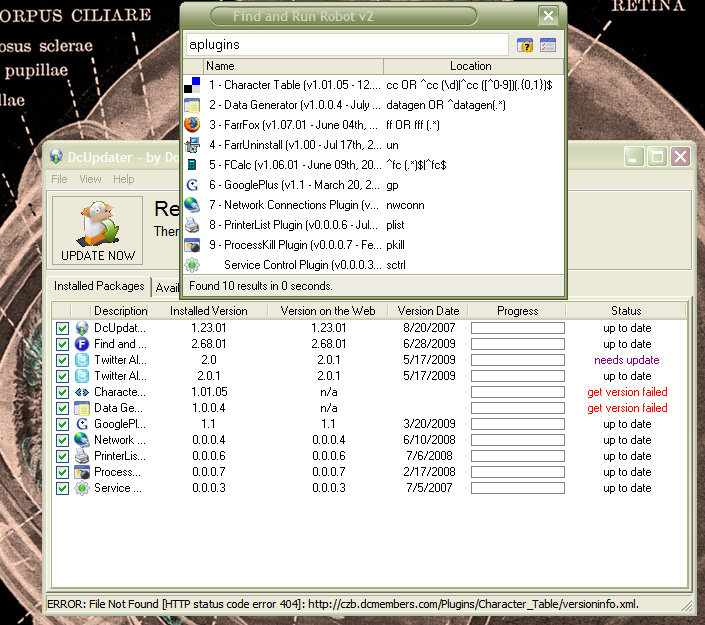
I'm having an issue with the DC Updater. It scans and says FARR needs updating, as well as my Twitter plug-in, and a couple of other things (all shown in the attached screenshot). It seems that FARR updates just fine, but then FARR pops up with the word "aplugins" in the FARR search field. I hit escape to close it, then DC Updater shows that the Twitter plug-ins still need updating. No setup file or anything to that effect shows up. Also, I question whether or not FARR actually updates, since DC Updater has been showing up frequently over the past couple/few weeks.

I'm hoping that I've explained the issue correctly. A screenshot of the issue is attached.

Thanks guys! As usual, you rock!
Kind Regards,
Daniel in Tulsa
AKA siouxdax

Visit my tumblog!

mouser

  • First Author
  • Administrator
  • Joined in 2005
  • *****
  • Posts: 40,931
    • Gathering Badge
    • Plugin Coding Medal
    • Participated in NANY Challenge Seventeen Times
    • Cody Award
    • Coding Snacks
    • Volunteers/Staff
Re: DC Updater FARR & Twitter Plug-In Issue
« Reply #1 on: July 09, 2009, 11:55 PM »
i can see your problem.. you've got 2 instances of the twitter alias.
this can actually happen pretty easily because of how easy it is to accidentally unzip it into its on subdirectory.
go to your farr plugins directory
look for a twitter subdir in there, and then look for a twitter subdir in the twitter subdir -- delete that one.
then have farr check for updates again.
if the problem remains, then its a bug with the twitter package not with you.

siouxdax

  • Lather. Rinse. Repeat.
  • Supporting Member
  • Joined in 2006
  • **
  • Posts: 247
Re: DC Updater FARR & Twitter Plug-In Issue
« Reply #2 on: July 10, 2009, 01:43 AM »
Okay, I found the duplicate folder in C:\Program Files\Find + Run Robot\AliasGroups\Installed\twitter. But upon updating I get the same result. How can I totally remove the Twitter plug-in so that it doesn't show in the DC Updater (it still shows two)? Maybe then I can reinstall the plug-in fresh.

Also, if you look at the screenshot I posted, the "Character_Table (FARR2 Plugin)" and "Data Generator (FARR2 Plugin)" both say "get version failed". What's up with that? How can I correct it? I really don't want to have to do a clean re-install of FARR, but if I have to then I'll need some instruction on how to backup all of my preferences, etc.

Thanks, mouser! You are the FARR God!... which is obvious since it's your creation.. :)
Kind Regards,
Daniel in Tulsa
AKA siouxdax

Visit my tumblog!

mouser

  • First Author
  • Administrator
  • Joined in 2005
  • *****
  • Posts: 40,931
    • Gathering Badge
    • Plugin Coding Medal
    • Participated in NANY Challenge Seventeen Times
    • Cody Award
    • Coding Snacks
    • Volunteers/Staff
Re: DC Updater FARR & Twitter Plug-In Issue
« Reply #3 on: July 10, 2009, 02:32 AM »
character table and data generator are obsolete -- they were merged into czb's amazing czb pack:
http://www.donationcoder.com/forum/index.php?topic=17153.0

so delete those in your directory and install the czb pack version.

As far as the
"C:\Program Files\Find + Run Robot\AliasGroups\Installed\twitter"

there HAS to be 2 copies in your FARR directory somewhere -- search for all .dcupdate files under C:\Program Files\Find + Run Robot\ and youll see them.
delete the older one which inside the .dcupdate will say twitter alias v 2.0
that will leave you with the good one.
« Last Edit: July 10, 2009, 03:54 AM by mouser »

hamradio

  • Amateur Radio Guy
  • Charter Honorary Member
  • Joined in 2006
  • ***
  • Posts: 893
    • Plugin Coding Medal
    • Participated in NANY Challenge Fifteen Times
    • Cody Award
    • Coding Snacks
    • Volunteers/Staff
    • Hardware Hacker
Re: DC Updater FARR & Twitter Plug-In Issue
« Reply #4 on: July 10, 2009, 02:48 AM »
Data Generator wasn't merged as that is one of my plugins. Just the dcupdate file you have points to the wrong url instead of donationcoders in the url like it once was it is now dcmembers.

On a side note I think I updated the dcupdate file in the one online @ http://carrolld.dcmembers.com/datagen/

Just download and replace the dcupdate file for Data Generator is all you have to do and let me know if that fixes it.
« Last Edit: July 10, 2009, 02:51 AM by hamradio »

lanux128

  • Global Moderator
  • Joined in 2005
  • *****
  • Posts: 6,277
    • Coding Snacks
    • Volunteers/Staff
    • Gathering Badge
    • Participated in NANY Challenge Once
    • Linux User
Re: DC Updater FARR & Twitter Plug-In Issue
« Reply #5 on: July 10, 2009, 02:49 AM »
i thought i had fixed this previously.. but anyway, siouxdax, you can check the files' location for both of the Twitter items by clicking on the View > Show Advanced Controls in the DCUpdater menu. (see pic). then you can delete the folder containing the older version.

DcUppdater.exe Screenshot - 10_07_2009 , 10_38_19 AM.png

siouxdax

  • Lather. Rinse. Repeat.
  • Supporting Member
  • Joined in 2006
  • **
  • Posts: 247
Re: DC Updater FARR & Twitter Plug-In Issue
« Reply #6 on: July 10, 2009, 03:49 AM »
character table and data generator are obsolete -- they were merged into czb's amazing czb pack:
http://www.donationcoder.com/forum/index.php?topic=17153.0

so delete those in your directory and install the czb pack version.

As far as the
"C:\Program Files\Find + Run Robot\AliasGroups\Installed\twitter"

there HAS to be 2 copies in your FARR directory somewhere -- search for all .dcupdate files under C:\Program Files\Find + Run Robot\ and youll see them.
delete the older one which inside the .dcupdate will say twitter alias v 2.0
that will leave you with the good one.

Okay, I corrected the CZB, per your instructions, but I would like to know the possibilities/functions of that plug-in. Anyone post that info?

As far as the duplicate Twitter issue, I followed your instructions and found the older copy. All is well at that end.

Once again, thank you so much! And any info regarding the CZB features are much appreciated!
Cheers!
Kind Regards,
Daniel in Tulsa
AKA siouxdax

Visit my tumblog!

hamradio

  • Amateur Radio Guy
  • Charter Honorary Member
  • Joined in 2006
  • ***
  • Posts: 893
    • Plugin Coding Medal
    • Participated in NANY Challenge Fifteen Times
    • Cody Award
    • Coding Snacks
    • Volunteers/Staff
    • Hardware Hacker
Re: DC Updater FARR & Twitter Plug-In Issue
« Reply #7 on: July 10, 2009, 03:52 AM »
Did you fix Data Generator like I mentioned?

character table and data generator are obsolete -- they were merged into czb's amazing czb pack:
http://www.donationcoder.com/forum/index.php?topic=17153.0

so delete those in your directory and install the czb pack version.

As far as the
"C:\Program Files\Find + Run Robot\AliasGroups\Installed\twitter"

there HAS to be 2 copies in your FARR directory somewhere -- search for all .dcupdate files under C:\Program Files\Find + Run Robot\ and youll see them.
delete the older one which inside the .dcupdate will say twitter alias v 2.0
that will leave you with the good one.

Okay, I corrected the CZB, per your instructions, but I would like to know the possibilities/functions of that plug-in. Anyone post that info?

As far as the duplicate Twitter issue, I followed your instructions and found the older copy. All is well at that end.

Once again, thank you so much! And any info regarding the CZB features are much appreciated!
Cheers!

siouxdax

  • Lather. Rinse. Repeat.
  • Supporting Member
  • Joined in 2006
  • **
  • Posts: 247
Re: DC Updater FARR & Twitter Plug-In Issue
« Reply #8 on: July 10, 2009, 04:01 AM »
hamradio:
Oops. No I didn't, but I downloaded the zip file you gave and moved it into the plug-ins folder. Is that the correct way to install it? And also, what do/can I do with this plug-in. I have no idea why I have it. LOL.
Kind Regards,
Daniel in Tulsa
AKA siouxdax

Visit my tumblog!

hamradio

  • Amateur Radio Guy
  • Charter Honorary Member
  • Joined in 2006
  • ***
  • Posts: 893
    • Plugin Coding Medal
    • Participated in NANY Challenge Fifteen Times
    • Cody Award
    • Coding Snacks
    • Volunteers/Staff
    • Hardware Hacker
Re: DC Updater FARR & Twitter Plug-In Issue
« Reply #9 on: July 10, 2009, 04:07 AM »
You need to extract it to a DataGenerator directory inside the plugins folder.

hamradio:
Oops. No I didn't, but I downloaded the zip file you gave and moved it into the plug-ins folder. Is that the correct way to install it? And also, what do/can I do with this plug-in. I have no idea why I have it. LOL.

siouxdax

  • Lather. Rinse. Repeat.
  • Supporting Member
  • Joined in 2006
  • **
  • Posts: 247
Re: DC Updater FARR & Twitter Plug-In Issue
« Reply #10 on: July 10, 2009, 04:21 AM »
Oh, sorry. I should have been more thorough. I did extract it to that folder. So what can I do with it? Is there a site about it?


You need to extract it to a DataGenerator directory inside the plugins folder.

hamradio:
Oops. No I didn't, but I downloaded the zip file you gave and moved it into the plug-ins folder. Is that the correct way to install it? And also, what do/can I do with this plug-in. I have no idea why I have it. LOL.
Kind Regards,
Daniel in Tulsa
AKA siouxdax

Visit my tumblog!

hamradio

  • Amateur Radio Guy
  • Charter Honorary Member
  • Joined in 2006
  • ***
  • Posts: 893
    • Plugin Coding Medal
    • Participated in NANY Challenge Fifteen Times
    • Cody Award
    • Coding Snacks
    • Volunteers/Staff
    • Hardware Hacker
Re: DC Updater FARR & Twitter Plug-In Issue
« Reply #11 on: July 10, 2009, 04:30 AM »
There is a readme file in the directory you extracted it to which tells more information. Also a few possible helpful things at -> http://www.donationcoder.com/forum/index.php?topic=9041

siouxdax

  • Lather. Rinse. Repeat.
  • Supporting Member
  • Joined in 2006
  • **
  • Posts: 247
Re: DC Updater FARR & Twitter Plug-In Issue
« Reply #12 on: July 10, 2009, 04:37 AM »
hamradio:
Well, as it turns out I have no use for such a plug-in. I wonder how I acquired it in the first place... :)
Kind Regards,
Daniel in Tulsa
AKA siouxdax

Visit my tumblog!

Original address: https://www.donationcoder.com/forum/index.php?topic=19115.0