DonationCoder.com forum
 
Read-only archive. This is a static copy of the DonationCoder.com forum. Reading and searching work as before; logging in, posting and private messages do not.
Archive of 2026-10-21 · About this archive · Main site

Author Topic: a (possibly) useful pet app i wrote that beautifully displays all .net colours.  (Read 10,771 times)

giddy

  • Member
  • Joined in 2008
  • **
  • Posts: 20
hi,

So I'm finally ready to showcase one of my apps, and its been almost a year since i stopped making any pet apps... and surprisingly this app is over 1.5 years old!!

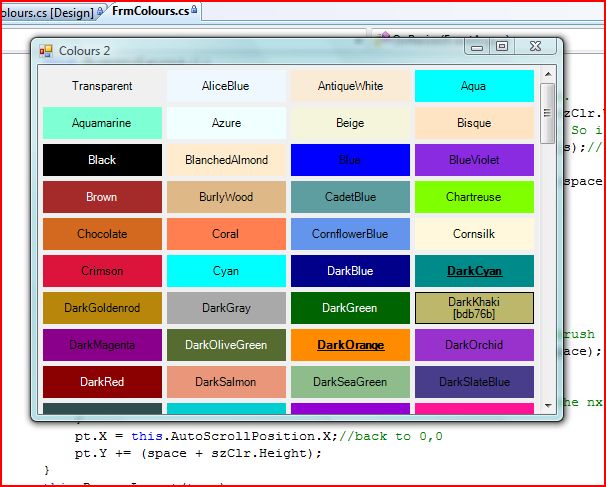
There always comes a time when you're coding and you suddenly need to know what one of the .net colours you're going to use looks like, especially with those whimsical names. So I made this up......tell me what you guys think?? :Thmbsup:

I've attached the file to this post and here a link too just incase.
http://www.mediafire.com/file/iwnoghfvzxy/Colours v2.1.exe

A little about the app, version one was all my effort... a little crazy programming went into getting mouse over highlights but the performance was terrible... a little help from the forums and version 2 performed way better... also it took a while for me to figure how to get the text on each box to be a visible colour! lol


Thanks so much

Gideon

« Last Edit: July 07, 2009, 04:07 PM by giddy »

mouser

  • First Author
  • Administrator
  • Joined in 2005
  • *****
  • Posts: 40,931
    • Gathering Badge
    • Plugin Coding Medal
    • Participated in NANY Challenge Seventeen Times
    • Cody Award
    • Coding Snacks
    • Volunteers/Staff
neat! i can see how that would be useful.
thanks for sharing giddy.

here's a screenshot for those curious:
Screenshot - 7_3_2009 , 9_53_35 AM.png

giddy

  • Member
  • Joined in 2008
  • **
  • Posts: 20
no problem.... hope you guys tried resizing the app... the colours appear properly placed no matter what size the app is.... this was something i coded just for challenge of it lol!!

I'm thinking about sharing this other app i made called quick build.... allows you to build vs solutions from the explorer shell context menu...

skwire

  • I eat Coding Snacks for breakfast...
  • Global Moderator
  • Joined in 2005
  • *****
  • Posts: 5,297
    • Participated in NANY Challenge Seventeen Times
    • Coding Snacks
    • Superboy Coder
    • Cody Award
    • Volunteers/Staff
    • Gathering Badge
When you right-click a colour, I think it would be cool to offer a few copy-to-clipboard options such as HTML colour code, RGB values, etc.

hamradio

  • Amateur Radio Guy
  • Charter Honorary Member
  • Joined in 2006
  • ***
  • Posts: 893
    • Plugin Coding Medal
    • Participated in NANY Challenge Fifteen Times
    • Cody Award
    • Coding Snacks
    • Volunteers/Staff
    • Hardware Hacker
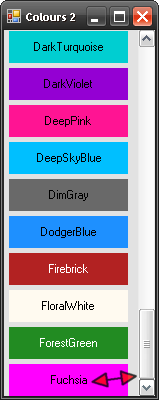
The scrollbar does not adjust right when you want 1 column of colors. See screenshot...

screen_07032009_001.png

Other than that it looks pretty good and skwires suggestion seems like it would make it even better too.
« Last Edit: July 03, 2009, 04:42 PM by hamradio »

mouser

  • First Author
  • Administrator
  • Joined in 2005
  • *****
  • Posts: 40,931
    • Gathering Badge
    • Plugin Coding Medal
    • Participated in NANY Challenge Seventeen Times
    • Cody Award
    • Coding Snacks
    • Volunteers/Staff
Quote
I think it would be cool to offer a few copy-to-clipboard options such as HTML colour code, RGB values, etc.

keep in mind that the point of this app, as i understand it, is to show you what specific preset colors that can be referenced in DOT NET programming languages look like.  so its not really meant for html/RGB colors, etc.  not that it might not be useful, just pointing out that i think the point of this is not to be a general purpose color tool.

giddy

  • Member
  • Joined in 2008
  • **
  • Posts: 20
Quote
is to show you what specific preset colors that can be referenced in DOT NET programming languages look like.  so its not really meant for html/RGB colors
Initially very true was only a reference app... but I did consider doing that strongly... would be a little more useful than it is... however I was thinking more on the lines of displaying hex and rgb when you mouse over a box and clicking it would copy it... but context menu sounds good too... which would deliver better user experience?

Quote
The scrollbar does not adjust right when you want 1 column of colors.
wow... really weird bug..  problem even with 2 columns... and by weird i mean ALL the boxes have been added to the form and their locations correctly set... its like the form doesn't want to scroll anymore!

Will try to fix it but probably after adding the hex/rgb options.

giddy

  • Member
  • Joined in 2008
  • **
  • Posts: 20
Ok.... was actually trouble getting a contextmenu in there because of the way i programmed it! I'm so ashamed when I look at this code sometimes... :-[

I just added copying hex codes since we don't use rgb and it would include me making the boxes bigger which would look crappy. To copy the hex just click the box, clicking the box makes it bold so you can kinda "mark" colours.

The link and the attachment in the first post has been updated.

Tell me what you guys think. :down: :up: ??

[attach]
« Last Edit: July 04, 2009, 12:11 PM by giddy »

Antonimo

  • Participant
  • Joined in 2007
  • *
  • Posts: 21
Hi Giddy,

I like this app very much; it is a really useful little tool for saving the palettes for various projects that I work on.

Quote
When you right-click a colour, I think it would be cool to offer a few copy-to-clipboard options such as HTML colour code, RGB values, etc.

I would also find this feature to be very useful, but I particularly wish to express gratitude for the app itself.

giddy

  • Member
  • Joined in 2008
  • **
  • Posts: 20
So finally after all those ages I put this up as Open Source on the MIT license:
http://colours.codeplex.com/

:)

Original address: https://www.donationcoder.com/forum/index.php?topic=19008.0