Mouser, after reading your recent comment about FARR being useful even if one already uses LBC, I decided to give FARR a try. I asked it to find Quick View Plus, which I have in an old version (version 6). I typed Quick View, and FARR came up with two possibilities: Quick View Plus and the uninstall link. I clicked on Quick View Plus, but instead of opening the program, it simply took me to the directory C:\Documents and Settings\All Users\Start Menu\Programs\Quick View Plus. That directory has only two items--the uninstaller and a shortcut called, oddly, View a File...lnk. Clicking on that opens Quick View Plus. That seemed very strange to me, especially since there's an entire Quick View Plus directory under Program Files, and it includes a 40 KB file called qvp32.exe (in Program Files\Quick View Plus\Program), which is apparently the file that launches the program.
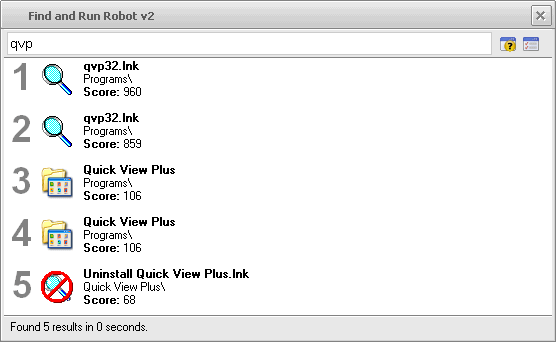
I then tried typing qvp in FARR, but that just brought up two identical entries leading to the Documents and Settings directory I mentioned above, plus the uninstall program. And typing qvp32 in FARR yielded NO results. I have no idea why FARR isn't going to the right place and giving me a result that will directly open Quick View Plus.
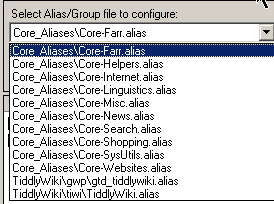
I decided that perhaps I needed to create an alias for this program. I went to the Help file and found this statement: "These .alias files are located in the AliasGroups\ subdirectory of FARR, and are further broken up into AliasGroups\Installed and AliasGroups\MyCustom." When I went into Options and selected AliasGroups, I found nothing that corresponded to Installed or MyCustom.
I'd welcome some help with this. Many thanks in advance.
I then tried typing qvp in FARR, but that just brought up two identical entries leading to the Documents and Settings directory I mentioned above, plus the uninstall program. And typing qvp32 in FARR yielded NO results. I have no idea why FARR isn't going to the right place and giving me a result that will directly open Quick View Plus.
I decided that perhaps I needed to create an alias for this program. I went to the Help file and found this statement: "These .alias files are located in the AliasGroups\ subdirectory of FARR, and are further broken up into AliasGroups\Installed and AliasGroups\MyCustom." When I went into Options and selected AliasGroups, I found nothing that corresponded to Installed or MyCustom.
I'd welcome some help with this. Many thanks in advance.