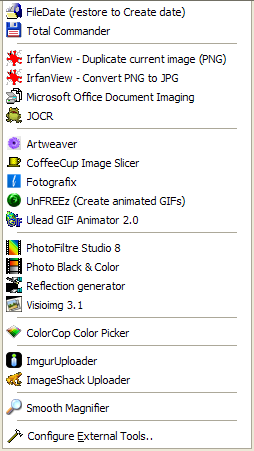
Advanced Screenshot Captor users know that you can configure the SC "Tools" menu to launch 3rd party programs that can operate on image files, in various ways.
I've just added a new feature that adds a new "Tools" subdirectory in the Screenshot Captor installation, which is scanned automatically when the program starts.
Screenshot Captor looks for files named *.sctool and parses those in search of 3rd party tool configurations, and these are added to the Tools menu automatically.
This allows two things:
I hope users will take a look at the .sctool feature which will be available in the next release of SC and share some tool packs!
I've just added a new feature that adds a new "Tools" subdirectory in the Screenshot Captor installation, which is scanned automatically when the program starts.
Screenshot Captor looks for files named *.sctool and parses those in search of 3rd party tool configurations, and these are added to the Tools menu automatically.
This allows two things:
- First, users can share tool "packs" as if they were plugins, by combining a utility with its .sctool file, which users simply unzip into the Tools subdirectory.
- Second, users can make an .sctool file for a common application (like Photoshop, Paint Shop Pro, etc.), which tells SC where to look to find the program on the hard disk of the user, and how to launch it to work with the selected image (if found, it is added to the Tools menu).
I hope users will take a look at the .sctool feature which will be available in the next release of SC and share some tool packs!


 ).
).