DonationCoder.com forum
 
Read-only archive. This is a static copy of the DonationCoder.com forum. Reading and searching work as before; logging in, posting and private messages do not.
Archive of 2026-10-21 · About this archive · Main site

Author Topic: packet.dll missing :(  (Read 24,420 times)

boarders paradise

  • Participant
  • Joined in 2009
  • *
  • Posts: 23
packet.dll missing :(
« on: June 15, 2009, 08:12 AM »
Hi folks.

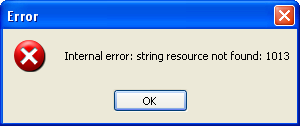
Installation of URLsnooper v2.23.01 doesn't work on XP. When executing URLsnoopersetup.exe I get this error:
[attach]

mouser

  • First Author
  • Administrator
  • Joined in 2005
  • *****
  • Posts: 40,931
    • Gathering Badge
    • Plugin Coding Medal
    • Participated in NANY Challenge Seventeen Times
    • Cody Award
    • Coding Snacks
    • Volunteers/Staff
Re: packet.dll missing :(
« Reply #1 on: June 15, 2009, 08:18 AM »
i think the problem is simply that you need to run the winpcap installer that comes with url snooper in order to to install winpcap, which is a network library that url snooper needs.

boarders paradise

  • Participant
  • Joined in 2009
  • *
  • Posts: 23
Re: packet.dll missing :(
« Reply #2 on: June 15, 2009, 08:39 AM »
Yes, I know ... that solves the issue, when installing manually. I just thought I'd let you guys know. Because the .exe file you download here: http://www.donationcoder.com/Software/Mouser/urlsnooper/downloads/URLSnooperSetup.exe
fails when executing with the abovementioned error (the first one). And I don't think this is on purpose ....  :D

mouser

  • First Author
  • Administrator
  • Joined in 2005
  • *****
  • Posts: 40,931
    • Gathering Badge
    • Plugin Coding Medal
    • Participated in NANY Challenge Seventeen Times
    • Cody Award
    • Coding Snacks
    • Volunteers/Staff
Re: packet.dll missing :(
« Reply #3 on: June 15, 2009, 09:09 AM »
maybe you unchecked the option or canceled the install of WinPcap that should get installed automatically when urlsnooper setup installs?

or maybe you unpacked manually and you are saying we should add a note that the user should remember to run the winpcap installer when they unpack manually.

boarders paradise

  • Participant
  • Joined in 2009
  • *
  • Posts: 23
Re: packet.dll missing :(
« Reply #4 on: June 15, 2009, 09:16 AM »
Sorry, I hoped my post was clear. I try again:

First and foremost: URLsnoopersetup.exe simply DOES NOT work. Download it from the link in my reply#2 and execute it. It won't run, but fail with the error in my 1st screenshot.

Secondly: When extracting the files manually from URLsnoopersetup.exe and then running the program, URLsnooper.exe fails with the error in my 2nd screenshot if WinPcap has not been installed manually, too. Yes, as you said, the user should probably be informed, that he/she would have to install WinPcap, too.

mouser

  • First Author
  • Administrator
  • Joined in 2005
  • *****
  • Posts: 40,931
    • Gathering Badge
    • Plugin Coding Medal
    • Participated in NANY Challenge Seventeen Times
    • Cody Award
    • Coding Snacks
    • Volunteers/Staff
Re: packet.dll missing :(
« Reply #5 on: June 15, 2009, 09:21 AM »
ahh i see now.. let me investigate that.. there is no excuse for the setup program not running properly.
thank you for the report.  anyone else seeing this?

maybe could you try redownloading the setup program using a different browser (sometimes the download gets corrupted)?
can i ask what language+version of Windows you are using?

boarders paradise

  • Participant
  • Joined in 2009
  • *
  • Posts: 23
Re: packet.dll missing :(
« Reply #6 on: June 15, 2009, 10:13 AM »
glad, we are on the same page now ...

the download was certainly not corrupted, but here are the hash values for you to check:

[attach]

boarders paradise

  • Participant
  • Joined in 2009
  • *
  • Posts: 23
Re: packet.dll missing :(
« Reply #7 on: June 15, 2009, 10:15 AM »
just download the .exe from the link above and execute it. I'm almost sure, you'll get the same error (if your OS=Win).

I'm running XPpro SP2, english language

mouser

  • First Author
  • Administrator
  • Joined in 2005
  • *****
  • Posts: 40,931
    • Gathering Badge
    • Plugin Coding Medal
    • Participated in NANY Challenge Seventeen Times
    • Cody Award
    • Coding Snacks
    • Volunteers/Staff
Re: packet.dll missing :(
« Reply #8 on: June 15, 2009, 10:17 AM »
it doesn't happen for me.
at one point in the installation does the error occur for you -- as soon as you double click the .exe?

boarders paradise

  • Participant
  • Joined in 2009
  • *
  • Posts: 23
Re: packet.dll missing :(
« Reply #9 on: June 15, 2009, 10:23 AM »
If "at one point" means "at what point", then my answer is that:

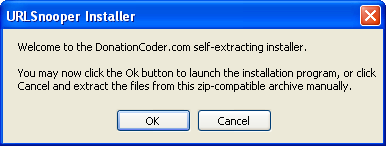
No, when double-clicking the .exe, I first see this window:

[attach]

boarders paradise

  • Participant
  • Joined in 2009
  • *
  • Posts: 23
Re: packet.dll missing :(
« Reply #10 on: June 15, 2009, 10:26 AM »
With my sandbox installation, I first got the installation window from reply #9 and when clicking on OK, I received the error message as shown on screenshot #1 in my OP.

At least I'm prepared for the future and know I won't bother people with my sandbox anymore ...  :-[

mouser

  • First Author
  • Administrator
  • Joined in 2005
  • *****
  • Posts: 40,931
    • Gathering Badge
    • Plugin Coding Medal
    • Participated in NANY Challenge Seventeen Times
    • Cody Award
    • Coding Snacks
    • Volunteers/Staff
Re: packet.dll missing :(
« Reply #11 on: June 15, 2009, 10:32 AM »
:)

well it does go to show you that sandboxes can cause issues -- that's good to know when testing.  what program are you using to do sandbox stuff?  the virtual machines (vmware, virtualpc, virtualbox, etc.) dont seem to have such problems.

boarders paradise

  • Participant
  • Joined in 2009
  • *
  • Posts: 23
Re: packet.dll missing :(
« Reply #12 on: June 15, 2009, 10:49 AM »
Yes, it's good to know. I am using Sandboxie.

Original address: https://www.donationcoder.com/forum/index.php?topic=18770.0