DonationCoder.com forum
 
Read-only archive. This is a static copy of the DonationCoder.com forum. Reading and searching work as before; logging in, posting and private messages do not.
Archive of 2026-10-21 · About this archive · Main site

Author Topic: Coding Snack: Switch Filenames  (Read 23,656 times)

Coeluh

  • Family Guy ^^
  • Supporting Member
  • Joined in 2007
  • **
  • Posts: 273
Coding Snack: Switch Filenames
« on: June 06, 2009, 11:11 AM »
Let's say, i've got 2 files: filea.jpg and fileb.jpg

But I want filea.jpg to be fileb.jpg and fileb.jpg to be filea.jpg. Normally the filenames I want to switch are longer, so it takes longer to switch them, because I have to copy/paste twice and stuff. I want a simple tool where I can drop 2 items and they will switch filenames.

Thanks a lot in advance! :)
« Last Edit: June 29, 2009, 01:56 PM by mouser »

NoWhereMan

  • Participant
  • Joined in 2005
  • *
  • Posts: 23
Re: IDEA: Switch Filenames
« Reply #1 on: June 06, 2009, 12:02 PM »
Here is a quick batch file which does what you are asking for

Code
@echo off

if %1.==. goto USAGE


if not exist %1 goto NOTEXISTS
if not exist %2 goto NOTEXISTS

REM move first to temp name
set tempfile=%1.%RANDOM%

move %1 %tempfile% > NUL
move %2 %1 > NUL
move %tempfile% %2 > NUL

goto EXIT

:USAGE
echo USAGE: swap file1 file2
goto EXIT

:NOTEXISTS
echo ERROR: Can't find the file(s) you specified

:EXIT
echo.

Obviously since it's a batch file it would flash in a command prompt window, but you can hide it by creating a shortcut and setting the program status to minimized. You can then drop either the shortcut or the batch file to your sendto folder, at your convenience :)

Just copy/paste the code to a text file (notepad) and save it as swap.bat or swap.cmd and you're set

bye

skwire

  • I eat Coding Snacks for breakfast...
  • Global Moderator
  • Joined in 2005
  • *****
  • Posts: 5,297
    • Participated in NANY Challenge Seventeen Times
    • Coding Snacks
    • Superboy Coder
    • Cody Award
    • Volunteers/Staff
    • Gathering Badge
Re: IDEA: Switch Filenames
« Reply #2 on: June 06, 2009, 11:43 PM »
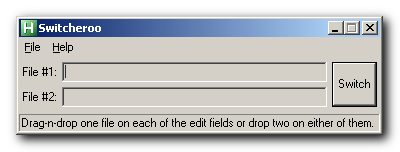
Give Switcheroo a try and see if it's what you had in mind.

2009-06-07_114401.png

Download: http://skwire.dcmembers.com/apps/switcheroo/Switcheroo.zip
« Last Edit: July 07, 2009, 11:18 AM by skwire »

Coeluh

  • Family Guy ^^
  • Supporting Member
  • Joined in 2007
  • **
  • Posts: 273
Re: IDEA: Switch Filenames
« Reply #3 on: June 07, 2009, 08:27 AM »
Give Switcheroo a try and see if it's what you had in mind.
(see attachment in previous post) (see attachment in previous post)
Download: http://skwire.dcmembers.com/apps/switcheroo/Switcheroo.zip
Switcheroo is cool. But: Maybe the files are not in the same folder, and not by that not selectable at the same time. One by one dropping would be cool.

It does the same job as the batch file, but the interface is nice. :)

skwire

  • I eat Coding Snacks for breakfast...
  • Global Moderator
  • Joined in 2005
  • *****
  • Posts: 5,297
    • Participated in NANY Challenge Seventeen Times
    • Coding Snacks
    • Superboy Coder
    • Cody Award
    • Volunteers/Staff
    • Gathering Badge
Re: IDEA: Switch Filenames
« Reply #4 on: June 07, 2009, 01:29 PM »
Maybe the files are not in the same folder, and not by that not selectable at the same time. One by one dropping would be cool.

Try build 6.  You now have two drop methods available:
  • You can drag-n-drop one file on to each of the edit fields
  • You can drag-n-drop two files anywhere on the form.

Download: http://skwire.dcmembers.com/apps/switcheroo/Switcheroo.zip
« Last Edit: June 07, 2009, 01:40 PM by skwire »

mouser

  • First Author
  • Administrator
  • Joined in 2005
  • *****
  • Posts: 40,931
    • Gathering Badge
    • Plugin Coding Medal
    • Participated in NANY Challenge Seventeen Times
    • Cody Award
    • Coding Snacks
    • Volunteers/Staff
Re: IDEA: Switch Filenames
« Reply #5 on: June 07, 2009, 02:01 PM »
Skwire is on fire lately!!

Coeluh

  • Family Guy ^^
  • Supporting Member
  • Joined in 2007
  • **
  • Posts: 273
Re: IDEA: Switch Filenames
« Reply #6 on: June 07, 2009, 04:01 PM »
Skwire is on fire lately!!
He shoud change is name to skfire ;)

skwire

  • I eat Coding Snacks for breakfast...
  • Global Moderator
  • Joined in 2005
  • *****
  • Posts: 5,297
    • Participated in NANY Challenge Seventeen Times
    • Coding Snacks
    • Superboy Coder
    • Cody Award
    • Volunteers/Staff
    • Gathering Badge
Re: IDEA: Switch Filenames
« Reply #7 on: June 07, 2009, 04:51 PM »
Code doesn't write itself, eh?  :D  Thanks for your kind compliments.  As I've mentioned before, I really enjoy making quick apps such as this one.

TaoPhoenix

  • 0 - 60 ... then back to 0 again!
  • Supporting Member
  • Joined in 2011
  • **
  • Posts: 4,642
    • Participated in NANY Challenge Three Times
Re: Coding Snack: Switch Filenames
« Reply #8 on: December 24, 2011, 07:51 AM »

(Someone tell me if they hate thread bumps!)

I just stumbled onto this, and found a great use case for it.

(Gangster's voice)
So ya' got's this file, see? And it's called Project Update December 2011 with annotations.pdf, which is a scan file. But then you add something else, and scan it again. I don't throw out partial work, I save it as drafts. But now it's no longer good! So I'm stuck scanning the new copy. But computers won't let you copy a new file with the same filename!
(End Gangster)

So this is neat so that when you rescan it, and it comes out Scan265432, you Switcheroo it, your fresh new scan gets the right file name, then you can rename the junk one Project-Junk etc.
Use attachthumb=# to show an attached image as an expandable thumbnail, or attach=# to show full size. (With Brackets)

Original address: https://www.donationcoder.com/forum/index.php?topic=18643.0