- then Infix definite is too expensive!
Re: INfix: easy, capable, but expensive WordPad-like PDF editor
« Reply #25 on: May 28, 2009, 02:09 PM »


 Topic: INfix: easy, capable, but expensive WordPad-like PDF editor (Read 64,734 times)


I am surprised that noone has mentionned OpenOffice
- you really shouldn't be surprised, because this thread is about a pdf EDITOR.


Yup - PagePlus X3 will search and replace (ctrl-H) within the text of a pdf file (provided the text is not part of an image).
X3 does offer to open pdf's by default (ie pdfs are listed as PagePlus files in the Open dialogue) but once a pdf is selected to be opened, it is imported as mentioned above. To save as a pdf you have to select "Publish as PDF" from the File menu.
 Admittedly that includes tax at (currently) about 15%, making the price more like £85 or $136, but I wasn't going to pay so much over the odds just because I live in the UK. It's a connected world now, and Nuance and other vendors will have to accept that. I bought a license for Able2Extract instead.

Nuance annoyed me. I live in the UK. I went to their "Buy Now" page, which says the price is US$99.99, about GB£62.5, then changed the country to UK. The price turned into £99.99 - which is over $159
@steeladept: There's a feature comparison matrix for the different versions of PDF Converter here: http://www.nuance.com/imaging/pdfconverter/comparison/pdf-family-compatibility-features.asp. I don't have any experience with the other versions, so don't know if I would miss any of the Pro features if I were using the regular version.
 I was talking about the difference between Standard and Pro versions of INfix. Their website is very general about it and it's comparison matrix does not specify between the two and their competitors.
Editing Products
Infix - seamless editing of PDF text, search & replace, plus a host of other facilties
Infix Pro - Search & replace across files plus integration with Infix Server
Infix Server - high-volume PDF editing and imposition for production environments.
Simply Edit Any PDF- but I haven't yet been able to reproduce such search & replace. Maybe because the file I was using, originally was OCR scanned. I must remember to test this feature more thoroughly. Maybe in the week-end.
Most PDFs just contain fragments of text - just a few words at a time. Other PDF editors allow you to edit each fragment individually.
Infix is the only PDF editor that intelligently re-creates the original content so that you can edit it in the way you would expect. It uses a set of intelligent algorithms to recreate the original structure of the document. This means you can edit a PDF just like you would a Word document.
Nothing comes close to Infix in the arena of PDF editing! Try it and you will agree!
(- the download link is for the standard version, for Windows.)
I found something that claims to do multiple search-and-replace within PDFs: PDF Text Replace Tool but it needs both MS Framework 2.0 and Visual C++ , and costs $49. I was baffled by the Visual C++ requirement, which only appears when you try to install it, it's not obvious on the Web site. Because I don't have Visual C++ and don't know what's involved in it, I didn't proceed any further.


. . but I wasn't going to pay so much over the odds just because I live in the UK. It's a connected world now, and Nuance and other vendors will have to accept that. I bought a license for Able2Extract instead.
 (another 20% on top of that waaah)
Just out of curiosity, how does the standard version compare to the Professional? What additional items does Pro offer, or haven't you tested that one?
There are two editions of software - Standard and Professional, both offering the same sophisticated text editing but with different levels of additional features such as graphics editing and template generation for Infix Server (our server-based editing solution).
Additional features offered by Infix Pro:
tick Search & Replace across batches of documents
tick Advanced, auto-text fitting
tick Template creation for Infix Server
Coming up on BitsDuJour is a PDF editor called e-PDF: http://www.bitsdujour.com/software/e-pdf/
 ):
):. . but I wasn't going to pay so much over the odds just because I live in the UK. It's a connected world now, and Nuance and other vendors will have to accept that. I bought a license for Able2Extract instead.
you should let them know so they might change their ways . .
I e-mailed Nuance. They didn't reply.. . but I wasn't going to pay so much over the odds just because I live in the UK. It's a connected world now, and Nuance and other vendors will have to accept that. I bought a license for Able2Extract instead.
you should let them know so they might change their ways . .

at least you had the choice of a similar product (hopefully equally good or better)
Nuance PDF Converter Professional 5, on the other hand, will search for text over the entire document but doesn't seem to offer a batch replace feature.
 I've already e-mailed the author about this.
Darwin, how does Nuance fare on PDFs with small fonts? Able2Extract tends to fail, not altogether surprising as PDF seems to handle fonts differently from Windows.
Darwin, how does Nuance fare on PDFs with small fonts? Able2Extract tends to fail, not altogether surprising as PDF seems to handle fonts differently from Windows.
I'm not sure I understand the question - do you mean when creating a document or in searching a pdf or...?
Hmm... now that I see the jpg "full-size" here, maybe it's not the best test candidate... The font looks big in the jpg. rjbull - do you have an image file that you could post for me to try to convert or is this what you were looking for?
 My problem files are usually patents, which always seem to be scanned in and sometimes have quite small text. I'll try and dig out an offending page and PM you, thanks
 Coming up on BitsDuJour is a PDF editor called e-PDF: http://www.bitsdujour.com/software/e-pdf/
- I don't think it can edit the pdf's original text, only add new text.
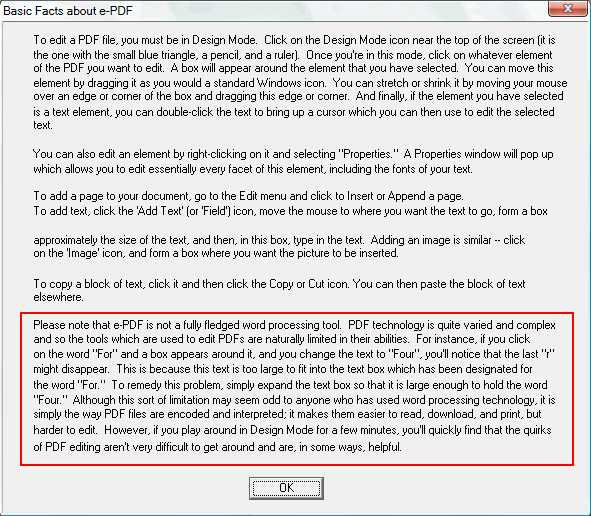
Of course I had to try out e-pdf. I cannot remember why I didn't keep it, but I didn't. What I wanted to tell, now, is, that together with e-pdf came this little info box, basic rules, which might explain certain pdf editing problems, in general:
Original address: https://www.donationcoder.com/forum/index.php?topic=18252.0