DonationCoder.com forum
 
Read-only archive. This is a static copy of the DonationCoder.com forum. Reading and searching work as before; logging in, posting and private messages do not.
Archive of 2026-10-21 · About this archive · Main site

Author Topic: FastShutdown  (Read 15,054 times)

Nod5

  • Supporting Member
  • Joined in 2006
  • **
  • Posts: 1,175
    • Coding Snacks
    • Participated in NANY Challenge Three Times
    • Plugin Coding Medal
FastShutdown
« on: April 26, 2009, 05:17 PM »
;-- Fast Shutdown -- by Nod5
;-- v090426
;-- does a onestep windows shutdown unless there are scheduled tasks later the same day
;-- default hotkeys: (middle click on Start button) OR (Right Shift + Escape)
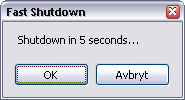
fast.png
A quick script for Win XP that I needed myself. ahk & exe in attached zip. I'll package it nicer later.

b48b1bb31a479ac4a3467f5f9297c77f *FastShutdown.ahk
e388781005816e81f7e4d92086a9d2e6 *FastShutdown.exe

Code
;-- Fast Shutdown -- by Nod5
;-- v090426
;-- does a onestep windows shutdown unless there are scheduled tasks later the same day
;-- default hotkeys: (middle click on Start button) OR (Right Shift + Escape)

#singleinstance, force
~Mbutton::

MouseGetPos,,,xxid, xxcontr
WinGetClass, xxstart, ahk_id %xxid%
if xxstart = Shell_TrayWnd	;-- if mouse over start button
 if xxcontr = Button1
   goto fastshutdown
return

RShift & Esc::
fastshutdown:
xout = 
xvar =
x = %A_Temp%\%A_now%.txt
RunWait %comspec% /c "schtasks > "%x%"",,Hide
FileRead, xvar, %x%
FileDelete, %x%
Loop, Parse, xvar, `n, `r 
{
if A_LoopField contains %A_YYYY%-%A_MM%-%A_DD%
 xout = %xout%`n%A_Loopfield%
}
if xout !=
{
MsgBox, 1, Fast Shutdown, %xout%`n`nReally shutdown?
IfMsgBox, OK
 Shutdown, 1
}
else
{
MsgBox, 1, Fast Shutdown, Shutdown in 5 seconds...,5
IfMsgBox, OK
 Shutdown, 1
IfMsgbox, Timeout
 Shutdown, 1
}
return
« Last Edit: April 26, 2009, 05:19 PM by Nod5 »

Nod5

  • Supporting Member
  • Joined in 2006
  • **
  • Posts: 1,175
    • Coding Snacks
    • Participated in NANY Challenge Three Times
    • Plugin Coding Medal
Re: FastShutdown
« Reply #1 on: April 27, 2009, 05:35 PM »
FastShutdown uses the "schtasks" command to output a list of scheduled tasks and then searches for the current date in it. Can someone with english XP installed please check if you have the save date format as my non-english install i.e. YYYY-MM-DD. Just do this: run > cmd > schtasks    and the list will show itself.  :Thmbsup:

rgdot

  • Supporting Member
  • Joined in 2009
  • **
  • Posts: 2,197
Re: FastShutdown
« Reply #2 on: April 27, 2009, 06:13 PM »
English (Canada)

TaskName                            Next Run Time
==================================== =====================
Ad-Aware Update (Weekly)            18:23:00, 27/04/2009

pencoe

  • Supporting Member
  • Joined in 2006
  • **
  • Posts: 21
Re: FastShutdown
« Reply #3 on: May 06, 2009, 06:18 AM »
German XP SP2(! SP3 will not install on this machine, time to change...  ;) ):

Taskname                            Nächste Ausführungszeit
==================================== ========================
SampleTask              09:15:00, 06.05.2009

Nod5

  • Supporting Member
  • Joined in 2006
  • **
  • Posts: 1,175
    • Coding Snacks
    • Participated in NANY Challenge Three Times
    • Plugin Coding Medal
Re: FastShutdown
« Reply #4 on: May 06, 2009, 04:15 PM »
Ok, so I need to query the local date format from within the AHK script. I'll try to sort it out tonight.

Nod5

  • Supporting Member
  • Joined in 2006
  • **
  • Posts: 1,175
    • Coding Snacks
    • Participated in NANY Challenge Three Times
    • Plugin Coding Medal
Re: FastShutdown
« Reply #5 on: May 10, 2009, 09:29 AM »
Found a relevant registry entry:
Quote
[HKEY_USERS\.DEFAULT\Control Panel\International]
"sShortDate"="yyyy-MM-dd"

So for a complete solution I need to add:
1. code to read that on the local computer:
Code
RegRead, dateformat, HKEY_USERS, .DEFAULT\Control Panel\International, sShortDate
2. modify the script based on the format there. There might be a lot of different such formats so it is hard to cover them all.

Here's a non-complete quick fix that at least might satisfy Canadians, Swedes and Germans (as a rule, world domination is best achieved incrementally ;D )
But sometimes, just sometimes, it can be had straight away, muaHAHAHAHA  :P :

Code
;-- Fast Shutdown -- by Nod5
;-- v090510b
;-- does a onestep windows shutdown unless there are scheduled tasks later the same day
;-- default hotkeys: (middle click on Start button) OR (Right Shift + Escape)

#singleinstance, force
~Mbutton::

MouseGetPos,,,xxid, xxcontr
WinGetClass, xxstart, ahk_id %xxid%
if xxstart = Shell_TrayWnd	;-- if mouse over start button
 if xxcontr = Button1
   goto fastshutdown
return

RShift & Esc::
fastshutdown:
xout = 
xvar =
x = %A_Temp%\%A_now%.txt
RunWait %comspec% /c "schtasks > "%x%"",,Hide
FileRead, xvar, %x%
FileDelete, %x%
FormatTime, today, A_Now, ShortDate
Loop, Parse, xvar, `n, `r 
{
if A_LoopField contains %today%
 xout = %xout%`n%A_Loopfield%
}
if xout !=
{
MsgBox, 1, Fast Shutdown, %xout%`n`nReally shutdown?
IfMsgBox, OK
 Shutdown, 1
}
else
{
MsgBox, 1, Fast Shutdown, Shutdown in 5 seconds...,5
IfMsgBox, OK
 Shutdown, 1
IfMsgbox, Timeout
 Shutdown, 1
}
return

(FormatTime in Autohotkey had a ShortDate option)
« Last Edit: May 10, 2009, 09:43 AM by Nod5 »

Original address: https://www.donationcoder.com/forum/index.php?topic=18048.0