DonationCoder.com forum
 
Read-only archive. This is a static copy of the DonationCoder.com forum. Reading and searching work as before; logging in, posting and private messages do not.
Archive of 2026-10-21 · About this archive · Main site

Last post Author Topic: How to duplicate a file in the same folder?  (Read 91,216 times)

Grorgy

  • Supporting Member
  • Joined in 2007
  • **
  • Posts: 821
Re: How to duplicate a file in the same folder?
« Reply #25 on: April 20, 2009, 10:39 PM »
I was just playing with lopesoft's file menu tools, and it has an option to duplicate files in same folder

Quote
Duplicate Files files of any type and folders Creates a new copy of the selected elements in the current folder.

http://www.lopesoft.com/en/index.html

It has a lot of other stuff you may not want to, but...

PhilB66

  • Supporting Member
  • Joined in 2007
  • **
  • Posts: 1,522
Re: How to duplicate a file in the same folder?
« Reply #26 on: April 22, 2009, 02:30 AM »
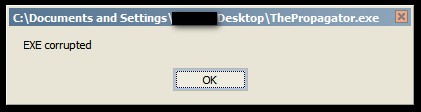
Trying to run ThePropagator.exe results in an error message

[attach]

cranioscopical

  • Friend of the Site
  • Supporting Member
  • Joined in 2006
  • **
  • Posts: 4,776
    • Cody Award
    • Official Forum Clown
    • rotten turkey sandwich - Rotten Turkey Sandwich
Re: How to duplicate a file in the same folder?
« Reply #27 on: April 22, 2009, 03:05 AM »
Quote
The script doesn't do a thing either.
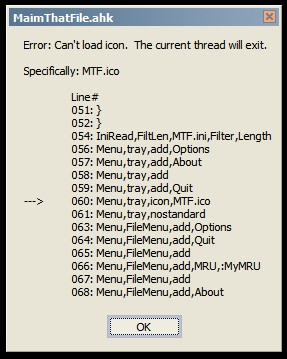
BTW, I was trying to run another script of yours, MaimThatFile.ahk, and got this error message:
That Target guy sure has a weird sense of humour!
Chris

Target

  • Honorary Member
  • Joined in 2006
  • **
  • Posts: 1,840
    • Coding Snacks
Re: How to duplicate a file in the same folder?
« Reply #28 on: April 22, 2009, 04:16 AM »
dunno what's happening there, though I was on the bus when I compiled it - I've recompiled it, tested it, tested it again, and re-attached it fyi

my bad with maim that file - the icon was in the previous attachments (which I've removed - the last post wasn't an update, only a check to make sure chris was using the same version as me).  I've attached a zipped bundle and a compiled version, so have another go and let me know how you get on
Alcohol is photoshop, bottled
Askhole - someone who ask for advice, then ignores it
"Look wise, say nothing, and grunt. Speech was given to conceal thought" - Sir William Osler
« Last Edit: April 22, 2009, 06:33 AM by Target »

cranioscopical

  • Friend of the Site
  • Supporting Member
  • Joined in 2006
  • **
  • Posts: 4,776
    • Cody Award
    • Official Forum Clown
    • rotten turkey sandwich - Rotten Turkey Sandwich
Re: How to duplicate a file in the same folder?
« Reply #29 on: April 22, 2009, 11:30 AM »
@Target
Haven't looked at this one before.
When I run it, neither a tray icon nor a 'drop box' appears.
I don't have a Win key to try so I'll look in the script later to change that.
Also, I use DirOpus so I'll have to revert to hExplorer, in order to jinx my system sufficiently.
At the moment I'm having to work for a crust... that'll be the fifth day this month!
Since usually (when I do so) I do this from home, I don't have long leisurely bus rides during which to play with software.


@PhilB66
MaimThatFile works just fine for me.
I was unable to make one version work, until I deleted every single thing related to it and started from scratch with the latest variant.
Perhaps that will help in your case, also.
Chris

cranioscopical

  • Friend of the Site
  • Supporting Member
  • Joined in 2006
  • **
  • Posts: 4,776
    • Cody Award
    • Official Forum Clown
    • rotten turkey sandwich - Rotten Turkey Sandwich
Re: How to duplicate a file in the same folder?
« Reply #30 on: April 22, 2009, 04:52 PM »
@Target
(I did not change Win+V)
Relying only on Explorer.exe:
  • No drop target appears
  • F12 does nothing
  • Crlt-alt-x kills it propoly.
Chris

PhilB66

  • Supporting Member
  • Joined in 2007
  • **
  • Posts: 1,522
Re: How to duplicate a file in the same folder?
« Reply #31 on: April 22, 2009, 05:58 PM »
@Target
(I did not change Win+V)
Relying only on Explorer.exe:
  • No drop target appears
  • F12 does nothing
  • Crlt-alt-x kills it propoly.
ditto

PhilB66

  • Supporting Member
  • Joined in 2007
  • **
  • Posts: 1,522
Re: How to duplicate a file in the same folder?
« Reply #32 on: April 22, 2009, 06:00 PM »
@PhilB66
MaimThatFile works just fine for me.
I was unable to make one version work, until I deleted every single thing related to it and started from scratch with the latest variant.
Perhaps that will help in your case, also.

Thanks, will redownload the script.

PhilB66

  • Supporting Member
  • Joined in 2007
  • **
  • Posts: 1,522
Re: How to duplicate a file in the same folder?
« Reply #33 on: April 22, 2009, 06:04 PM »
I was just playing with lopesoft's file menu tools, and it has an option to duplicate files in same folder
Thanks for the suggestion Grorgy, but the last thing I want is to clutter my right-click context menu.

PhilB66

  • Supporting Member
  • Joined in 2007
  • **
  • Posts: 1,522
Re: How to duplicate a file in the same folder?
« Reply #34 on: April 22, 2009, 06:08 PM »
Free to use for how long it does not say.
It claims to be shareware, but I don't see any limits.

Thanks for the link cmpm. It has a 45-day evaluation period.

Target

  • Honorary Member
  • Joined in 2006
  • **
  • Posts: 1,840
    • Coding Snacks
Re: How to duplicate a file in the same folder?
« Reply #35 on: April 23, 2009, 01:08 AM »
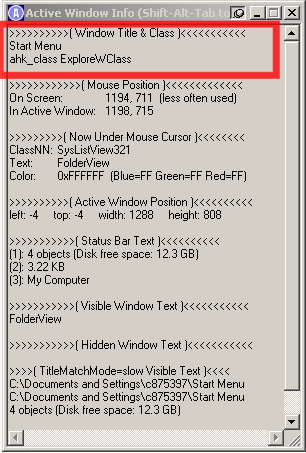
can you guys run the attached window spy for me and tell what the AHK class is for your versions of explorer please

[attachthumb=#2]

at the moment it's set up to run with "ExploreWClass" and this works on all the PC's I've tried it on (all XP SP2 machines)

If your explorer window isn't active, or it doesn't match the above, then nothing will happen
Alcohol is photoshop, bottled
Askhole - someone who ask for advice, then ignores it
"Look wise, say nothing, and grunt. Speech was given to conceal thought" - Sir William Osler

cranioscopical

  • Friend of the Site
  • Supporting Member
  • Joined in 2006
  • **
  • Posts: 4,776
    • Cody Award
    • Official Forum Clown
    • rotten turkey sandwich - Rotten Turkey Sandwich
Re: How to duplicate a file in the same folder?
« Reply #36 on: April 23, 2009, 01:40 AM »
can you guys run the attached window spy for me and tell what the AHK class is for your versions of explorer please
(see attachment in previous post)
at the moment it's set up to run with "ExploreWClass" and this works on all the PC's I've tried it on (all XP SP2 machines)

Ah!  Here's the thing. I dumped the Propagator into a temp folder and stuck a shortcut onto my desktop:
>>>>>>>>>>( Window Title & Class )<<<<<<<<<<<
Program Manager
ahk_class Progman


So, having read this, I launched explorer and navigated with it to the temp folder and fired off the ahk script from there:
>>>>>>>>>>( Window Title & Class )<<<<<<<<<<<
F:\RAM\Props
ahk_class ExploreWClass


Et voila, procreating bunnies!

Apologies for the unwarrented failure but now I'm lapin it up.

So, make it work from a shortcut?


Chris

Target

  • Honorary Member
  • Joined in 2006
  • **
  • Posts: 1,840
    • Coding Snacks
Re: How to duplicate a file in the same folder?
« Reply #37 on: April 23, 2009, 02:15 AM »
well, that's rather bizarre - duplicated your methodology and it's working, but it's a bit spotty

it appears to intermittently fail to detect the explorer window, or it does (there is a momentary flash of the drop target) but loses it again almost immediately

I'll have a bit a game and see if I can work it out (thanks for the feedback!!)
Alcohol is photoshop, bottled
Askhole - someone who ask for advice, then ignores it
"Look wise, say nothing, and grunt. Speech was given to conceal thought" - Sir William Osler

Target

  • Honorary Member
  • Joined in 2006
  • **
  • Posts: 1,840
    • Coding Snacks
Re: How to duplicate a file in the same folder?
« Reply #38 on: April 23, 2009, 04:43 AM »
OK, I think I may have worked it out

it's a very minor change, but try it and let me know
Alcohol is photoshop, bottled
Askhole - someone who ask for advice, then ignores it
"Look wise, say nothing, and grunt. Speech was given to conceal thought" - Sir William Osler

PhilB66

  • Supporting Member
  • Joined in 2007
  • **
  • Posts: 1,522
Re: How to duplicate a file in the same folder?
« Reply #39 on: April 23, 2009, 08:06 AM »
OK, I think I may have worked it out

it's a very minor change, but try it and let me know

Nada.

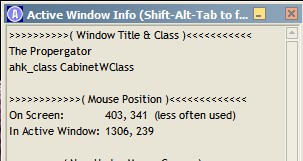
Window Spy screenshot:

[attach]

PhilB66

  • Supporting Member
  • Joined in 2007
  • **
  • Posts: 1,522
Re: How to duplicate a file in the same folder?
« Reply #40 on: April 23, 2009, 08:15 AM »
Yes, it does, but what if I want several duplicates? Is it possible to both stamp and number the files?

Date - Time??

Yes, that would be great. Also, could you add a path to icon in the script so I could add an icon and compile it.

[attach]

cranioscopical

  • Friend of the Site
  • Supporting Member
  • Joined in 2006
  • **
  • Posts: 4,776
    • Cody Award
    • Official Forum Clown
    • rotten turkey sandwich - Rotten Turkey Sandwich
Re: How to duplicate a file in the same folder?
« Reply #41 on: April 23, 2009, 12:37 PM »
OK, I think I may have worked it out
it's a very minor change, but try it and let me know

Nada.
Here's my experience:
  • Launch from desktop shortcut
  • Wait a bit (this is a technical term, don't worry if it's hard to grasp)
  • Nothing visible -- it's running
  • Open an explorer window -- drop target appears
  • F-12'd to set 15 copies
  • Dragged file from explorer window to drop target -- 15 copies created
  • Drop target invisible when explorer window loses focus or closed
  • Drop target visible when explorer window launched or gains focus
  • Can't move drop target around -- bounces back to start position (does anyone care about that?)
  • Drop target not 'on top' (does anyone care about that, either?)
  • Ctrl-Alt-x'd into oblivion
Do these bunnies have bugs?

Getting closer!

Anyone have a utility to expunge 15 unwanted copies?  ;D
Chris

PhilB66

  • Supporting Member
  • Joined in 2007
  • **
  • Posts: 1,522
Re: How to duplicate a file in the same folder?
« Reply #42 on: April 23, 2009, 02:17 PM »
Whoa.

Thanks for this cranioscopical. I can now confirm that the bunnies been reproducing like crazies...

[attach]

cranioscopical

  • Friend of the Site
  • Supporting Member
  • Joined in 2006
  • **
  • Posts: 4,776
    • Cody Award
    • Official Forum Clown
    • rotten turkey sandwich - Rotten Turkey Sandwich
Re: How to duplicate a file in the same folder?
« Reply #43 on: April 23, 2009, 03:03 PM »
Quote
Win+V doesn't work though.

For testing I changed the key to alt-V:
line 82 of script from $#V:: to $!V::
(I have no Windows key on my Northgate keyboards.)
That works fine for my test.

Method was:
  • launch Popogator
  • F-12 to set the number of desired instances
  • In explorer, select a file and either Ctrl-C it or context-menu copy it
  • Hit alt-V (or Winkey+V if you don't need to change the script)
  • Instant replication of file to the value set by F-12.

I know it's a hare-brained scheme but...


Chris

Target

  • Honorary Member
  • Joined in 2006
  • **
  • Posts: 1,840
    • Coding Snacks
Re: How to duplicate a file in the same folder?
« Reply #44 on: April 23, 2009, 11:31 PM »
Window Spy screenshot:
(see attachment in previous post)

What OS?  I assume it's Vista, and unfortunately I only have XP to work with so there could be other gotcha's like this.  I've updated the script to include the extra class, but you'll need to test it for me...

Also, could you add a "Duplicate to" feature (similar to "Copy to" and "Move to" functionality)?
I knew someone was going to ask for this...

I suppose I could, but how would you access this functionality? maybe different hotkeys, eg WIN+SHIFT+V to copy, WIN+CTRL+V to move...

  • Drop target invisible when explorer window loses focus or closed, and visible when explorer window launched or gains focus
  • Can't move drop target around -- bounces back to start position (does anyone care about that?)
  • Drop target not 'on top' (does anyone care about that, either?)
  • the drop target window is destroyed whenever explorer is inactive, and recreated each time it is (active, that is...).  I did it this way to avoid have stray windows floating around (seemed perfectly logical to me, but what do I know :huh:)
  • Is this something you would like to be able to do?  I wondered about moving the drop target - logically it didn't seem to matter where it was so long as it wasn't over anything critical (and it's translucent anyway), and given that it will self destruct as soon as you click on it, that doesn't seem like too big an issue either.  I just thought about this a bit more and wondered whether or not some sort of pause functionality might be useful (not sure why, but maybe you guys have an idea)
  • not sure what you mean by 'not on top' - it is set to be 'on top', just not active (remember, if the focus goes away from the explorer window the drop target self destructs)

keep the feedback coming and we'll get there

launch Popogator

don't know about hare brained, but I think I can see where some of your problems are coming from...
Alcohol is photoshop, bottled
Askhole - someone who ask for advice, then ignores it
"Look wise, say nothing, and grunt. Speech was given to conceal thought" - Sir William Osler

cranioscopical

  • Friend of the Site
  • Supporting Member
  • Joined in 2006
  • **
  • Posts: 4,776
    • Cody Award
    • Official Forum Clown
    • rotten turkey sandwich - Rotten Turkey Sandwich
Re: How to duplicate a file in the same folder?
« Reply #45 on: April 23, 2009, 11:53 PM »
  • Drop target invisible when explorer window loses focus or closed, and visible when explorer window launched or gains focus
  • Can't move drop target around -- bounces back to start position (does anyone care about that?)
  • Drop target not 'on top' (does anyone care about that, either?)
  • the drop target window is destroyed whenever explorer is inactive, and recreated each time it is (active, that is...)
  • I wondered about moving the drop target - logically it didn't seem to matter
  • not sure what you mean by 'not on top' - it is set to be 'on top', just not active
  • Makes perfect sense -- I didn't realize the subtlety of your design
  • Static suits me. Others might like it on the monitor screen from which it was initiated -- maybe not.
  • Didn't understand the destruction/recreation so thought it had been obscured by another window at that location

Quote from: Target
I think I can see where some of your problems are coming from...
You noticed!  Time to write the Poopograter

Quote from: Target
keep the feedback coming and we'll get there
It's been a long March here but it's all white to be late, Alice forgiven.

And no, I have no shame!

Chris

Target

  • Honorary Member
  • Joined in 2006
  • **
  • Posts: 1,840
    • Coding Snacks
Re: How to duplicate a file in the same folder?
« Reply #46 on: April 24, 2009, 12:24 AM »
or the defecator...

Quote
It's been a long March here but it's all white to be late, Alice forgiven
i realise it's been a long March, but don't worry April be all right

Quote
I have no shame!

just to prove you've mastered the understatement...
Alcohol is photoshop, bottled
Askhole - someone who ask for advice, then ignores it
"Look wise, say nothing, and grunt. Speech was given to conceal thought" - Sir William Osler

cranioscopical

  • Friend of the Site
  • Supporting Member
  • Joined in 2006
  • **
  • Posts: 4,776
    • Cody Award
    • Official Forum Clown
    • rotten turkey sandwich - Rotten Turkey Sandwich
Re: How to duplicate a file in the same folder?
« Reply #47 on: April 24, 2009, 12:56 AM »


Quote
It's been a long March here but it's all white to be late, Alice forgiven
i realise it's been a long March, but don't worry April be all right

Quote
I have no shame!

just to prove you've mastered the understatement...
;D

Hot keys don't work for me in the latest offering.
A press on F12 does nothing, but if I hold it down the script reports an inordinate number of hotkeys received.
Have you done anything that would affect that, or is this purely random?

Chris

cranioscopical

  • Friend of the Site
  • Supporting Member
  • Joined in 2006
  • **
  • Posts: 4,776
    • Cody Award
    • Official Forum Clown
    • rotten turkey sandwich - Rotten Turkey Sandwich
Re: How to duplicate a file in the same folder?
« Reply #48 on: April 24, 2009, 01:22 AM »
Hot keys don't work for me in the latest offering.
A press on F12 does nothing, but if I hold it down the script reports an inordinate numbe
r of hotkeys received.

Went back one generation and then the hotkeys did work. Then I killed that and ran the newest version which took F12.
Bunnies were in their own window, no transparency. That window and the explorer window sat and refreshed over and over.
I could drag a file icon to the bunnies to get duplication but if I attempted to move the explorer window it jumped back to its original position,
so it looks as if you're locking in place the bunnies and the explorer window.

At one point I had open two explorer windows and the bunnies ran away.
Shy as they are, they re-emerged once one of the explorer windows was closed.

All this and I haven't even had a drink. This is the best game I've played all week  :)

Chris

Target

  • Honorary Member
  • Joined in 2006
  • **
  • Posts: 1,840
    • Coding Snacks
Re: How to duplicate a file in the same folder?
« Reply #49 on: April 24, 2009, 01:59 AM »
Hot keys don't work for me in the latest offering.

the hand is quicker than the I...

I amended the top of the script to included the new window class, but forgot about the hotkeys - I guess that'll learn me to concentrate on one thing at a time...

Quote
All this and I haven't even had a drink. This is the best game I've played all week  :)

I'm laughing and laughing and laughing (now if I could just stop gritting my teeth...)
Alcohol is photoshop, bottled
Askhole - someone who ask for advice, then ignores it
"Look wise, say nothing, and grunt. Speech was given to conceal thought" - Sir William Osler

Original address: https://www.donationcoder.com/forum/index.php?topic=17933.0