quick info for how to configure the good commandline png compression tool to work from within screenshot captor.
only 1 caveat, the file already has to be saved as a png before using this tool (note you can change format by just adding the new extension in the filename box and hitting enter).
ok so get pngout from here -> http://advsys.net/ken/utils.htm#pngout
(direct download is here -> http://advsys.net/ken/util/pngout.exe)
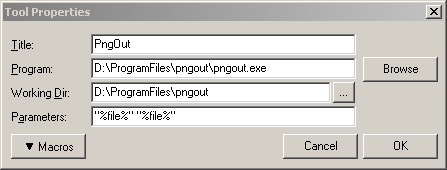
then configure tool in sc as shown below:
important note: change pngout.exe directory to where you put your pngout.exe file.
only 1 caveat, the file already has to be saved as a png before using this tool (note you can change format by just adding the new extension in the filename box and hitting enter).
ok so get pngout from here -> http://advsys.net/ken/utils.htm#pngout
(direct download is here -> http://advsys.net/ken/util/pngout.exe)
then configure tool in sc as shown below:
important note: change pngout.exe directory to where you put your pngout.exe file.