DonationCoder.com forum
 
Read-only archive. This is a static copy of the DonationCoder.com forum. Reading and searching work as before; logging in, posting and private messages do not.
Archive of 2026-10-21 · About this archive · Main site

Last post Author Topic: Oversized icons when using large icon setting (DPI)  (Read 30,122 times)

mouser

  • First Author
  • Administrator
  • Joined in 2005
  • *****
  • Posts: 40,931
    • Gathering Badge
    • Plugin Coding Medal
    • Participated in NANY Challenge Seventeen Times
    • Cody Award
    • Coding Snacks
    • Volunteers/Staff
Re: Oversized icons when using large icon setting (DPI)
« Reply #25 on: May 18, 2009, 02:26 PM »
Quote
I get non-cropped icons if I activate program options > settings > display options > report columns > SlideNum.
But as soon as I deactivate it (since I don't want the numbers) the cropping is back.

that's a good clue -- i'll look into it.

Nod5

  • Supporting Member
  • Joined in 2006
  • **
  • Posts: 1,175
    • Coding Snacks
    • Participated in NANY Challenge Three Times
    • Plugin Coding Medal
Re: Oversized icons when using large icon setting (DPI)
« Reply #26 on: May 18, 2009, 10:07 PM »
lanux: Yes, as I said I get no cropping in small icon mode. The combination Large Icon Slides + SlideNum is needed to get the problem.

you guys didn't say if you could reproduce the problem or not. If not, then I'll describe my settings more so we can try to narrow it down.

lanux128

  • Global Moderator
  • Joined in 2005
  • *****
  • Posts: 6,277
    • Coding Snacks
    • Volunteers/Staff
    • Gathering Badge
    • Participated in NANY Challenge Once
    • Linux User
Re: Oversized icons when using large icon setting (DPI)
« Reply #27 on: May 19, 2009, 12:39 AM »
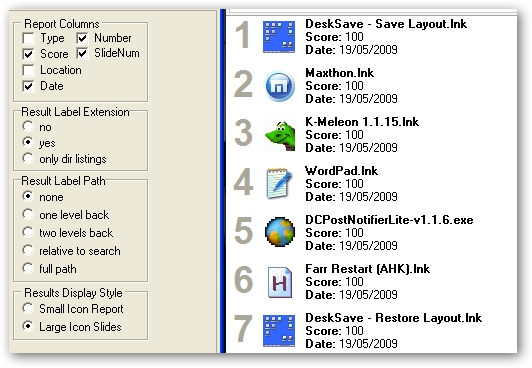
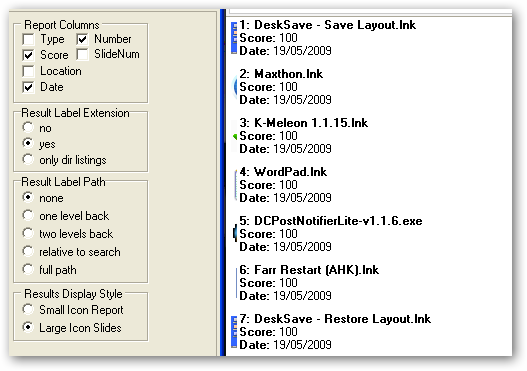
i tried the combination on my PC and the icons are partially hidden. i post screenshots below and maybe you can confirm they look the same on your computer.

BeforeAfter
ws-slidenum-before-1.pngws-slidenum-after-1.png


mouser

  • First Author
  • Administrator
  • Joined in 2005
  • *****
  • Posts: 40,931
    • Gathering Badge
    • Plugin Coding Medal
    • Participated in NANY Challenge Seventeen Times
    • Cody Award
    • Coding Snacks
    • Volunteers/Staff
Re: Oversized icons when using large icon setting (DPI)
« Reply #28 on: May 19, 2009, 03:48 AM »
ok, fixed but not yet uploaded; will be in next version.

Nod5

  • Supporting Member
  • Joined in 2006
  • **
  • Posts: 1,175
    • Coding Snacks
    • Participated in NANY Challenge Three Times
    • Plugin Coding Medal
Re: Oversized icons when using large icon setting (DPI)
« Reply #29 on: May 19, 2009, 09:07 AM »
:up:

Nod5

  • Supporting Member
  • Joined in 2006
  • **
  • Posts: 1,175
    • Coding Snacks
    • Participated in NANY Challenge Three Times
    • Plugin Coding Medal
Re: Oversized icons when using large icon setting (DPI)
« Reply #30 on: May 20, 2009, 06:22 AM »
with the newly released v2.60.01 I now get no icon at all when disabling SlideNum (regardless if I have large or small icon mode on)

lanux128

  • Global Moderator
  • Joined in 2005
  • *****
  • Posts: 6,277
    • Coding Snacks
    • Volunteers/Staff
    • Gathering Badge
    • Participated in NANY Challenge Once
    • Linux User
Re: Oversized icons when using large icon setting (DPI)
« Reply #31 on: May 20, 2009, 06:39 AM »
with the newly released v2.60.01 I now get no icon at all when disabling SlideNum (regardless if I have large or small icon mode on)

i noticed this behaviour too and then i checked 'SlideNum' and 'Small Icon Report' and the icons appeared. maybe that will help mouser in tracking down this problem.

Nod5

  • Supporting Member
  • Joined in 2006
  • **
  • Posts: 1,175
    • Coding Snacks
    • Participated in NANY Challenge Three Times
    • Plugin Coding Medal
Re: Oversized icons when using large icon setting (DPI)
« Reply #32 on: May 20, 2009, 04:16 PM »
Problem solved in v2.60.02!  :Thmbsup:

Original address: https://www.donationcoder.com/forum/index.php?topic=17873.0