DonationCoder.com forum
 
Read-only archive. This is a static copy of the DonationCoder.com forum. Reading and searching work as before; logging in, posting and private messages do not.
Archive of 2026-10-21 · About this archive · Main site

Author Topic: Turning off Direct Draw acceleration  (Read 7,184 times)

lanux128

  • Global Moderator
  • Joined in 2005
  • *****
  • Posts: 6,277
    • Coding Snacks
    • Volunteers/Staff
    • Gathering Badge
    • Participated in NANY Challenge Once
    • Linux User
Turning off Direct Draw acceleration
« on: April 09, 2009, 11:02 AM »
is there a way to programmatically toggle DirectDraw Acceleration other than the 'dxdiag' way? i'm looking for a way to temporarily disable DirectDraw Acceleration to trouble-shoot a game, maybe with a few DLL calls. any chance of doing that?

f0dder

  • [Well, THAT escalated quickly!]
  • Charter Honorary Member
  • Joined in 2005
  • ***
  • Posts: 9,153
    • Participated in NANY Challenge Once
Re: Turning off Direct Draw acceleration
« Reply #1 on: April 09, 2009, 12:38 PM »
I don't think it's a good idea doing it programmatically. Sure, sucks having to ask your users to do it manually, but stil...
- carpe noctem

lanux128

  • Global Moderator
  • Joined in 2005
  • *****
  • Posts: 6,277
    • Coding Snacks
    • Volunteers/Staff
    • Gathering Badge
    • Participated in NANY Challenge Once
    • Linux User
Re: Turning off Direct Draw acceleration
« Reply #2 on: April 09, 2009, 01:05 PM »
what if i put in a really big button that says 'caution' in all caps? :) actually it's related to my post here where i'm trying to get Grim Fandango to run on my PC without any graphical glitches. disabling hardware acceleration is one way to solve the problem but i loath to toggle manually each time.

lanux128

  • Global Moderator
  • Joined in 2005
  • *****
  • Posts: 6,277
    • Coding Snacks
    • Volunteers/Staff
    • Gathering Badge
    • Participated in NANY Challenge Once
    • Linux User
Re: Turning off Direct Draw acceleration
« Reply #3 on: April 14, 2009, 02:15 AM »
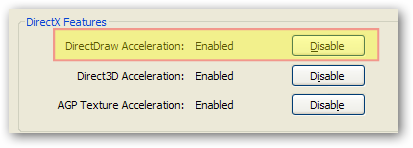
some quick registry comparison showed the these two keys are involved when 'DirectDraw' is turned off from the dxdiag applet (see image). i'm thinking of a batch file or an AHK script that toggles these settings but could anyone could verify this before i inadvertently bork my gfx drivers.. :-\

Code
HKLM, SOFTWARE\Microsoft\Direct3D\Drivers, SoftwareOnly
HKLM, SOFTWARE\Microsoft\DirectDraw, EmulationOnly

Original address: https://www.donationcoder.com/forum/index.php?topic=17835.0