


I was talking to a friend the other day about accessing donationcoder or other sites using SSL (https urls), and how many have a problem where they support ssl but some of the links on the site itself will redirect you to normal http links inadvertently, leading you back to non-secure connection.
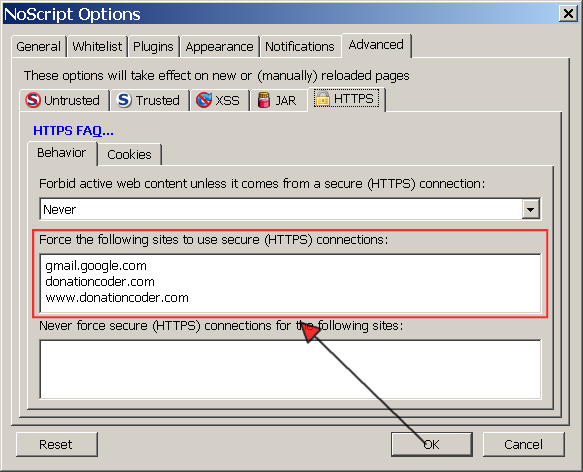
It turns out that there are a couple of firefox extensions that can be used to force firefox to always use an https style ssl link on certain websites. That is, it will dynamic adjust all http links to be https (or vice versa) on sites you specify.
The easiest solution is to use the very powerful, actively developed, donation supported "noscript" extension. People who are paranoid about security tend to already have noscript installed so chances are if you care about forcing https you might already have noscript installed, and just not know about this feature.
For more instructions on how to configure noscript to force https, see for example this page.
It turns out that there are a couple of firefox extensions that can be used to force firefox to always use an https style ssl link on certain websites. That is, it will dynamic adjust all http links to be https (or vice versa) on sites you specify.
The easiest solution is to use the very powerful, actively developed, donation supported "noscript" extension. People who are paranoid about security tend to already have noscript installed so chances are if you care about forcing https you might already have noscript installed, and just not know about this feature.
For more instructions on how to configure noscript to force https, see for example this page.


 - carpe noctem


 My dpi, resolution, and font settings are a bit unusual, so the box never showed the "Add Exception" button, which is the one I was looking for. I only needed to expand the dialogue size and there it was tucked away on the far right corner
  !
! .
. on their site explaining a lot of details of how to secure your site and your browser. The use of secure cookies in this process is very important.
 . FF3.5 will hopefully make the possibility of cross scripting attacks more remote, FWIU.