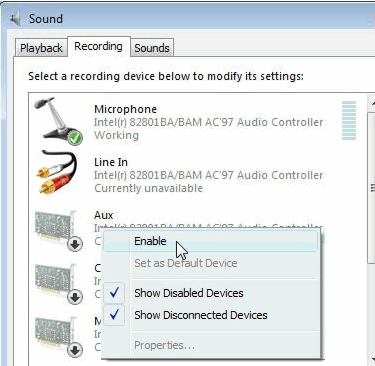
One problem I have had with this 'new' Vista of mine is, that I couldn't figure out how to record from the sound card. I have all these fancy "record everything you hear" programs, but none of them would record anything! When I checked what device they were hooking up to, I found it always was the wrong one, but I never knew how to change that. Until today. Today's giveawayoftheday, Advanced Audio Recorder, has a button that will take you right to an explanation on the subject, and it is clear reading.
The link will give you the full version, this is my short version:
Vista Recording Problems: http://www.audio-recording.net/vistaproblem/
25 March 2009: http://www.giveawayoftheday.com/advanced-audio-recorder-602/
The link will give you the full version, this is my short version:
Quote
Control Panel > Sound / Hardware & Sound > Recording > Right click on a white space and select 'Show Disabled Devices' from the pop-up menu. > Enable > Set Default as 'Stereo Mix' > Apply > OK.
[attachimg=#]
Vista Recording Problems: http://www.audio-recording.net/vistaproblem/
25 March 2009: http://www.giveawayoftheday.com/advanced-audio-recorder-602/