DonationCoder.com forum
 
Read-only archive. This is a static copy of the DonationCoder.com forum. Reading and searching work as before; logging in, posting and private messages do not.
Archive of 2026-10-21 · About this archive · Main site

Author Topic: PortableApps - Manage your collection of install-less utilties and usb drive app  (Read 19,820 times)

mouser

  • First Author
  • Administrator
  • Joined in 2005
  • *****
  • Posts: 40,931
    • Gathering Badge
    • Plugin Coding Medal
    • Participated in NANY Challenge Seventeen Times
    • Cody Award
    • Coding Snacks
    • Volunteers/Staff
Most large programs for Windows PCs come packaged in installers, which guide the user through installing the program, add entries on the start menu, and provide an entry in the Add/Remove software control panel.

But there are times when you really don't want to be able to use software without installing it -- such as placing it on a usb drive and running it from a public computer or from a friend's computer.  Such install-less programs are generally called "portable."

The PortableApps suite was designed to help facilitate the use of portable applications, by making it easier for you to collect, manage, and launch sets of portable applications.  It's a cool free project.

Quote
PortableApps.com Suite™ is a complete collection of portable apps including a web browser, email client, office suite, calendar/scheduler, instant messaging client, antivirus, audio player, sudoku game, password manager, PDF reader, minesweeper clone, backup utility and integrated menu, all preconfigured to work portably. Just drop it on your portable device and you're ready to go.


http://portableapps.com


Screenshot - 3_10_2009 , 9_44_21 AM.png

Note: we've talked about portableapps.com plenty of times on the dc forum; for more info see here.


from www.lifehacker.com

gexecuter

  • Move over and give us some room...
  • Supporting Member
  • Joined in 2008
  • **
  • Posts: 252
Yeah it's a pretty cool launcher.
Mouser is made of win and awesome!

wraith808

  • Supporting Member
  • Joined in 2006
  • **
  • Posts: 11,205
    • Participated in NANY Challenge Fourteen Times
    • Coding Snacks
    • Writer
    • Hardware Hacker
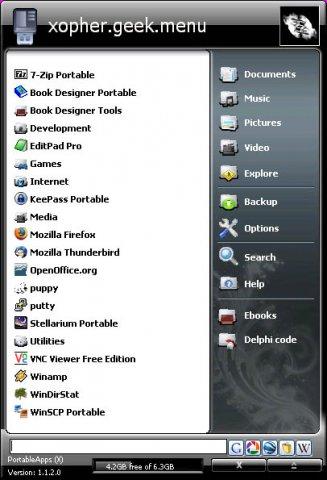
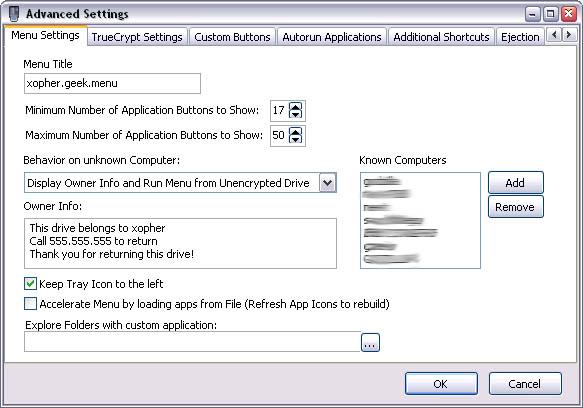
I actually like geek.Menu, a fork of PortableApps, a lot better.  The differences make it a lot more useable, though it seems that perhaps PortableApps will catch up with geek.Menu with their next release.  The cool thing is you can have both on your USB drive though...


« Last Edit: March 10, 2009, 05:52 PM by wraith808 »

Ehtyar

  • That News Guy
  • Supporting Member
  • Joined in 2007
  • **
  • Posts: 1,237
    • Plugin Coding Medal
    • Gathering Badge
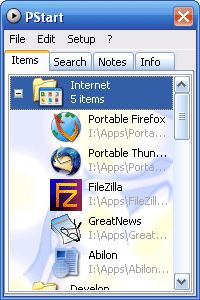
Most of the apps Haller makes available can be run portably without those bogus NSIS launchers which significantly reduce startup times (an example). I also use PStart out of personal preference.

Ehtyar.
« Last Edit: March 10, 2009, 10:06 PM by Ehtyar »

Josh

  • Charter Honorary Member
  • Joined in 2005
  • ***
  • Posts: 3,411
    • Gathering Badge
    • Official Forum Clown
    • Coding Snacks
    • Plugin Coding Medal
    • Volunteers/Staff
    • Military Service Badge - US Army
    • Furry Fandom Badge - Furry Fandom
    • Linux User
Geek.menu! Great find!
Strength in Knowledge

lanux128

  • Global Moderator
  • Joined in 2005
  • *****
  • Posts: 6,277
    • Coding Snacks
    • Volunteers/Staff
    • Gathering Badge
    • Participated in NANY Challenge Once
    • Linux User
i used PStart once but didn't stick with it, can't remember why.. :)

start03.gif

• http://pegtop.net/start/

Target

  • Honorary Member
  • Joined in 2006
  • **
  • Posts: 1,840
    • Coding Snacks
Not trying to rain on Portable Apps parade here (it's a fine addition to anyones kit), but it's worth noting that there are others, eg -


there are others (google is your friend), these are just the ones that came to mind as i was drafting this

Some of these come in a variety of flavours as well (some with more apps, some with less)

with a little bit of work you can even roll your own (I have a couple of different ones which i 'customise' by deleting the apps which I have no use for, and adding those which haven't been included, ie insert your file manager of choice here...)

EDIT: added another example suite...
Alcohol is photoshop, bottled
Askhole - someone who ask for advice, then ignores it
"Look wise, say nothing, and grunt. Speech was given to conceal thought" - Sir William Osler
« Last Edit: March 11, 2009, 03:30 AM by Target »

wreckedcarzz

  • Still lurking. Still an anthro.
  • Charter Member
  • Joined in 2005
  • ***
  • Posts: 1,629
    • Participated in NANY Challenge Twice
    • Coding Snacks
    • Furry Fandom Badge - Furry Fandom
    • Linux User
+1 for Geek.Menu - I set it up today to use a custom background on startup and switch back on removal, and I like it much more than the basic PortableApps.com Menu

My 16GB flash drive has about 5GB of PortableApps and data on it, and counting.

ewemoa

  • Honorary Member
  • Joined in 2008
  • **
  • Posts: 2,922
    • Plugin Coding Medal
    • Participated in NANY Challenge Three Times
I've been using ASuite as I based my installation off of Lupo PenSuite.  It's ok I guess -- has anyone compared this with any of the others mentioned in this thread?

sgtevmckay

  • Magis Esse
  • Supporting Member
  • Joined in 2009
  • **
  • Posts: 838
Yes there are others, and yes some may have some more custom items available.
Some may have some security features, and some may have all or none of these.

My personal recommendation is and has always been PotableApps.
Of all the portable applications software and loose communities, PortableApps is the tightest and most supportive.
A lot of portable Beta testing takes place at PortableApps and the finding's are readily available through their forum.

I would also note that most other portable Launchers have a system support for PortableApp's installer.
Well lets face, most of the popular Portable Launchers base their work on what PortableApps has built.

I have never had an issue with utilizing portable software from other resources with the PortableApps Launcher.

As an IT Administrator, and someone who travels a lot, it is an excellent idea to have something.
in the past I have worked at Correctional institution that would not allow a Laptop, but would clear a portable drive.
The advantage of having your own needs to yourself, and leave little to no footprint is invaluable.

PortableApp has always been there for me, and drop dead reliable.

I create Portable Application drives locally for several local Business. A couple of customization tweaks(Company Logo and coloor ETC.), the agreed upon software, and encryption for the stick.
I charge $20.00 plus cost of drive. Having developed well over 1300 of these, using PortableApps, last year alone; well you do the math!
Now understand the $20 fee is for the customization and loading Labor) of the software. I do not charge for portableApps or the software supplied as it is all free. I also offer a years upgrades for an additional $5 (Of which I carry a constant 2700 -/+), this fee is to have the drives brought or mailed to me and I update all the free software, again only charging labor - not for the software. I notify my client of upgrades to software available via e-mail to an appointed contact person.

Now I am guestimating more than 5000 sticks sold to companies over the last 3 years all with portableApps, and all these have one thing in common; No complaints, and no break downs. Atleast on the software end.

I have tested a lot of the Apps out there, and have found many lacking, or they are too much, with little explanation on use, but in my experience PortableApps is the most stable and intuitive.

For all the options available and all the other portable launchers out there, I say go with PortablleApps and you won't go wrong.

On a personal note:
On my 16G OCZ Diesel
I Run Ubuntu, PortableApps, and a good number of diagnostics
So Yes I use it, and I openly support it.

Chris

  • Charter Member
  • Joined in 2005
  • ***
  • Posts: 42
I also use PStart out of personal preference.

I also like PStart with many applications from PortableApps as well as other apps.

Chris

sgtevmckay

  • Magis Esse
  • Supporting Member
  • Joined in 2009
  • **
  • Posts: 838
Portable Launchers are also great for another portable item; Portable Harddrives

If you are like me and sometimes a 16 or 32 gig thumb won't do the trick. You can also use your portable launcher from external portable harddrives.
I have a 320GB portable WD, with about 83 gigs of portable software, and another 110gigs of documents, pictures, and pre-preped presentations.

Especially when I travel to give a presentation, I carry it on a portable HDD, and I have almost no limits on th esize of the presentation.

I know that portable launchers push the concept of software on a chip, but I carry my OS and everything on an HDD, and portable app launchers helps me keep very organized while I am on the go.

PAL are not limited to thumbdrives, I have a friend that keeps an 8GB SD drive for his portable Apps.

How do you use your PAP?

Ehtyar

  • That News Guy
  • Supporting Member
  • Joined in 2007
  • **
  • Posts: 1,237
    • Plugin Coding Medal
    • Gathering Badge
I also have a portable 500gb hard drive. It has virtually everything on it, because I can't stand finding myself without something when I need it. Not sure what I'd do if I didn't have my portable drive.

Ehtyar.

phillfri

  • Participant
  • Joined in 2006
  • *
  • Posts: 41
Portable Hard Drive here too. 160GB Thinkpad USB Portable Secure Hard Drive (physical encryption). After carrying all my data on this USB hard drive for the past year, it dawned on me that I'm collecting a lot of info on there (business and personal) that I wouldn't want someone to be able to have access to if my HDD were lost or stolen. I personally carry my HDD with me 90% of the time, but I don't take it dinner with me when I'm on the road :>)

Original address: https://www.donationcoder.com/forum/index.php?topic=17377.0