DonationCoder.com forum
 
Read-only archive. This is a static copy of the DonationCoder.com forum. Reading and searching work as before; logging in, posting and private messages do not.
Archive of 2026-10-21 · About this archive · Main site

Author Topic: MIDI data and screensaver  (Read 12,848 times)

ayryq

  • Supporting Member
  • Joined in 2009
  • **
  • Posts: 292
MIDI data and screensaver
« on: March 05, 2009, 04:00 AM »
Does anyone know of a way (or program) to make MIDI data stop the windows screensaver or power saving mode, switch the power "profile" or anything similar?

I.E., if the screensaver is running and I tap a few notes on my (piano) keyboard, the screensaver should shut off, and if I'm playing a song, the screensaver should not start.

The problem is that if I'm playing music on-screen with my MIDI keyboard, the screensaver may turn on, so I have to move a hand from the MIDI keyboard to the computer keyboard or mouse.

I'd like to do this without disabling the screensaver, so that after 10 minutes of MIDI (or mouse or keyboard) inactivity, the screensaver comes on as usual.

I am running MIDI-OX (http://www.midiox.com/) all the time, which routes my keyboard to an external sound module.

Thanks, and great forum. I'm a long-time lurker.
Eric

scancode

  • I will eat Cody someday.
  • Honorary Member
  • Joined in 2007
  • **
  • Posts: 641
    • Cody Award
    • Participated in NANY Challenge Twice
    • Coding Snacks
    • Furry Fandom Badge - Furry Fandom
    • DJ Badge - DJ
MIDIzzy
« Reply #1 on: March 27, 2009, 04:46 AM »
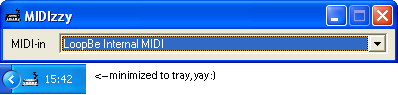
Try MIDIzzy:

midizzy.jpg
MIDIzzy

a small MIDI-based mouse-mover thinglet for Windows

midizzy.PNG


Instructions

    • Run the program.
    • Select the MIDI interface.
    • Enjoy.
What's new in v1.1?
    • Minimizes to tray.
    • Sends Scroll Lock instead of moving the mouse.
    • GUI is wider.
What was new in v1.0?
    • First version!
    • It works! [or should :P]
Credits
Have fun!

Download MIDIzzy.zip (40.1 KB)
To comply with the GPL, here's the app's full source code: MIDIzzy-SRC.rar (169.4 KB)
« Last Edit: March 27, 2009, 06:45 PM by scancode »

Jabberwock

  • Participant
  • Joined in 2006
  • *
  • Posts: 76
Re: MIDI data and screensaver
« Reply #2 on: March 27, 2009, 09:02 AM »
You could also try GlovePIE, I suppose that key emulation should get rid of the screensaver...

ayryq

  • Supporting Member
  • Joined in 2009
  • **
  • Posts: 292
Re: MIDI data and screensaver
« Reply #3 on: March 27, 2009, 06:00 PM »
MIDIzzy works perfectly. Jabberwock's comment made me think about key emulation - if MIDIzzy were to press a normally-unused key (say, Scroll Lock), the program could run all the time without interfering with the mouse. As it is, if I'm using the keyboard to enter music into the computer (and using the mouse at the same time), I have to disable MIDIzzy and remember to restart it when I'm done.

I feel bad, since I have really no idea what was involved in coding this, and I appreciate it greatly, but I would have the following feature requests if you decide to follow up.
1. My MIDI ports are longer than the control size. I have three that appear identical when truncated. E.g. "1:Roland SC-8850 MIDI IN 1"
2. It would be nice to minimize to tray.

Again, thanks so much - it's very usable and useful as is.

Cheers,
Eric

scancode

  • I will eat Cody someday.
  • Honorary Member
  • Joined in 2007
  • **
  • Posts: 641
    • Cody Award
    • Participated in NANY Challenge Twice
    • Coding Snacks
    • Furry Fandom Badge - Furry Fandom
    • DJ Badge - DJ
Re: MIDI data and screensaver
« Reply #4 on: March 27, 2009, 06:01 PM »
MIDIzzy works perfectly. Jabberwock's comment made me think about key emulation - if MIDIzzy were to press a normally-unused key (say, Scroll Lock), the program could run all the time without interfering with the mouse. As it is, if I'm using the keyboard to enter music into the computer (and using the mouse at the same time), I have to disable MIDIzzy and remember to restart it when I'm done.

I feel bad, since I have really no idea what was involved in coding this, and I appreciate it greatly, but I would have the following feature requests if you decide to follow up.
1. My MIDI ports are longer than the control size. I have three that appear identical when truncated. E.g. "1:Roland SC-8850 MIDI IN 1"
2. It would be nice to minimize to tray.

Again, thanks so much - it's very usable and useful as is.

Cheers,
Eric

No problem! Give me a couple minutes!

scancode

  • I will eat Cody someday.
  • Honorary Member
  • Joined in 2007
  • **
  • Posts: 641
    • Cody Award
    • Participated in NANY Challenge Twice
    • Coding Snacks
    • Furry Fandom Badge - Furry Fandom
    • DJ Badge - DJ
Updated MIDIzzy
« Reply #5 on: March 27, 2009, 06:45 PM »
Try v1.1

Greetings!

Original address: https://www.donationcoder.com/forum/index.php?topic=17305.0