DonationCoder.com forum
 
Read-only archive. This is a static copy of the DonationCoder.com forum. Reading and searching work as before; logging in, posting and private messages do not.
Archive of 2026-10-21 · About this archive · Main site

Author Topic: Help me back up a virus infected CD (!)  (Read 10,077 times)

lanux128

  • Global Moderator
  • Joined in 2005
  • *****
  • Posts: 6,277
    • Coding Snacks
    • Volunteers/Staff
    • Gathering Badge
    • Participated in NANY Challenge Once
    • Linux User
Help me back up a virus infected CD (!)
« on: March 03, 2009, 05:19 AM »
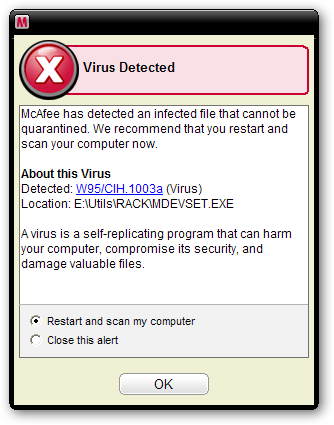
a friend has an old cd from which he intended to retrieve some stuff but unfortunately his anti-virus scanner's spider sense was working and it displayed this error message (see pic). i told him to turn off his anti-virus temporarily and get his stuff, later he can run a full scan on his PC. at the same time, i'm thinking how can he back up this CD minus the infected file(s)? hopefully fellow DC'ers could come up with some solutions.. :)

ws-got-virus-1.png

mouser

  • First Author
  • Administrator
  • Joined in 2005
  • *****
  • Posts: 40,931
    • Gathering Badge
    • Plugin Coding Medal
    • Participated in NANY Challenge Seventeen Times
    • Cody Award
    • Coding Snacks
    • Volunteers/Staff
Re: Help me back up a virus infected CD (!)
« Reply #1 on: March 03, 2009, 05:33 AM »
as you say the best thing to do would be to
1) scan the cd with the antivirus tool and make note of all infected files.
2) *VERY* CAREFULLY: disable the antivirus program and COPY the non-infected files from cd to hard disk folder
3) re-enable the antivirus and scan copied files to double check

You *REALLY* have to be super careful with step 2 -- if you accidentally double clicked on one of the infected files while you were copying them with the antivirus off and launched it, you could infect your pc.

Target

  • Honorary Member
  • Joined in 2006
  • **
  • Posts: 1,840
    • Coding Snacks
Re: Help me back up a virus infected CD (!)
« Reply #2 on: March 03, 2009, 05:55 AM »
I assume that the advisory you received is just that, an advisory, ie a 'virus' was found in one of the files on the CD, rather than in  running process...

I'm no expert, but it seems to me you shouldn't really need to disable your AV to do this

you should be able to copy ALL the files without problem, just so long as you don't run anything

once you've got everything in a (quarantine) folder, rescan it and you should expect your AV software will do it's thing and delete/clean/whatever any nasties that may be lurking (it may well be worthwhile checking with a couple of alternative scanners though, just to be sure)

Alcohol is photoshop, bottled
Askhole - someone who ask for advice, then ignores it
"Look wise, say nothing, and grunt. Speech was given to conceal thought" - Sir William Osler

mouser

  • First Author
  • Administrator
  • Joined in 2005
  • *****
  • Posts: 40,931
    • Gathering Badge
    • Plugin Coding Medal
    • Participated in NANY Challenge Seventeen Times
    • Cody Award
    • Coding Snacks
    • Volunteers/Staff
Re: Help me back up a virus infected CD (!)
« Reply #3 on: March 03, 2009, 06:11 AM »
Target may be right, as long as you avoid trying to copy those bad files your antivirus should let you copy the good ones.

nosh

  • Supporting Member
  • Joined in 2007
  • **
  • Posts: 1,441
Re: Help me back up a virus infected CD (!)
« Reply #4 on: March 03, 2009, 06:14 AM »
Though not really needed in this case, I think a virtual machine is a must-have these days for numerous reasons, MS Virtual PC is free, fast and supports hardware virtualization.

f0dder

  • [Well, THAT escalated quickly!]
  • Charter Honorary Member
  • Joined in 2005
  • ***
  • Posts: 9,153
    • Participated in NANY Challenge Once
Re: Help me back up a virus infected CD (!)
« Reply #5 on: March 03, 2009, 08:24 AM »
Disable the antivirus temporarily, copy the CD to harddrive, re-enable antivirus and scan the copied files, either deleting or quarantining the infected files - done :)
- carpe noctem

Eóin

  • O'Callaghan
  • Charter Member
  • Joined in 2006
  • ***
  • Posts: 1,401
Re: Help me back up a virus infected CD (!)
« Reply #6 on: March 03, 2009, 10:19 AM »
I would add to be wary of autorun from the cd possibly infecting your PC when the anti-virus is disabled. To be safe also disable autorun, (it really should be disabled anyway in my opinion).

If the cd is just a backup it's probably an unlikely thing to happen.
Interviewer: Is there anything you don't like?
Bjarne Stroustrup: Marketing hype as a substitute for technical argument. Thoughtless adherence to dogma. Pride in ignorance.

Carol Haynes

  • Waffles for England (patent pending)
  • Global Moderator
  • Joined in 2005
  • *****
  • Posts: 8,073
    • Cody Award
    • Furry Fandom Badge - Furry Fandom
Re: Help me back up a virus infected CD (!)
« Reply #7 on: March 03, 2009, 10:58 AM »
Holding down shift while external drives (USB and CDs as far as I know) stops autorun from functioning.

Just copying an infected file to your hard disc shouldn't cause a problem - its only if you run an infected application that you have issues.

Crush

  • Hello dude!
  • Member
  • Joined in 2006
  • **
  • Posts: 402
    • Participated in NANY Challenge Three Times
Re: Help me back up a virus infected CD (!)
« Reply #8 on: March 03, 2009, 02:16 PM »
Attention! CIH is the most brutal virus existing that can delete your system-bios and your harddisc directly!

Josh

  • Charter Honorary Member
  • Joined in 2005
  • ***
  • Posts: 3,411
    • Gathering Badge
    • Official Forum Clown
    • Coding Snacks
    • Plugin Coding Medal
    • Volunteers/Staff
    • Military Service Badge - US Army
    • Furry Fandom Badge - Furry Fandom
    • Linux User
Re: Help me back up a virus infected CD (!)
« Reply #9 on: March 03, 2009, 02:36 PM »
It can also shut off your cable modem's fan and cause it to overheat while stealing your cat and making your teeth and air conditioner act up!
Strength in Knowledge

f0dder

  • [Well, THAT escalated quickly!]
  • Charter Honorary Member
  • Joined in 2005
  • ***
  • Posts: 9,153
    • Participated in NANY Challenge Once
Re: Help me back up a virus infected CD (!)
« Reply #10 on: March 03, 2009, 03:08 PM »
Dunno if CIH is the most brutal virus, but some versions did indeed erase your flash-bios - only works on Win9x afaik, though. And as for "erase your harddisk directly", it doesn't get more direct than what anybody with normal administrative privileges can do :)
- carpe noctem

Nod5

  • Supporting Member
  • Joined in 2006
  • **
  • Posts: 1,175
    • Coding Snacks
    • Participated in NANY Challenge Three Times
    • Plugin Coding Medal
Re: Help me back up a virus infected CD (!)
« Reply #11 on: March 05, 2009, 06:26 PM »
In addition to the suggestion Nosh made (about a virtualization software) it is a good idea to have a "lab computer" for testing these kinds of things in isolation from the regular computer. With a pretty simple to make SATA power switch we can turn one computer into two. See this: http://lifehacker.com/5160614/build-your-own-sata-switch . This is of course a bit overkill for the case at hand but worth mentioning anyway.

scancode

  • I will eat Cody someday.
  • Honorary Member
  • Joined in 2007
  • **
  • Posts: 641
    • Cody Award
    • Participated in NANY Challenge Twice
    • Coding Snacks
    • Furry Fandom Badge - Furry Fandom
    • DJ Badge - DJ
Re: Help me back up a virus infected CD (!)
« Reply #12 on: March 05, 2009, 06:53 PM »
What I've done in a couple cases is using TeraCopy to copy the CD to the HDD, while leaving the AV enabled. You might get a lot of popups, but the non-infected files will be copied :)

Original address: https://www.donationcoder.com/forum/index.php?topic=17268.0