


Deal Available: 6. MAR. ’09, FRIDAY
Deal Price: $9.95, You Save: 51%, List Price: $19.95
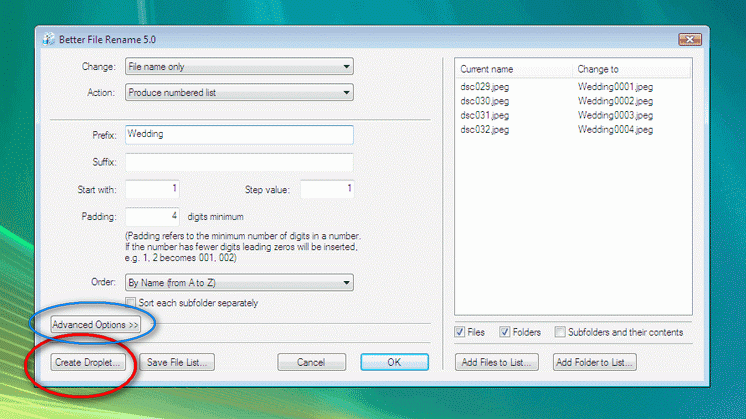
There are a lot of renamers, and many of them may suit you better than Better. However, Better has a special feature that is easy to overlook (: miss) but which I have learned to love: you can create a droplet, A Better Droplet ("Drag & drop files and folders onto these droplets to apply the stored settings. This allows you to automate the renaming part of your workflow"), for automated batch renaming.
For a year or so I have been downloading musicfiles from my Internet supplier. These files are always named with the prefix "tdcplay_", which I of course will want to rename. For this particular job Better File Rename is just perfect! I grab the unzipped folders and drop them on top of my "tdc.dpt" file, and they are renamed! No windows, no messages to click, no nothing, the folders and the files within them are just renamed. Of course there must be other programs offering the same feature, but I really like this part of Better File Rename, because of the lack of popups you'll need to click.
For many other renaming jobs I will most likely use File Renamer Turbo, or the renaming part of StExBar.
http://www.bitsdujour.com/software/frank-reiff/
http://www.publicspace.net/windows/BetterFileRename/index.html
clickable thumb:
[attachthumb=#]
Deal Price: $9.95, You Save: 51%, List Price: $19.95
There are a lot of renamers, and many of them may suit you better than Better. However, Better has a special feature that is easy to overlook (: miss) but which I have learned to love: you can create a droplet, A Better Droplet ("Drag & drop files and folders onto these droplets to apply the stored settings. This allows you to automate the renaming part of your workflow"), for automated batch renaming.
For a year or so I have been downloading musicfiles from my Internet supplier. These files are always named with the prefix "tdcplay_", which I of course will want to rename. For this particular job Better File Rename is just perfect! I grab the unzipped folders and drop them on top of my "tdc.dpt" file, and they are renamed! No windows, no messages to click, no nothing, the folders and the files within them are just renamed. Of course there must be other programs offering the same feature, but I really like this part of Better File Rename, because of the lack of popups you'll need to click.
For many other renaming jobs I will most likely use File Renamer Turbo, or the renaming part of StExBar.
http://www.bitsdujour.com/software/frank-reiff/
http://www.publicspace.net/windows/BetterFileRename/index.html
clickable thumb:
[attachthumb=#]


 VanDragt.com


 )
)