DonationCoder.com forum
 
Read-only archive. This is a static copy of the DonationCoder.com forum. Reading and searching work as before; logging in, posting and private messages do not.
Archive of 2026-10-21 · About this archive · Main site

Author Topic: Configuring Gmail in the SendTo  (Read 19,975 times)

Dr-Leech

  • Psychedelic Coder
  • Member
  • Joined in 2006
  • **
  • Posts: 151
Configuring Gmail in the SendTo
« on: February 23, 2009, 11:39 AM »
Hi,

I'm having troubles setting up a gmail account in SC SendTo settings.

Anyone was lucky?

lanux128

  • Global Moderator
  • Joined in 2005
  • *****
  • Posts: 6,277
    • Coding Snacks
    • Volunteers/Staff
    • Gathering Badge
    • Participated in NANY Challenge Once
    • Linux User
Re: Configuring Gmail in the SendTo
« Reply #1 on: February 23, 2009, 11:51 AM »
were you using gmail's POP settings? why not post a screenshot of the config dialog, much better to diagnose the problem.. :)

Dr-Leech

  • Psychedelic Coder
  • Member
  • Joined in 2006
  • **
  • Posts: 151
Re: Configuring Gmail in the SendTo
« Reply #2 on: February 23, 2009, 12:29 PM »
sure, this is the screenshot:


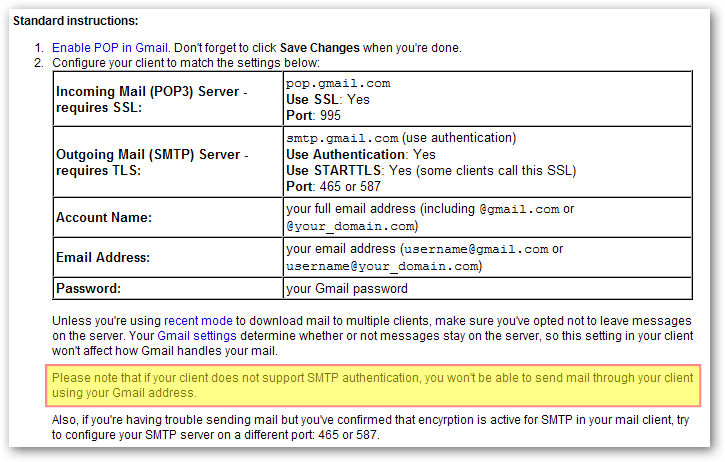
based on the settings google provide here: http://mail.google.com/support/bin/answer.py?hl=en&answer=13287

lanux128

  • Global Moderator
  • Joined in 2005
  • *****
  • Posts: 6,277
    • Coding Snacks
    • Volunteers/Staff
    • Gathering Badge
    • Participated in NANY Challenge Once
    • Linux User
Re: Configuring Gmail in the SendTo
« Reply #3 on: February 24, 2009, 02:02 AM »
looking at the link you provided, it looks like Gmail requires authentication to send email via its servers, which i can't see a way to enable within screenshot captor. maybe mouser could shed some light here. :)

ws-gmail-instructions-1.png

Carol Haynes

  • Waffles for England (patent pending)
  • Global Moderator
  • Joined in 2005
  • *****
  • Posts: 8,073
    • Cody Award
    • Furry Fandom Badge - Furry Fandom
Re: Configuring Gmail in the SendTo
« Reply #4 on: February 24, 2009, 02:08 AM »
Why not just use your default mail client?

mouser

  • First Author
  • Administrator
  • Joined in 2005
  • *****
  • Posts: 40,931
    • Gathering Badge
    • Plugin Coding Medal
    • Participated in NANY Challenge Seventeen Times
    • Cody Award
    • Coding Snacks
    • Volunteers/Staff
Re: Configuring Gmail in the SendTo
« Reply #5 on: February 24, 2009, 02:12 AM »
i'll see if i can add it in the future; as carol says you can alternatively configure sc to invoke default mail handler on the pc.

Dr-Leech

  • Psychedelic Coder
  • Member
  • Joined in 2006
  • **
  • Posts: 151
Re: Configuring Gmail in the SendTo
« Reply #6 on: February 24, 2009, 02:54 PM »
Because I use gmail and prism, to use it as a desktop app. And it doesn't allow you to attach files.

Anyone knows a small email client? Reaaaally lightweight that allow you to use as default for this situation?

cmpm

  • Charter Member
  • Joined in 2006
  • ***
  • Posts: 2,026
Re: Configuring Gmail in the SendTo
« Reply #7 on: February 24, 2009, 04:13 PM »
you could try 'gmail drive'
it's added to the system's send to menu automatically
should be able to stick it in screenshot captor somewhere....
but not in the email send to section i think

http://www.filehippo.com/download_gmail_drive/

Dr-Leech

  • Psychedelic Coder
  • Member
  • Joined in 2006
  • **
  • Posts: 151
Re: Configuring Gmail in the SendTo
« Reply #8 on: February 24, 2009, 04:16 PM »
you could try 'gmail drive'
it's added to the system's send to menu automatically
should be able to stick it in screenshot captor somewhere....
but not in the email send to section i think

http://www.filehippo.com/download_gmail_drive/


Yes, my problem is that I don't want to be limited to only one mail account. Thanks.

I'll try The Bat mail client. I just need it for send screenshots. And none of the command line apps I've tried worked for me.

tomos

  • Charter Member
  • Joined in 2006
  • ***
  • Posts: 11,970
    • Gathering Badge
    • Participated in NANY Challenge Once
Re: Configuring Gmail in the SendTo
« Reply #9 on: February 24, 2009, 05:20 PM »
would nPOPUK do the job for you?
http://www.donationcoder.com/forum/index.php?topic=7682.msg54314#msg54314
http://www.npopuk.org.uk/history.htm

(I think!) I tried it at the time but I didnt have need for it - I see it was updated late last year
Tom

Carol Haynes

  • Waffles for England (patent pending)
  • Global Moderator
  • Joined in 2005
  • *****
  • Posts: 8,073
    • Cody Award
    • Furry Fandom Badge - Furry Fandom
Re: Configuring Gmail in the SendTo
« Reply #10 on: February 24, 2009, 08:24 PM »
You probably have Outlook Express or Windows Mail already installed on your system. Just enable POP in the GMAIL account and set up a pop account in the OE or WM.

lanux128

  • Global Moderator
  • Joined in 2005
  • *****
  • Posts: 6,277
    • Coding Snacks
    • Volunteers/Staff
    • Gathering Badge
    • Participated in NANY Challenge Once
    • Linux User
Re: Configuring Gmail in the SendTo
« Reply #11 on: February 25, 2009, 01:26 AM »
if you're going to send only screenshots then you can do it from Screenshot Captor by installing a tool like Shup. on the other hand, you can right-click on an image in the thumbnail pane an choose 'Send To > Mail Recipient'.

steeladept

  • Fettucini alfredo is macaroni & cheese for adults
  • Supporting Member
  • Joined in 2006
  • **
  • Posts: 1,061
    • Linux User
    • Military Service Badge - US Air Force
Re: Configuring Gmail in the SendTo
« Reply #12 on: February 25, 2009, 05:18 AM »
Personally, I would give a shot using Portable Apps.  I think there is a Thunderbird version, then you can configure that and take it with you wherever you go.  As a side bonus, you can configure SC in there as well (I already do) so they will always be together and available.  And I believe you can configure Thunderbird to work with GMail.  If not, I am sure there is a plugin for this!  Just a thought....

tomos

  • Charter Member
  • Joined in 2006
  • ***
  • Posts: 11,970
    • Gathering Badge
    • Participated in NANY Challenge Once
Re: Configuring Gmail in the SendTo
« Reply #13 on: February 25, 2009, 10:46 AM »
... I believe you can configure Thunderbird to work with GMail

yes :)
Tom

mouser

  • First Author
  • Administrator
  • Joined in 2005
  • *****
  • Posts: 40,931
    • Gathering Badge
    • Plugin Coding Medal
    • Participated in NANY Challenge Seventeen Times
    • Cody Award
    • Coding Snacks
    • Volunteers/Staff
Re: Configuring Gmail in the SendTo
« Reply #14 on: February 25, 2009, 10:52 AM »
gmail happened to be down yesterday.. i wonder if you might try again to make sure the failure wasn't due to that?

Dr-Leech

  • Psychedelic Coder
  • Member
  • Joined in 2006
  • **
  • Posts: 151
Re: Configuring Gmail in the SendTo
« Reply #15 on: February 25, 2009, 04:43 PM »
Ok, I've found my setup:

SC + The Bat! (it's lightweighter than Thunderbird)

Shup is really good, if only had the option to send by email, that would be the definitive all-in-one package.

And mouser, add authentication to smtp in future releases, please.. You'll do happy to many people (or at least me). :)

mouser

  • First Author
  • Administrator
  • Joined in 2005
  • *****
  • Posts: 40,931
    • Gathering Badge
    • Plugin Coding Medal
    • Participated in NANY Challenge Seventeen Times
    • Cody Award
    • Coding Snacks
    • Volunteers/Staff
Re: Configuring Gmail in the SendTo
« Reply #16 on: February 25, 2009, 04:54 PM »
i will try to set up TLS -- i think that is the problem, not authentification per se.

Original address: https://www.donationcoder.com/forum/index.php?topic=17151.0