DonationCoder.com forum
 
Read-only archive. This is a static copy of the DonationCoder.com forum. Reading and searching work as before; logging in, posting and private messages do not.
Archive of 2026-10-21 · About this archive · Main site

Author Topic: REQ: Independent volume per application for XP  (Read 25,274 times)

Coeluh

  • Family Guy ^^
  • Supporting Member
  • Joined in 2007
  • **
  • Posts: 273
REQ: Independent volume per application for XP
« on: January 29, 2009, 08:05 PM »
I've been googling, but there is no such thing for windows xp. It should be like a replacement or sideapp for the normal volume control. There is a thing called indievolume, but 1. the layout sucks and 2. its not freeware. Im not paying for changing the volume, eh?

Ordstrin

  • Member
  • Joined in 2009
  • **
  • Posts: 32
Re: REQ: Independent volume per application for XP
« Reply #1 on: January 30, 2009, 06:29 AM »
Not that I've got any solutions for you... but Windows 7 beta seems to have exactly that, built in.
Of course, I can't confirm this since Windows 7 beta doesn't fully work with my 6 year old on-board sound hardware.

Coeluh

  • Family Guy ^^
  • Supporting Member
  • Joined in 2007
  • **
  • Posts: 273
Re: REQ: Independent volume per application for XP
« Reply #2 on: January 31, 2009, 04:43 PM »
Not that I've got any solutions for you... but Windows 7 beta seems to have exactly that, built in.
Of course, I can't confirm this since Windows 7 beta doesn't fully work with my 6 year old on-board sound hardware.
Yeah but dude, i aint gonna switch to a OS beta just for that, im sticking with xp

mattski

  • Participant
  • Joined in 2009
  • *
  • Posts: 1
Re: REQ: Independent volume per application for XP
« Reply #3 on: February 25, 2009, 02:18 AM »
IndieVolume seems to do this

PhilB66

  • Supporting Member
  • Joined in 2007
  • **
  • Posts: 1,522
Re: REQ: Independent volume per application for XP
« Reply #4 on: February 25, 2009, 03:24 AM »
IndieVolume seems to do this

Reread OP. I put the important stuff in bold for easy comprehension.

There is a thing called indievolume, but 1. the layout sucks and 2. its not freeware. Im not paying for changing the volume, eh?

Nice first post mattski  :Thmbsup:. and welcome to DC :D

tomos

  • Charter Member
  • Joined in 2006
  • ***
  • Posts: 11,970
    • Gathering Badge
    • Participated in NANY Challenge Once
Re: REQ: Independent volume per application for XP
« Reply #5 on: February 25, 2009, 11:04 AM »
IndieVolume seems to do this

mattski,
I, on the other hand, like you(!) sometimes dont read posts so closely ;) (tough being imperfect isnt it :D)

I see IndieVolume gets (relatively) poor reviews up to September of last year in the discount thread here (I think only supporting members can access those threads) but I havent heard of anything else
Tom

Coeluh

  • Family Guy ^^
  • Supporting Member
  • Joined in 2007
  • **
  • Posts: 273
Re: REQ: Independent volume per application for XP
« Reply #6 on: March 04, 2009, 10:12 PM »
Maybe Mattski is some webrep?

But indievolume sucks big time. Why did not anyone else work out this great idea?

Nod5

  • Supporting Member
  • Joined in 2006
  • **
  • Posts: 1,175
    • Coding Snacks
    • Participated in NANY Challenge Three Times
    • Plugin Coding Medal
Re: REQ: Independent volume per application for XP
« Reply #7 on: March 05, 2009, 06:00 PM »
I have no solution but I think PulseAudio (a sort of sound proxy) in theory can do this. But I've found no way to get it working on Windows (on XP). I earlier started another PulseAudio-thread with a somewhat related request: http://www.donationcoder.com/forum/index.php?topic=14100

Quote
PulseAudio is a sound server, a background process accepting sound input from one or more sources (processes or capture devices) and redirecting it to one or more sinks (sound cards, remote network PulseAudio servers, or other processes).
http://en.wikipedia.org/wiki/PulseAudio
« Last Edit: March 05, 2009, 06:10 PM by Nod5 »

Coeluh

  • Family Guy ^^
  • Supporting Member
  • Joined in 2007
  • **
  • Posts: 273
Re: REQ: Independent volume per application for XP
« Reply #8 on: March 05, 2009, 06:19 PM »
I have no solution but I think PulseAudio (a sort of sound proxy) in theory can do this. But I've found no way to get it working on Windows (on XP). I earlier started another PulseAudio-thread with a somewhat related request: http://www.donationcoder.com/forum/index.php?topic=14100

Quote
PulseAudio is a sound server, a background process accepting sound input from one or more sources (processes or capture devices) and redirecting it to one or more sinks (sound cards, remote network PulseAudio servers, or other processes).
http://en.wikipedia.org/wiki/PulseAudio
What's the use of this then???

Nod5

  • Supporting Member
  • Joined in 2006
  • **
  • Posts: 1,175
    • Coding Snacks
    • Participated in NANY Challenge Three Times
    • Plugin Coding Medal
Re: REQ: Independent volume per application for XP
« Reply #9 on: March 05, 2009, 09:14 PM »
Well if someone does find a way to use it on XP then it might be able to do what you're after.

nite_monkey

  • Member
  • Joined in 2006
  • **
  • Posts: 753
Re: REQ: Independent volume per application for XP
« Reply #10 on: March 06, 2009, 02:28 PM »
I don't know if anyone has ran accross this, but I found it on pulseaudio's website.pulseaudio for windows I haven't tried it, because on my old computer it wouldn't work in ubuntu, and I don't have a need for it on my new computer in windows... I think
[Insert really cool signature here]

Nod5

  • Supporting Member
  • Joined in 2006
  • **
  • Posts: 1,175
    • Coding Snacks
    • Participated in NANY Challenge Three Times
    • Plugin Coding Medal
Re: REQ: Independent volume per application for XP
« Reply #11 on: March 06, 2009, 05:56 PM »
Yes, I tried that a while ago but without success. See the other thread above. Too bad because it would be really, really useful to have an easy to use, GUI controlled sound proxy (application independent volume control, output to multiple soundcards, switch output from one soundcard to another on the fly...)

Coeluh

  • Family Guy ^^
  • Supporting Member
  • Joined in 2007
  • **
  • Posts: 273
Re: REQ: Independent volume per application for XP
« Reply #12 on: March 07, 2009, 11:51 AM »
Yes, I tried that a while ago but without success. See the other thread above. Too bad because it would be really, really useful to have an easy to use, GUI controlled sound proxy (application independent volume control, output to multiple soundcards, switch output from one soundcard to another on the fly...)
I would only be interested in the first thing. It's a shame only vista supports it by default.

PhilB66

  • Supporting Member
  • Joined in 2007
  • **
  • Posts: 1,522
Re: REQ: Independent volume per application for XP
« Reply #13 on: March 07, 2009, 03:33 PM »

Coeluh

  • Family Guy ^^
  • Supporting Member
  • Joined in 2007
  • **
  • Posts: 273
Re: REQ: Independent volume per application for XP
« Reply #14 on: March 07, 2009, 03:53 PM »

Mizraim

  • Supporting Member
  • Joined in 2006
  • **
  • Posts: 155
    • Cody Award
Re: REQ: Independent volume per application for XP
« Reply #15 on: March 07, 2009, 04:03 PM »
I gotta say, when I first tried Vista and opened the Volume control I was ecstatic!  8) The ability to set volume on each individual application is great! While I no-longer use XP, I was also wondering if something like this existed for it. But I haven't been able to find anything else beyond that which has already been mentioned, and not to the degree of Vista's version. But that made me think, if it's been coded into Vista, couldn't there be a way to find that code, and make an app for XP? 

PhilB66

  • Supporting Member
  • Joined in 2007
  • **
  • Posts: 1,522
Re: REQ: Independent volume per application for XP
« Reply #16 on: March 07, 2009, 04:13 PM »
check out Quick Mixer @ http://www.angelfire.com/oh4/quickmixer/QMixer.html
Doesnt to the programs thingy.
No, but it does let you configure different sound profiles (10 I believe) and switch between them with a hotkey combination.

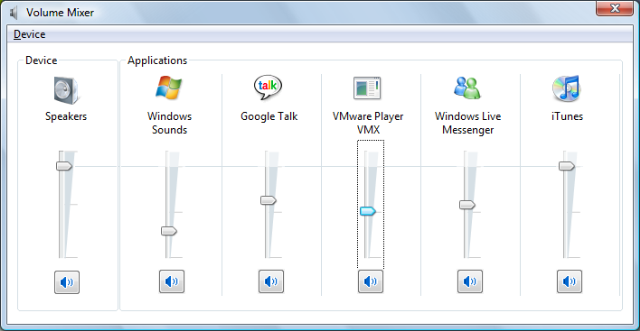
OK, I had a look at The Windows Vista Volume Mixer screenshot... I see what you are after...  :-\
« Last Edit: March 07, 2009, 04:22 PM by PhilB66 »

Coeluh

  • Family Guy ^^
  • Supporting Member
  • Joined in 2007
  • **
  • Posts: 273
Re: REQ: Independent volume per application for XP
« Reply #17 on: March 07, 2009, 06:01 PM »
check out Quick Mixer @ http://www.angelfire.com/oh4/quickmixer/QMixer.html
Doesnt to the programs thingy.
No, but it does let you configure different sound profiles (10 I believe) and switch between them with a hotkey combination.

OK, I had a look at The Windows Vista Volume Mixer screenshot... I see what you are after...  :-\
THanks anyway!

mwb1100

  • Supporting Member
  • Joined in 2006
  • **
  • Posts: 1,645
Re: REQ: Independent volume per application for XP
« Reply #18 on: March 07, 2009, 06:18 PM »
But that made me think, if it's been coded into Vista, couldn't there be a way to find that code, and make an app for XP?

The architecture of the audio driver stack in Windows was completely revamped for Vista. One of the design targets of the new architecture was to support this type of control among applications (and classes of applications).  That's not to say it can't be done in XP, just that it's not as good a fit for how the drivers work, so it's not necessarily easy.
« Last Edit: March 07, 2009, 06:57 PM by mwb1100 »

Mizraim

  • Supporting Member
  • Joined in 2006
  • **
  • Posts: 155
    • Cody Award
Re: REQ: Independent volume per application for XP
« Reply #19 on: March 07, 2009, 06:45 PM »
That makes sense. I appreciate the explanation. Sorry I don't know much about coding; to me something that has been coded for the Windows OS should work for all Windows OS's, but that just shows how much I don't know.  :D

Original address: https://www.donationcoder.com/forum/index.php?topic=16812.0