DonationCoder.com forum
 
Read-only archive. This is a static copy of the DonationCoder.com forum. Reading and searching work as before; logging in, posting and private messages do not.
Archive of 2026-10-21 · About this archive · Main site

Author Topic: Exclude a specific folder within a folder you want included?  (Read 5,483 times)

Josh83

  • Supporting Member
  • Joined in 2007
  • **
  • Posts: 7
In "My Documents" I have a folder full of PDF files that I have yet to properly rename after downloading them from JSTOR and other sites. I don't want FARR to search this folder, since it typically brings up a lot of things I don't want since they haven't been named properly yet. Is my only option to move this folder of unsorted PDFs into a folder that's not included in the FARR search? Or is there a way to search everything else in "My Documents" except this one folder?

Thanks,
Josh

lanux128

  • Global Moderator
  • Joined in 2005
  • *****
  • Posts: 6,277
    • Coding Snacks
    • Volunteers/Staff
    • Gathering Badge
    • Participated in NANY Challenge Once
    • Linux User
Re: Exclude a specific folder within a folder you want included?
« Reply #1 on: January 12, 2009, 05:46 AM »
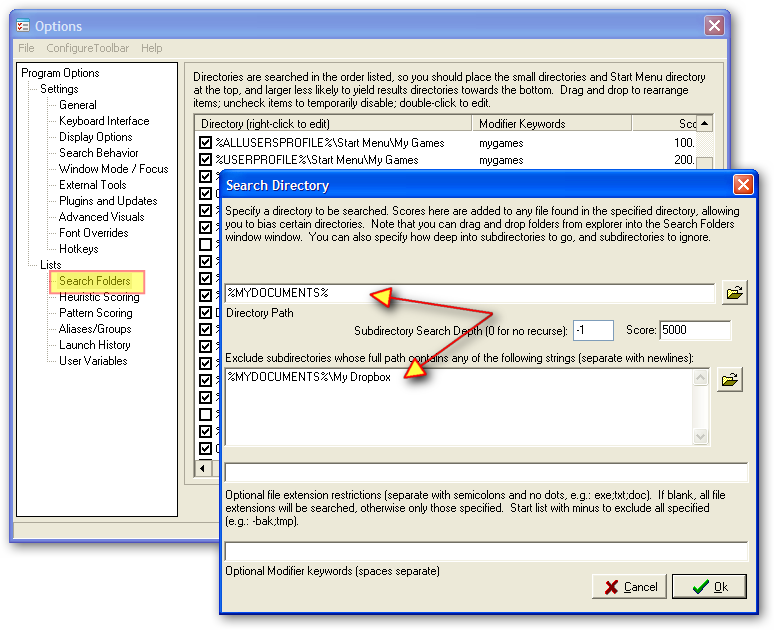
@Josh83: this feature is built-in, you have to go to Farr's 'Options' and choose 'Search Folders' section and either add or edit an entry as per screenshot.

ws-Farr-exclude-1.png

Josh83

  • Supporting Member
  • Joined in 2007
  • **
  • Posts: 7
Re: Exclude a specific folder within a folder you want included?
« Reply #2 on: January 12, 2009, 06:34 AM »
Thanks so much. I was playing with that earlier but couldn't figure it out. This screen shot makes it clear.

mouser

  • First Author
  • Administrator
  • Joined in 2005
  • *****
  • Posts: 40,931
    • Gathering Badge
    • Plugin Coding Medal
    • Participated in NANY Challenge Seventeen Times
    • Cody Award
    • Coding Snacks
    • Volunteers/Staff
Re: Exclude a specific folder within a folder you want included?
« Reply #3 on: January 12, 2009, 06:39 AM »
just a note you could have just typed "My Dropbox" in the exclusion list, the prefix of %MYDOCUMENTS% is not needed (in fact i have to go check to make sure it would work!)

Original address: https://www.donationcoder.com/forum/index.php?topic=16546.0