DonationCoder.com forum
 
Read-only archive. This is a static copy of the DonationCoder.com forum. Reading and searching work as before; logging in, posting and private messages do not.
Archive of 2026-10-21 · About this archive · Main site

Author Topic: HashTab - Great little tool ...  (Read 17,397 times)

Carol Haynes

  • Waffles for England (patent pending)
  • Global Moderator
  • Joined in 2005
  • *****
  • Posts: 8,073
    • Cody Award
    • Furry Fandom Badge - Furry Fandom
HashTab - Great little tool ...
« on: January 10, 2009, 11:43 AM »
I started using this years ago but just found out there is a new version available.

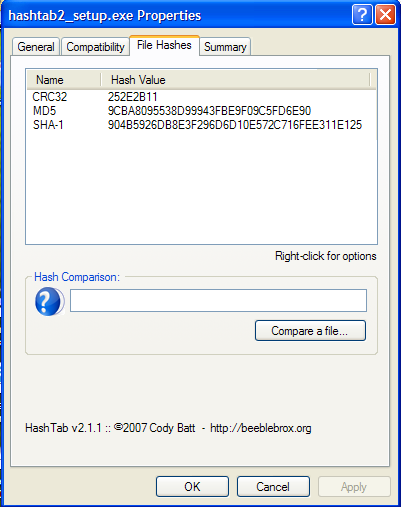
Basically it adds an extra tab in file properties in Windows Explorer and calculates the hash check values for the files. Currently it supports up to 12 different hash calculations (you can select which ones you want to actually calculate).

For example:
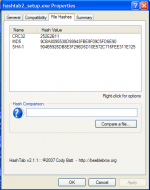
sc.png

See: http://beeblebrox.org/hashtab/

ewemoa

  • Honorary Member
  • Joined in 2008
  • **
  • Posts: 2,922
    • Plugin Coding Medal
    • Participated in NANY Challenge Three Times
Re: HashTab - Great little tool ...
« Reply #1 on: January 10, 2009, 11:47 AM »
Nice!

Love the license text ;)
« Last Edit: January 10, 2009, 11:48 AM by ewemoa »

PhilB66

  • Supporting Member
  • Joined in 2007
  • **
  • Posts: 1,522
Re: HashTab - Great little tool ...
« Reply #2 on: January 10, 2009, 02:40 PM »
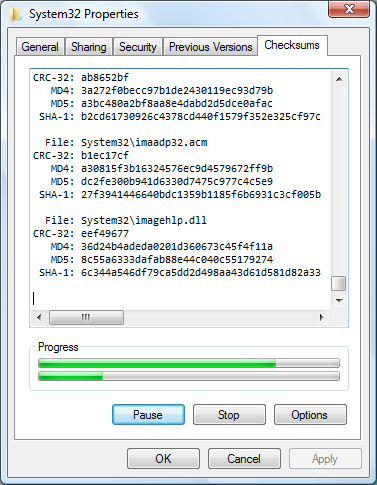
HashCheck Shell Extension does that too (and is much smaller in size). It is for both 32-bit and x64 Windows.

Quote
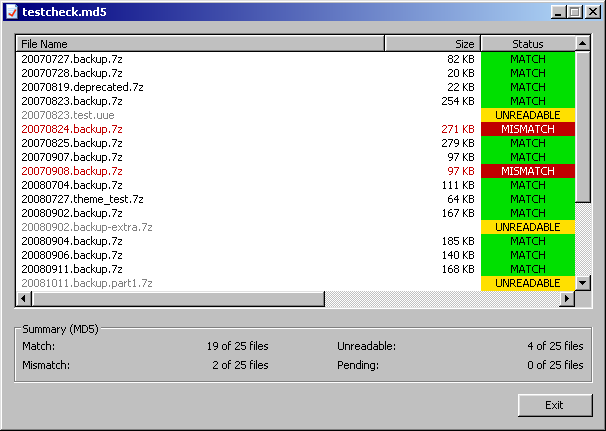
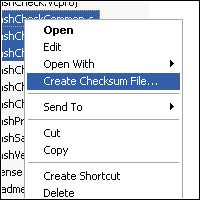
HashCheck can process and verify the checksums/hashes stored in checksum files--these are files with a .sfv, .md4, .md5, or .sha1 file extension. Just double-click on the checksum file, and HashCheck will check the actual checksums of the listed files against those specified in the checksum file.

[attach]

ewemoa

  • Honorary Member
  • Joined in 2008
  • **
  • Posts: 2,922
    • Plugin Coding Medal
    • Participated in NANY Challenge Three Times
Re: HashTab - Great little tool ...
« Reply #3 on: January 11, 2009, 03:08 AM »
Wow, also nice!  I like the checksumming of folder-content feature.

Mmm, source code :)
« Last Edit: January 11, 2009, 03:11 AM by ewemoa »

IainB

  • @Slartibartfarst
  • Supporting Member
  • Joined in 2008
  • **
  • Posts: 7,544
Re: HashTab - Great little tool ...
« Reply #4 on: April 23, 2014, 06:45 AM »
Just thought I'd revive this thread to say that I've been using HashTab (v5.1.23) for a while now and am finding it very useful in my file management tasks - e.g., when I am wanting to determine whether two files of the same or different names are in fact the same (duplicated) file.
However, I might dispense with using it on those occasions when the xplorer² Checksum column is likely to be more useful (see below).

Also:
  • HashCheck Shell Extension: Thanks to @PhilB66's mention of it in this thread (above), I am about to trial this.
  • WinMD5sum: I have been using this on occasion.
  • xplorer² Checksum column:: is a column you can invoke in xplorer² to give you a checksum of files in (say) a directory listing. The manual warns that invoking the Checksum column could be a resource hog:
    Quote
    x² extracts certain information from each file and displays it in different columns of the folder pane (e.g. checksum).
    However, this additional consumes CPU resources and slows down other operations.
    To make the operation more efficient, x² has a provision that it will display the information only if the file-size is below a [settable] threshold value.
    (A very handy feature.)

MilesAhead

  • Supporting Member
  • Joined in 2009
  • **
  • Posts: 7,736
    • Coding Snacks
Re: HashTab - Great little tool ...
« Reply #5 on: April 23, 2014, 01:52 PM »
I don't know about the other checksums, but a nice feature of the MD5 Hash algorithm is that it is designed to produce wildly different strings on the smallest difference.  It eliminates the need to do side by side string comparison.  If I do an MD5 Hash to compare files I just look at the first 4 characters in the string.  I've never seen an instance where they match and the rest of the strings do not.

Anyway, to pimp my own version MD5Hash is available here.  It queues up files to a depth of 4095.  You can right click a fairly large folder and let it go.  I tried a hybrid single/multi-instance scheme, but it is quirky since window creation, which is the governing resource of single instance, takes to long to guaraantee only one instance.  But if a copy is already open, multiple right click in Explorer sends the command lines to the open copy.

Unfortunately I don't have the source anymore to de-quirk it.  :)

IainB

  • @Slartibartfarst
  • Supporting Member
  • Joined in 2008
  • **
  • Posts: 7,544
Re: HashTab - Great little tool ...
« Reply #6 on: April 24, 2014, 02:46 AM »
@MilesAhead: Thanks. Have downloaded it to try out.

MilesAhead

  • Supporting Member
  • Joined in 2009
  • **
  • Posts: 7,736
    • Coding Snacks
Re: HashTab - Great little tool ...
« Reply #7 on: April 24, 2014, 12:11 PM »
@MilesAhead: Thanks. Have downloaded it to try out.

Thanks for taking a look.  It's a vanilla c++ dialog.  It's main feature, other than speed, is you can feed it multi-GB files and it won't choke.

Carol Haynes

  • Waffles for England (patent pending)
  • Global Moderator
  • Joined in 2005
  • *****
  • Posts: 8,073
    • Cody Award
    • Furry Fandom Badge - Furry Fandom
Re: HashTab - Great little tool ...
« Reply #8 on: April 24, 2014, 01:15 PM »
Thanks - forgotten about this - new version seems OK

MilesAhead

  • Supporting Member
  • Joined in 2009
  • **
  • Posts: 7,736
    • Coding Snacks
Re: HashTab - Great little tool ...
« Reply #9 on: April 26, 2014, 10:58 PM »
I just thought I'd mention, on Windows 8 MD5Hash dialog may look grayed out and the edit control with the hash results hard to read.  This is due to MS changing how Glass and composition works from Windows Seven.

Unfortunately I have no practical means to fix it. Sorry.

A work around is hit control a in the edit control to select everything and/or copy to clipboard.

Carol Haynes

  • Waffles for England (patent pending)
  • Global Moderator
  • Joined in 2005
  • *****
  • Posts: 8,073
    • Cody Award
    • Furry Fandom Badge - Furry Fandom
Re: HashTab - Great little tool ...
« Reply #10 on: May 12, 2014, 11:34 PM »
Seems to work on my copy of Windows 8 OK

MilesAhead

  • Supporting Member
  • Joined in 2009
  • **
  • Posts: 7,736
    • Coding Snacks
Re: HashTab - Great little tool ...
« Reply #11 on: May 13, 2014, 06:15 PM »
Seems to work on my copy of Windows 8 OK

Thanks for the report.  I have been using a Glass customization tool for W8.  Not as nice as W7.  But it looks pretty good when used with Aero Glass Tweaker, if the included resource file is used.  In that case the dialog looks sort of like clear plastic.  But the sums can be read easily.  If interested it's Aero Glass for DWM by Big Muscle.  :)  Links for the files can be found in threads on the Windows8 Customization sub-forum.

Carol Haynes

  • Waffles for England (patent pending)
  • Global Moderator
  • Joined in 2005
  • *****
  • Posts: 8,073
    • Cody Award
    • Furry Fandom Badge - Furry Fandom
Re: HashTab - Great little tool ...
« Reply #12 on: May 14, 2014, 02:51 PM »
Will check it out - thanks

Original address: https://www.donationcoder.com/forum/index.php?topic=16518.0