DonationCoder.com forum
 
Read-only archive. This is a static copy of the DonationCoder.com forum. Reading and searching work as before; logging in, posting and private messages do not.
Archive of 2026-10-21 · About this archive · Main site

Author Topic: IDEA: Sort files and then move to new directories  (Read 12,581 times)

wetsmellydog

  • Participant
  • Joined in 2007
  • *
  • Posts: 120
IDEA: Sort files and then move to new directories
« on: January 07, 2009, 05:44 PM »
I have an abundance of files that have the same prefix ie 123.xx1, 123.xx2, 456.xx1, 456.xx2 ect that need to be sorted and then placed into a directory with the name of the prefix ie c:\123, c:\456.

I only need to define the location of the resulting directory that the files will be placed.

A batch file or AHK program would be fine with me.

Thanks as always! :)

lanux128

  • Global Moderator
  • Joined in 2005
  • *****
  • Posts: 6,277
    • Coding Snacks
    • Volunteers/Staff
    • Gathering Badge
    • Participated in NANY Challenge Once
    • Linux User
Re: IDEA: Sort files and then move to new directories
« Reply #1 on: January 08, 2009, 01:01 AM »
this is quite a popular request, take a look at these threads and see if any of them suit your purpose.

• http://www.donationcoder.com/forum/index.php?topic=7447.0
• http://www.donationcoder.com/forum/index.php?topic=5269.0
• http://www.donationcoder.com/forum/index.php?topic=12998.0

wetsmellydog

  • Participant
  • Joined in 2007
  • *
  • Posts: 120
Re: IDEA: Sort files and then move to new directories
« Reply #2 on: January 08, 2009, 01:12 PM »

wetsmellydog

  • Participant
  • Joined in 2007
  • *
  • Posts: 120
Re: IDEA: Sort files and then move to new directories
« Reply #3 on: January 08, 2009, 01:17 PM »

Codebyte

  • "Premature Optimization is the root of all evil."
  • Supporting Member
  • Joined in 2007
  • **
  • Posts: 160
    • Participated in NANY Challenge Once
    • Coding Snacks
    • Plugin Coding Medal
Re: IDEA: Sort files and then move to new directories
« Reply #4 on: January 08, 2009, 03:20 PM »
I'm playing around with something for you atm... stay in touch and check this post frequently :)
CodeByter.com - http://www.codebyter.com

Codebyte

  • "Premature Optimization is the root of all evil."
  • Supporting Member
  • Joined in 2007
  • **
  • Posts: 160
    • Participated in NANY Challenge Once
    • Coding Snacks
    • Plugin Coding Medal
Re: IDEA: Sort files and then move to new directories
« Reply #5 on: January 08, 2009, 06:48 PM »
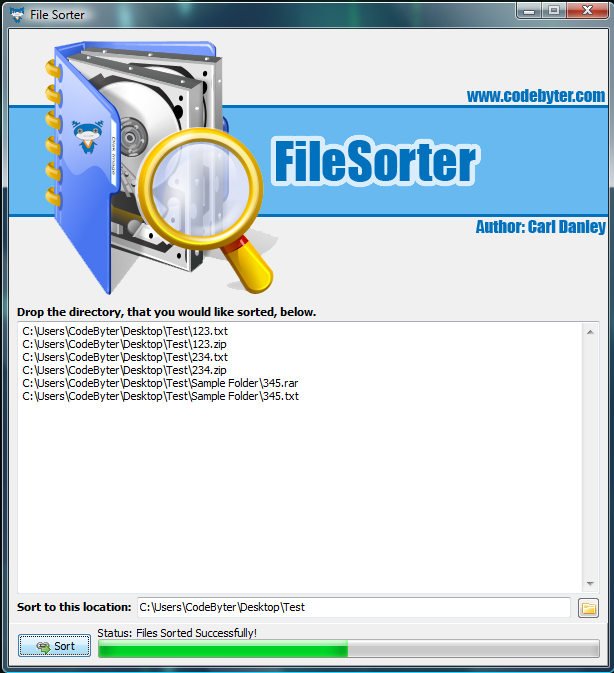
Here is what I got out of it:

[attach]
CodeByter.com - http://www.codebyter.com
« Last Edit: January 08, 2009, 06:51 PM by Codebyte »

lanux128

  • Global Moderator
  • Joined in 2005
  • *****
  • Posts: 6,277
    • Coding Snacks
    • Volunteers/Staff
    • Gathering Badge
    • Participated in NANY Challenge Once
    • Linux User
Re: IDEA: Sort files and then move to new directories
« Reply #6 on: January 09, 2009, 01:55 AM »
Codebyte: that looks very impressive! :Thmbsup: need to bookmark this thread for future reference. :)

skrommel

  • Fastest code in the west
  • Developer
  • Joined in 2005
  • ***
  • Posts: 933
    • Participated in NANY Challenge Twice
    • Coding Snacks
Re: IDEA: Sort files and then move to new directories
« Reply #7 on: January 10, 2009, 04:19 PM »
:) Just in case you haven't found a working solution...

Skrommel

Code
;MoveSameName.ahk
; Moves files with the same name to a common folder
;Skrommel @ 2009

from=C:\Dir1
to=C:\Dir2

Loop,%from%\*.*,0,0
{
  SplitPath,A_LoopFileLongPath,name,dir,ext,name_no_ext,drive
  MsgBOx,Moving`n %A_LoopFileLongPath%`nto`n %to%\%name_no_ext%\%name%
  FileCreateDir,%to%\%name_no_ext%
  FileMove,%A_LoopFileLongPath%,%to%\%name_no_ext%\%name%
}

wetsmellydog

  • Participant
  • Joined in 2007
  • *
  • Posts: 120
Re: IDEA: Sort files and then move to new directories
« Reply #8 on: January 12, 2009, 11:03 PM »
Here is what I got out of it:
(see attachment in previous post)
Features:
  • Simple Drag and Drop interface to make life easier!
  • Click Sort and watch as your files are sorted into folder's according to their filenames!
  • After File's are sorted into folders, FileSorter cleans up after itself (deletes the now empty folders)!

Download Here: http://www.codebyter.com/Media/Programs/Coding_Snacks/FileSorter/FileSorter.exe

I hope this helps... I pictured your filenames to look like something to below:
-Folder
-------123.txt
-------123.zip
-------123.jpg
-------234.txt
-------234.zip
-------234.jpg

The result will be:
-Folder
------123
--------------123.txt
--------------123.zip
--------------123.jpg
------234
--------------234.txt
--------------234.zip
--------------234.jpg

Please let me know if there is anything else you would like added :)

EDIT FOR IMAGE CLARIFICATION: The progress bar at the bottom is accurate but Vista's progressbar is kind of weird so I tried to capture the progress bar in motion for you.

So far looks good.
Two things that I can see;
1) Clear list button
2) Option for Move/Copy

Been busy so I have not been able to really put it through its paces but so far so good!  :)

wetsmellydog

  • Participant
  • Joined in 2007
  • *
  • Posts: 120
Re: IDEA: Sort files and then move to new directories
« Reply #9 on: January 12, 2009, 11:06 PM »
:) Just in case you haven't found a working solution...

Skrommel

Code
;MoveSameName.ahk
; Moves files with the same name to a common folder
;Skrommel @ 2009

from=C:\Dir1
to=C:\Dir2

Loop,%from%\*.*,0,0
{
  SplitPath,A_LoopFileLongPath,name,dir,ext,name_no_ext,drive
  MsgBOx,Moving`n %A_LoopFileLongPath%`nto`n %to%\%name_no_ext%\%name%
  FileCreateDir,%to%\%name_no_ext%
  FileMove,%A_LoopFileLongPath%,%to%\%name_no_ext%\%name%
}

It keeps asking for confirmation after each file. Will removing MSGBOx line make it more automatic?

skrommel

  • Fastest code in the west
  • Developer
  • Joined in 2005
  • ***
  • Posts: 933
    • Participated in NANY Challenge Twice
    • Coding Snacks
Re: IDEA: Sort files and then move to new directories
« Reply #10 on: January 13, 2009, 07:35 AM »
:-[ Yes.

Skrommel

Original address: https://www.donationcoder.com/forum/index.php?topic=16467.0