DonationCoder.com forum
 
Read-only archive. This is a static copy of the DonationCoder.com forum. Reading and searching work as before; logging in, posting and private messages do not.
Archive of 2026-10-21 · About this archive · Main site

Author Topic: Countdown timer with elapsed time shown in tiny docked strip  (Read 31,639 times)

suleika

  • Supporting Member
  • Joined in 2007
  • **
  • Posts: 117
Countdown timer with elapsed time shown in tiny docked strip
« on: November 13, 2008, 12:17 AM »
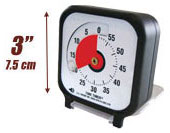
There are lots of countdown timer programs around but when I saw a post on Mark Forster's site about the Time Timer clocks and watches I realised how useful a quick glance visualisation would be when working at my computer. 

[attachimg=#]

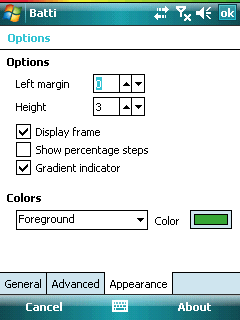
And then I thought of how it might work.  On my pocket PC I use a little program called batti to display battery status in a colourful bar at the very top of the screen - as small as 1 pixel (I have it set to 2).

[attachimg=#]

So how about a countdown timer for windows which would display the countdown in a thin docked bar/strip at the edge of the screen or by the taskbar?

At its most simple, the total length of the bar would be the total time set and block colouring would give a rough idea of time elapsed. But ideally there would be a way to mark the bar like a tape measure, so you could read 23 minutes passed out of 60 minutes, for example, or 3 min 10 seconds out of 5 minutes.  If the bar were not too thin, it could even have numbers on it.  And it would be very cool to be able to have more than one timer going at once, with some way of distinguishing them.

Does that all make sense?   Does anyone think it could be done?
« Last Edit: November 13, 2008, 12:20 AM by suleika »

VideoInPicture

  • Honorary Member
  • Joined in 2008
  • **
  • Posts: 467
    • Coding Snacks
Re: Countdown timer with elapsed time shown in tiny docked strip
« Reply #1 on: November 13, 2008, 07:45 AM »
Yes, this can be done. I don't know of any specific program for Windows that does what you described with a with a linear line as a timer indicator but you could easily do it if you start off with the source code for Custom Desktop Logo: http://customdesktoplogo.wikidot.com. You would simply write a draw function that draws a line into an image in memory given a min, max, and current time. Custom Desktop Logo already has a timer so that can be used to update the time in the line. The text is also easy to do since we can take the text function with alpha blended shadows from Circle Dock: http://circledock.wikidot.com.

For multiple timers, you could simply run more than one instance of the program.

Edit: If we want the line to be docked to an edge of the screen and take up something like 1-20 pixels so that other windows won't overlap it, that could also be possible. I remember seeing an example program over at CodeProject that taught you how to create a toolbar that reserves screen space. There are probably multiple code paths that can be taken to make the program in an easy fashion.

Does anyone know of a current program that does this or want to do it in AutoHotkey?
Author of Circle Dock: http://circledock.wikidot.com
Author of Video In Picture: http://videoinpicture.wikidot.com
Author of Webcam Signature: http://webcamsignature.wikidot.com
Author of Easy Unicode Paster: http://easyunicodepaster.wikidot.com
« Last Edit: November 13, 2008, 07:59 AM by VideoInPicture »

skrommel

  • Fastest code in the west
  • Developer
  • Joined in 2005
  • ***
  • Posts: 933
    • Participated in NANY Challenge Twice
    • Coding Snacks
Re: Countdown timer with elapsed time shown in tiny docked strip
« Reply #2 on: November 15, 2008, 02:03 AM »
:) Nothing fancy, but try ThinTimer!

It shows a thin progress bar on the top edge of the screen.

Skrommel

Code
;ThinTimer.ahk
; Shows a thin progress bar on the top edge of the screen
;Skrommel @ 2008

alarm=034500   ;Alarm time HHMMSS
height=2       ;Progress bar height >0
message=Timer!  ;Message to display when timer reached

#NoEnv
#SingleInstance,Force

range:=A_YYYY . A_MM . A_DD . alarm
EnvSub,range,%A_now%,seconds 

Gui,+ToolWindow +AlwaysOnTop -Caption
Gui,Add,Progress,% "Vprogress X-2 Y-2 W" A_ScreenWidth+4 " H" height+5 " Range0-" range
Gui,Show,% "X0 Y0 W" A_ScreenWidth " H" height
Gui,+LastFound
guiid:=WinExist("A")
WinSet,Transparent,150,ahk_id %guiid%  ; Transparency 
WinSet,ExStyle,+0x20,ahk_id %guiid%    ; Click-through

Loop,%range%
{
  Sleep,1000
  GuiControl,,progress,% range-A_Index
}
If message<>
  MsgBox,%message%
ExitApp
« Last Edit: November 15, 2008, 02:48 AM by skrommel »

suleika

  • Supporting Member
  • Joined in 2007
  • **
  • Posts: 117
Re: Countdown timer with elapsed time shown in tiny docked strip
« Reply #3 on: November 17, 2008, 07:45 PM »
Thank you, Skrommel.  :)  It works and I like it.

I made a very basic minute countdown-timer version, which probably needs neatening up, and which would be much more useful with hours, minutes and seconds as input than just minutes.

Code

InputBox, TimerValue, Timer Value, Minutes to countdown:
AlarmTime =
AlarmTime += TimerValue, minutes
	
alarm=%AlarmTime%  ;Alarm time
height=2       ;Progress bar height >0
message=Time's up!  ;Message to display when timer reached


#NoEnv
#SingleInstance,Force

range:=AlarmTime
EnvSub,range,%A_now%,seconds

Gui,+ToolWindow +AlwaysOnTop -Caption
Gui,Add,Progress,% "Vprogress X-2 Y-2 W" A_ScreenWidth+4 " H" height+5 " Range0-" range
Gui,Show,% "X0 Y0 W" A_ScreenWidth " H" height
Gui,+LastFound
guiid:=WinExist("A")
WinSet,Transparent,150,ahk_id %guiid%  ; Transparency
WinSet,ExStyle,+0x20,ahk_id %guiid%    ; Click-through

Loop,%range%
{
  Sleep,1000
  GuiControl,,progress,% range-A_Index
}
If message<>
  MsgBox,%message%
ExitApp

I was trying to work out how I might use a tooltip to see what the progress was, but I couldn't make it work at all.  Could it work?  Could a tooltip show up displaying time left/total time when the mouse hovers over the progress bar?

And is there any way to have more than one of them running at the same time?  I imagine they'd have to show underneath each other in the same toolwindow.

skrommel

  • Fastest code in the west
  • Developer
  • Joined in 2005
  • ***
  • Posts: 933
    • Participated in NANY Challenge Twice
    • Coding Snacks
Re: Countdown timer with elapsed time shown in tiny docked strip
« Reply #4 on: December 03, 2008, 07:03 PM »
:) Here's one showing how many seconds are left when the mouse hovers above the bar.

To make multiple timers I don't think I can use the Progress control... Too much work for tonight...

Skrommel


Code
InputBox, TimerValue, Timer Value, Minutes to countdown:
AlarmTime =
AlarmTime += TimerValue, minutes
	
alarm=%AlarmTime%  ;Alarm time
height=2       ;Progress bar height >0
message=Time's up!  ;Message to display when timer reached

#NoEnv
#SingleInstance,Force
DetectHiddenWindows,On
CoordMode,Mouse,Screen

range:=AlarmTime
EnvSub,range,%A_now%,seconds

Gui,+ToolWindow +AlwaysOnTop -Caption
Gui,Add,Progress,% "Vprogress X-2 Y-2 W" A_ScreenWidth+4 " H" height+5 " Range0-" range
Gui,Show,% "X0 Y0 W" A_ScreenWidth " H" height
Gui,+LastFound
guiid:=WinExist("A")
WinSet,Transparent,150,ahk_id %guiid%  ; Transparency
WinSet,ExStyle,+0x20,ahk_id %guiid%    ; Click-through

Loop,%range%
{
  Sleep,1000
  left:=range-A_Index
  GuiControl,,progress,% left
  Gosub,LEFT
}
If message<>
  MsgBox,%message%
ExitApp

LEFT:
  MouseGetPos,,my
  If (my<=height)
  {
    showing=1
    ToolTip,% left " seconds left"
  }
  Else
  If showing=1
    ToolTip
Return

suleika

  • Supporting Member
  • Joined in 2007
  • **
  • Posts: 117
Re: Countdown timer with elapsed time shown in tiny docked strip
« Reply #5 on: December 20, 2008, 01:43 PM »
I must have had a cookie blip - I didn't see this thread being updated... sorry!

Anyway, thank you for the improved version.  I am trying it out now...

EdThePilot

  • Supporting Member
  • Joined in 2007
  • **
  • Posts: 1
Re: Countdown timer with elapsed time shown in tiny docked strip
« Reply #6 on: December 30, 2008, 03:30 PM »
Here's one showing how many seconds are left when the mouse hovers above the bar.

To make multiple timers I don't think I can use the Progress control... Too much work for tonight...

Skrommel
This is a great script, thanks! By the way, it's not on your DC homepage, it really should be!!!

Original address: https://www.donationcoder.com/forum/index.php?topic=15703.0