DonationCoder.com forum
 
Read-only archive. This is a static copy of the DonationCoder.com forum. Reading and searching work as before; logging in, posting and private messages do not.
Archive of 2026-10-21 · About this archive · Main site

Author Topic: Problem with Custom Desktop Logo  (Read 9,852 times)

ebs

  • Charter Member
  • Joined in 2005
  • ***
  • Posts: 12
Problem with Custom Desktop Logo
« on: November 07, 2008, 03:23 PM »
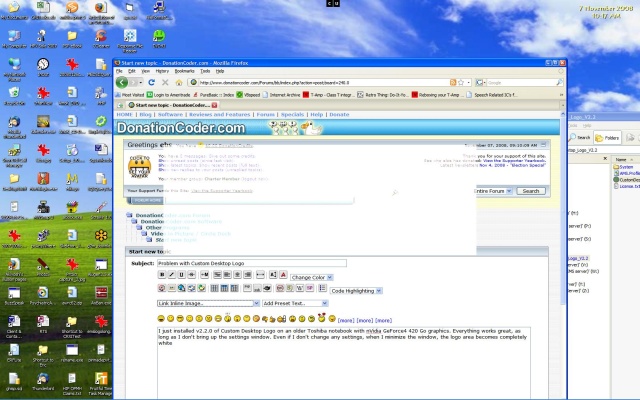
I just installed v2.2.0 of Custom Desktop Logo on an older Toshiba notebook with nVidia GeForce4 420 Go graphics.

Everything works great, as long as I don't bring up the settings window. Even if I don't change any settings, when I minimize the window, the logo area becomes completely white, like this:

[attach]
VideoInPicture

  • Honorary Member
  • Joined in 2008
  • **
  • Posts: 467
    • Coding Snacks
Re: Problem with Custom Desktop Logo
« Reply #1 on: November 12, 2008, 04:29 PM »
That is a weird bug. I haven't seem Custom Desktop Logo do that on either Windows Vista or XP even when I open and close the settings windows. It should be independent of your hardware because Custom Desktop Logo uses the .Net Framework. Perhaps you have a blank image in the same folder as the image you want to display?
Author of Circle Dock: http://circledock.wikidot.com
Author of Video In Picture: http://videoinpicture.wikidot.com
Author of Webcam Signature: http://webcamsignature.wikidot.com
Author of Easy Unicode Paster: http://easyunicodepaster.wikidot.com

ebs

  • Charter Member
  • Joined in 2005
  • ***
  • Posts: 12
Re: Problem with Custom Desktop Logo
« Reply #2 on: November 12, 2008, 04:45 PM »
Perhaps you have a blank image in the same folder as the image you want to display?

Nope, just the one image. This happens with all of the supplied images, too, and only after the settings window is displayed.
If I run the program without showing the settings window, everything works perfectly.

Regards,
Eric

VideoInPicture

  • Honorary Member
  • Joined in 2008
  • **
  • Posts: 467
    • Coding Snacks
Re: Problem with Custom Desktop Logo
« Reply #3 on: November 12, 2008, 05:31 PM »
Hmm, what happens if you minimize the Settings Panel and then right-click the tray icon and toggle the visibility of the logo?
Author of Circle Dock: http://circledock.wikidot.com
Author of Video In Picture: http://videoinpicture.wikidot.com
Author of Webcam Signature: http://webcamsignature.wikidot.com
Author of Easy Unicode Paster: http://easyunicodepaster.wikidot.com

ebs

  • Charter Member
  • Joined in 2005
  • ***
  • Posts: 12
Re: Problem with Custom Desktop Logo
« Reply #4 on: November 12, 2008, 08:00 PM »
Hmm, what happens if you minimize the Settings Panel and then right-click the tray icon and toggle the visibility of the logo?

Hiding the logo works as expected, but restoring it still shows the empty white rectangle.

Regards,
Eric

Original address: https://www.donationcoder.com/forum/index.php?topic=15638.0