DonationCoder.com forum
 
Read-only archive. This is a static copy of the DonationCoder.com forum. Reading and searching work as before; logging in, posting and private messages do not.
Archive of 2026-10-21 · About this archive · Main site

Author Topic: Is Screenshot Captor not capable of capturing text for editing in text file?  (Read 22,870 times)

studentguru

  • Participant
  • Joined in 2005
  • *
  • Posts: 2
Hi everyone,

I have downloaded this software on my test machine and is pretty impressed with it so far. Right now the ONLY feature I am looking for in any screen capture software is one that can capture text (on the screen) that cannot be captured/copied otherwise and then paste into text files so that I can edit the words .

Snagit can do that some of the time but I am not ready to go there yet.

It seems Screenshot Captor does not have this feature. Am I right?

If you know of any screen capture freeware that has this particular feature I want please let me know.


I have read the help file of the software and it does not tell me anything about this particular feature.

Thanks  a million. :)

studentguru


« Last Edit: November 19, 2005, 06:41 AM by studentguru »

mouser

  • First Author
  • Administrator
  • Joined in 2005
  • *****
  • Posts: 40,931
    • Gathering Badge
    • Plugin Coding Medal
    • Participated in NANY Challenge Seventeen Times
    • Cody Award
    • Coding Snacks
    • Volunteers/Staff
screenshot captor does not do this (yet).

studentguru

  • Participant
  • Joined in 2005
  • *
  • Posts: 2
Thanks Mouser,

I love your Find and Run Robot. It seems the only software in Windows that can find a text file , thus replacing my need to go into windows explorer to call up the Search function in Windows explorer.

I have tried quite a few similar softwares but none could find text files, only finding programs and may be folders.

mouser

  • First Author
  • Administrator
  • Joined in 2005
  • *****
  • Posts: 40,931
    • Gathering Badge
    • Plugin Coding Medal
    • Participated in NANY Challenge Seventeen Times
    • Cody Award
    • Coding Snacks
    • Volunteers/Staff
in all of our programs, including screenshot captor and F+R robot you will find at the bottom of the help file a list of related programs and their websites.  it's a good place to look for similar programs - and there are certainly others that can find text files as well :)

jackdewey

  • Participant
  • Joined in 2006
  • *
  • Posts: 3
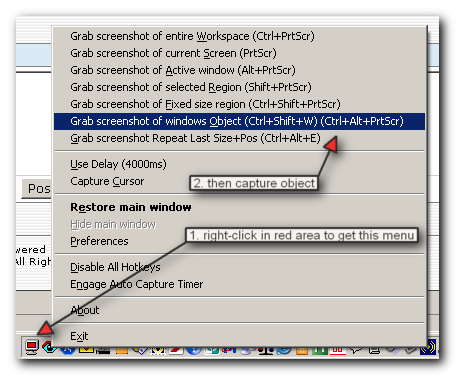
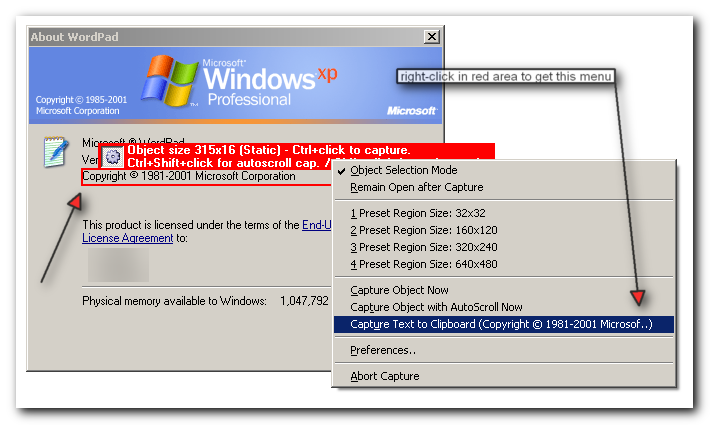
I have just downloaded ScreenShot Graber for the text scraper functionality that is mentioned on the web site. I have tried grabbing text on a few dialog but have not been successful.

What are the steps to follow to select the text and send it to the clipboard. When I select the Send text to clipboard menu item in the edit menu, I only seem to get the dialog name and the time when the snapshot was taken.

Thanks for any help you can provide.

mouser

  • First Author
  • Administrator
  • Joined in 2005
  • *****
  • Posts: 40,931
    • Gathering Badge
    • Plugin Coding Medal
    • Participated in NANY Challenge Seventeen Times
    • Cody Award
    • Coding Snacks
    • Volunteers/Staff
this may help.  i really need to update help file..

jackdewey

  • Participant
  • Joined in 2006
  • *
  • Posts: 3
Thanks. Very easy to use with the snapshots :)

I guess the only thing is that does not necessarily work with all dialogs depending on how they were built. I tried with the Firefox Options dialog and could not just select the text.

mouser

  • First Author
  • Administrator
  • Joined in 2005
  • *****
  • Posts: 40,931
    • Gathering Badge
    • Plugin Coding Medal
    • Participated in NANY Challenge Seventeen Times
    • Cody Award
    • Coding Snacks
    • Volunteers/Staff
right; it's not all that sophisticated.
if you need a more advanced shareware tool try
http://www.structurise.com/kleptomania/index.htm

jackdewey

  • Participant
  • Joined in 2006
  • *
  • Posts: 3
Yes, I know Kleptonamia but was trying to find alternatives. Thanks for the help.

AbteriX

  • Member #520
  • Charter Honorary Member
  • Joined in 2005
  • ***
  • Posts: 1,150
CopyMessageBox

[x] CopyMsgBoxText allows you to easily copy texts or screenshots
    of message boxes and dialogs into the clipboard.

[x] Useful for documentation/bug reports etc: Instead of copying a messagebox's
     (or any dialog's) text by hand, simply strike a key (configurable to your choice) - and the
     text is copied to the clipboard. The "Paste" command of your editor inserts the message to your document!


License:     Freeware
Version:     2.2
Operating System:    Windows™ 98, Windows™ NT, Windows™ Me, Window™ 2000,
     Windows™ XP, Windows™ 2003

http://www.thyante.com/index.php?id=3,0,0,1,0,0


Greetings, Stefan.

rjbull

  • Charter Member
  • Joined in 2005
  • ***
  • Posts: 3,217
CopyMessageBox

Even CopyMsgBox doesn't always work.  I hae to access some programs via Citrix Metaframe, which seems to leave the rest of the computer completely blind to what's going on.

On some versions of Windows, such as Windows 2000 at least, you can just get the focus on an error message box and press Control-C to copy the plain text to the clipboard.  Again, doesn't work with Citrixed programs.

mouser

  • First Author
  • Administrator
  • Joined in 2005
  • *****
  • Posts: 40,931
    • Gathering Badge
    • Plugin Coding Medal
    • Participated in NANY Challenge Seventeen Times
    • Cody Award
    • Coding Snacks
    • Volunteers/Staff
yeah win2k and winxp you can select a messagebox and hit ctrl+C, and it actually copies the text.. im sure there are a lot of people who would have liked to know about that cool trick.

allen

  • Charter Member
  • Joined in 2006
  • ***
  • Posts: 1,206
    • Participated in NANY Challenge Once
    • Cody Award
    • Programming School - Deluxe Bonus Medal
    • Military Service Badge - US Navy
    • Linux User
    • Writer
yeah win2k and winxp you can select a messagebox and hit ctrl+C, and it actually copies the text.. im sure there are a lot of people who would have liked to know about that cool trick.

. . . I want something to crash, now.  I had no idea . . . that's awesome.

As for an effective freeware text grabber, I've never come across one.  Of the ones I've used, Kleptomania was the best but I basically gave up looking a year or two ago, so it's entirely possible (hopefully!) that my knowledge is outdated ;)

hamradio

  • Amateur Radio Guy
  • Charter Honorary Member
  • Joined in 2006
  • ***
  • Posts: 893
    • Plugin Coding Medal
    • Participated in NANY Challenge Fifteen Times
    • Cody Award
    • Coding Snacks
    • Volunteers/Staff
    • Hardware Hacker
To test that you can also go into paint flood fill then goto exit and it asks if you want to save hit ctrl + c then take it into a text editor and hit ctrl + v.  No crash needed to see it in action.

jgpaiva

  • Artificial Idiocy
  • Global Moderator
  • Joined in 2006
  • *****
  • Posts: 4,727
    • Cody Award
    • Participated in NANY Challenge Once
    • Coding Snacks
    • Portugal Inhabitant
    • Linux User
This is a very useful tip! Thanks mouser!
Allen: the attachment is a compiled script that launches a windows message-box, you can test it there ;)

AbteriX

  • Member #520
  • Charter Honorary Member
  • Joined in 2005
  • ***
  • Posts: 1,150
yeah win2k and winxp you can select a messagebox and hit ctrl+C, and it actually copies the text.. im sure there are a lot of people who would have liked to know about that cool trick.
Cool, thank you.
Greetings, Stefan.

mouser

  • First Author
  • Administrator
  • Joined in 2005
  • *****
  • Posts: 40,931
    • Gathering Badge
    • Plugin Coding Medal
    • Participated in NANY Challenge Seventeen Times
    • Cody Award
    • Coding Snacks
    • Volunteers/Staff
i'll just point out it was rjbull who posted about the ctrl+c trick  :huh:

AbteriX

  • Member #520
  • Charter Honorary Member
  • Joined in 2005
  • ***
  • Posts: 1,150
Thank you too rjbull  :D
Greetings, Stefan.

jgpaiva

  • Artificial Idiocy
  • Global Moderator
  • Joined in 2006
  • *****
  • Posts: 4,727
    • Cody Award
    • Participated in NANY Challenge Once
    • Coding Snacks
    • Portugal Inhabitant
    • Linux User
Oops... Sorry!
THANKS rjbull!

rjbull

  • Charter Member
  • Joined in 2005
  • ***
  • Posts: 3,217
THANKS rjbull!

Thanks, but actually, I think we should all thank Google  :Thmbsup:

And, to repeat; it only works with some versions of Windows.  Not with Win9x, as I recall it.


Original address: https://www.donationcoder.com/forum/index.php?topic=1545.0