DonationCoder.com forum
 
Read-only archive. This is a static copy of the DonationCoder.com forum. Reading and searching work as before; logging in, posting and private messages do not.
Archive of 2026-10-21 · About this archive · Main site

Author Topic: CHKDSK Assist - Schedule CHKDSK Operations  (Read 45,314 times)

darklight_tr

  • Charter Member
  • Joined in 2005
  • ***
  • Posts: 39
    • Participated in NANY Challenge Once
    • Coding Snacks
CHKDSK Assist - Schedule CHKDSK Operations
« on: October 11, 2008, 01:07 AM »
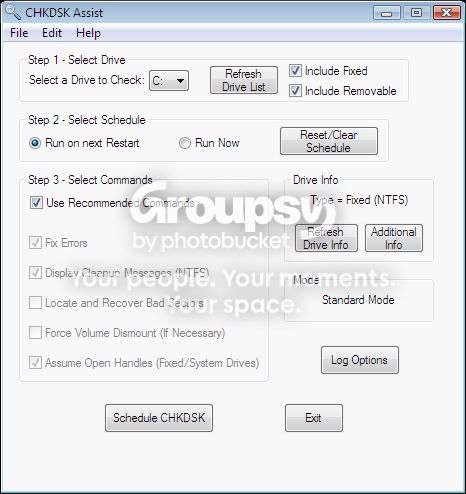
CHKDSK Assist is a GUI based script that allows you to schedule CHKDSK operations on your PC.

I welcome any questions or comments about it. Thanks!

OS Support: Windows XP, Windows Vista, Windows 7
Tested On: Windows XP, Windows 7

Download Links -> Installer OR ZIP - Both link directly to my website for the download.  CHKDSKAssist_setup.exe is the version with an installer based on Inno Setup, CHKDSKAssist.zip is a zip file with no installer.

You can also find this script on my website: http://www.tylerretelle.com


Updates (Use Help->Check for Updates to upgrade)

08/28/11:  v1.6.2 has been released. Release notes below.

-Fixed an issue with the About dialog.
-Engine upgraded to AutoHotkey_L v1.1.03.00.
-Added a status bar to the Options GUI. (GUI RV18)
-Moved Options GUI status messages to the status bar. (GUI RV18)
-Removed the Options GUI status message text boxes, which have been replaced by the status bar.
-Installer upgraded to TR Tools Setup v2.8.1.
-Made a minor behavior change to the Check for Updates code.
-Added compatibility fixes for newer AutoHotkey engine versions to the Check for Updates code.
-Includes v4 Revision 1.0.0 of the CHKDSK Assist Manual.  The help file has been migrated from Helpinator v2.x FREE to v3.5 FREE.

Please Note: Upgrades from v1.4.1 or older are not supported due to the changes made to the installer.  You must uninstall that version before installing the latest one.


Main GUI


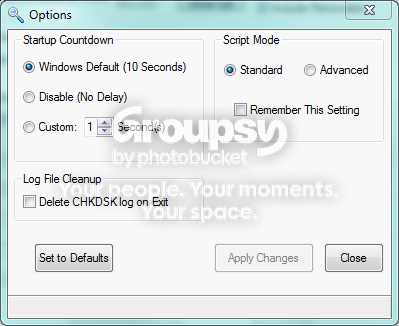
Options GUI
« Last Edit: August 29, 2011, 04:32 AM by darklight_tr »

techidave

  • Supporting Member
  • Joined in 2007
  • **
  • Posts: 1,046
Re: CHKDSK Assist - Schedule CHKDSK Operations
« Reply #1 on: October 11, 2008, 03:18 AM »
looks very interesting.  i will have to give it a whirl!

mouser

  • First Author
  • Administrator
  • Joined in 2005
  • *****
  • Posts: 40,931
    • Gathering Badge
    • Plugin Coding Medal
    • Participated in NANY Challenge Seventeen Times
    • Cody Award
    • Coding Snacks
    • Volunteers/Staff
Re: CHKDSK Assist - Schedule CHKDSK Operations
« Reply #2 on: October 21, 2008, 10:21 AM »
Cool.

darklight_tr

  • Charter Member
  • Joined in 2005
  • ***
  • Posts: 39
    • Participated in NANY Challenge Once
    • Coding Snacks
Re: CHKDSK Assist - Schedule CHKDSK Operations
« Reply #3 on: November 02, 2008, 09:55 PM »
Thank you both for trying it out, I hope you like it.  ;D

v1.2.0 has been released.  Check out the first post for details.

mouser

  • First Author
  • Administrator
  • Joined in 2005
  • *****
  • Posts: 40,931
    • Gathering Badge
    • Plugin Coding Medal
    • Participated in NANY Challenge Seventeen Times
    • Cody Award
    • Coding Snacks
    • Volunteers/Staff
Re: CHKDSK Assist - Schedule CHKDSK Operations
« Reply #4 on: November 02, 2008, 10:04 PM »
let us know if you'd like some webspace on a dcmembers.com account.

jsfaint

  • Participant
  • Joined in 2007
  • *
  • Posts: 7
Re: CHKDSK Assist - Schedule CHKDSK Operations
« Reply #5 on: November 06, 2008, 01:19 AM »
It's cooooool~ Good job!

darklight_tr

  • Charter Member
  • Joined in 2005
  • ***
  • Posts: 39
    • Participated in NANY Challenge Once
    • Coding Snacks
Re: CHKDSK Assist - Schedule CHKDSK Operations
« Reply #6 on: November 06, 2008, 11:51 PM »
It's cooooool~ Good job!

Thanks.

I just discovered a particularly annoying bug with v1.2.0.  I've posted v1.2.1, which fixes the bug.

let us know if you'd like some webspace on a dcmembers.com account.

Hmm...I think I might like that!
« Last Edit: November 07, 2008, 12:19 AM by darklight_tr »

freewareking101

  • Participant
  • Joined in 2008
  • *
  • Posts: 3
Re: CHKDSK Assist - Schedule CHKDSK Operations
« Reply #7 on: November 08, 2008, 09:22 AM »
OMG this awesome! I've been looking for this kind of TOOL!
Thanks for sharing

mouser

  • First Author
  • Administrator
  • Joined in 2005
  • *****
  • Posts: 40,931
    • Gathering Badge
    • Plugin Coding Medal
    • Participated in NANY Challenge Seventeen Times
    • Cody Award
    • Coding Snacks
    • Volunteers/Staff
Re: CHKDSK Assist - Schedule CHKDSK Operations
« Reply #8 on: November 08, 2008, 05:45 PM »
Very cool -- i just put it on the blog (and added it to the Coding Snacks page).

SleepingWolf

  • Supporting Member
  • Joined in 2007
  • **
  • Posts: 118
Re: CHKDSK Assist - Schedule CHKDSK Operations
« Reply #9 on: January 01, 2009, 11:02 PM »
I haven't tried it but there are two GUIs for the excellent JKDefrag one of which is ScanDefrag which also enables scheduling of ChkDisk among other things... but I'll try yours soonish...
-------------------------------------------

Question everything, use a fact-checker.
Respect yourself and respect others.
Peace out!

doctorfrog

  • Supporting Member
  • Joined in 2008
  • **
  • Posts: 140
Re: CHKDSK Assist - Schedule CHKDSK Operations
« Reply #10 on: February 21, 2009, 08:37 PM »
Just giving this useful script a modest bump. Thanks for this, it's a great improvement over the meaningless progress bar that accompanies the default Windows control for CHKDSK.

Josh

  • Charter Honorary Member
  • Joined in 2005
  • ***
  • Posts: 3,411
    • Gathering Badge
    • Official Forum Clown
    • Coding Snacks
    • Plugin Coding Medal
    • Volunteers/Staff
    • Military Service Badge - US Army
    • Furry Fandom Badge - Furry Fandom
    • Linux User
Re: CHKDSK Assist - Schedule CHKDSK Operations
« Reply #11 on: February 21, 2009, 09:41 PM »
Most useful program I have on my PC next to Process Explorer. Thank you very much!
Strength in Knowledge

PhilB66

  • Supporting Member
  • Joined in 2007
  • **
  • Posts: 1,522
Re: CHKDSK Assist - Schedule CHKDSK Operations
« Reply #12 on: February 21, 2009, 11:48 PM »
Very cool -- i just put it on the blog (and added it to the Coding Snacks page).

What about a [attach]

mouser

  • First Author
  • Administrator
  • Joined in 2005
  • *****
  • Posts: 40,931
    • Gathering Badge
    • Plugin Coding Medal
    • Participated in NANY Challenge Seventeen Times
    • Cody Award
    • Coding Snacks
    • Volunteers/Staff
Re: CHKDSK Assist - Schedule CHKDSK Operations
« Reply #13 on: February 22, 2009, 12:05 AM »
done, thanks for reminding me phil  :up:

darklight_tr

  • Charter Member
  • Joined in 2005
  • ***
  • Posts: 39
    • Participated in NANY Challenge Once
    • Coding Snacks
Re: CHKDSK Assist - Schedule CHKDSK Operations
« Reply #14 on: February 22, 2009, 05:40 AM »
Just giving this useful script a modest bump. Thanks for this, it's a great improvement over the meaningless progress bar that accompanies the default Windows control for CHKDSK.
Most useful program I have on my PC next to Process Explorer. Thank you very much!

:-*  Thanks for the kind words.  Its very nice to hear when someone appreciates your work.  Thanks a ton! :D

Josh

  • Charter Honorary Member
  • Joined in 2005
  • ***
  • Posts: 3,411
    • Gathering Badge
    • Official Forum Clown
    • Coding Snacks
    • Plugin Coding Medal
    • Volunteers/Staff
    • Military Service Badge - US Army
    • Furry Fandom Badge - Furry Fandom
    • Linux User
Re: CHKDSK Assist - Schedule CHKDSK Operations
« Reply #15 on: February 22, 2009, 01:23 PM »
I should send you more credits for not choosing a mouser-esque name such as "Check disk+spell and find robot"
Strength in Knowledge

tomos

  • Charter Member
  • Joined in 2006
  • ***
  • Posts: 11,970
    • Gathering Badge
    • Participated in NANY Challenge Once
Re: CHKDSK Assist - Schedule CHKDSK Operations
« Reply #16 on: November 12, 2009, 10:04 PM »
hi darklight
I had a go at this today (been getting some blue screens lately..)

First:
I used the portable version
OS xp sp2 home

So I scheduled it for a restart,
I rebooted & went for a cup of tea
when I came back, it was finished - I checked the log & it said
Quote
The type of the file system is NTFS.

Chkdsk cannot run because the volume is in use by another
process.  Would you like to schedule this volume to be
checked the next time the system restarts? (Y/N) y

This volume will be checked the next time the system restarts.
so I restarted & went off again but came back again to the same message

Third time, I got a beer & manually entered chkdsk c: /f /r & sat in front of the computer :) - it checked everything, showed the results for about 1/100th of a second.So I went back to your app & checked the log again to see the same message again.

So now I googled & discovered I could look in the event viewer under applications (eventvwr.msc) (I'm learning a lot today)
The log of the chckdsk was there
Spoiler (click to show/hide)
Event Type: Information
Event Source: Winlogon
Event Category: None
Event ID: 1001
Date: 2009-11-12
Time: 22:03:20
User: N/A
Computer: _____
Description:
Checking file system on C:
The type of the file system is NTFS.
Volume label is Boot.

A disk check has been scheduled.
Windows will now check the disk.                       
Cleaning up minor inconsistencies on the drive.
CHKDSK is verifying file data (stage 4 of 5)...
File data verification completed.
CHKDSK is verifying free space (stage 5 of 5)...
Free space verification is complete.

30716248 KB total disk space.
12933644 KB in 59166 files.
    36840 KB in 7361 indexes.
        0 KB in bad sectors.
  137260 KB in use by the system.
    65536 KB occupied by the log file.
17608504 KB available on disk.

    4096 bytes in each allocation unit.
  7679062 total allocation units on disk.
  4402126 allocation units available on disk.

Internal Info:
70 0e 01 00 e9 03 01 00 ec 62 01 00 00 00 00 00  p........b......
92 9a 00 00 02 00 00 00 6a 04 00 00 00 00 00 00  ........j.......
4e 26 18 05 00 00 00 00 9c b4 b9 13 00 00 00 00  N&..............
0a 9a 4c 05 00 00 00 00 aa 28 ae d3 00 00 00 00  ..L......(......
14 d6 f5 88 00 00 00 00 2c ec e5 7d 01 00 00 00  ........,..}....
b0 45 dd 77 00 00 00 00 d8 3d 07 00 1e e7 00 00  .E.w.....=......
00 00 00 00 00 30 68 15 03 00 00 00 c1 1c 00 00  .....0h.........

Windows has finished checking your disk.
Please wait while your computer restarts.

so, I'm wondering:
a) have I done something silly (well possible)
b) is my computer wonky (well possible)
c) is your app not able to find the logfile (see next)

Just in case it's related:
Quote from: me (in another thread here somewhere)
unfortunately in my case I had an error report for the Dr.Watson debugger last year - MS's 'solution' was to disable it - http://support.microsoft.com/kb/949820 (I remember at the time it was seizing up and created a multi GB log file).
Tom

darklight_tr

  • Charter Member
  • Joined in 2005
  • ***
  • Posts: 39
    • Participated in NANY Challenge Once
    • Coding Snacks
Re: CHKDSK Assist - Schedule CHKDSK Operations
« Reply #17 on: November 30, 2009, 04:02 PM »
tomos,

Sorry for my late reply...I haven't checked this post too much lately.

From what you posted, everything is working fine.  The log file only logs what is output when CHKDSK Assist sends its command to cmd.exe.  If you need to reboot first (required if you are checking the drive with the Windows install on it) you will see exactly what you posted in the log file.  I should probably make this more clear, and will do so in the documentation in the next release.

I'll also look into pulling the info from the Event Viewer into the script itself or at least adding a link so you can get to it quickly.

tomos

  • Charter Member
  • Joined in 2006
  • ***
  • Posts: 11,970
    • Gathering Badge
    • Participated in NANY Challenge Once
Re: CHKDSK Assist - Schedule CHKDSK Operations
« Reply #18 on: November 30, 2009, 04:20 PM »
thanks for that clarification darklight,
I might try it again - I accidentally turned off all the power here yesterday ;D :-[
Tom

cranioscopical

  • Friend of the Site
  • Supporting Member
  • Joined in 2006
  • **
  • Posts: 4,776
    • Cody Award
    • Official Forum Clown
    • rotten turkey sandwich - Rotten Turkey Sandwich
Re: CHKDSK Assist - Schedule CHKDSK Operations
« Reply #19 on: November 30, 2009, 11:07 PM »
thanks for that clarification darklight,
I accidentally turned off all the power here yesterday
You'll get used to it. I've been kept in the dark for years ;)
Chris

Original address: https://www.donationcoder.com/forum/index.php?topic=15301.0
