DonationCoder.com forum
 
Read-only archive. This is a static copy of the DonationCoder.com forum. Reading and searching work as before; logging in, posting and private messages do not.
Archive of 2026-10-21 · About this archive · Main site

Author Topic: Switch power profile based on which program is active in windows  (Read 9,313 times)

patteo

  • Charter Member
  • Joined in 2005
  • ***
  • Posts: 437
Does anyone know of a program to switch power profile based on which program is active in windows.

For example, if I'm running a graphics program like Corel Draw in the currently active windows, I may want to Switch to full power.

But if I'm just reading a long text file in Notepad, I may want to switch to a much lower power profile.

Toshiba has a Toshiba Power Saver Properties that does this.

It allows the Profile to switch automatically.

What I'm looking for is a generic software that is not tied to a particular brand of laptop.

Alternatively, I'm looking for something similar that will work for an IBM (Lenovo) Thinkpad

VideoInPicture

  • Honorary Member
  • Joined in 2008
  • **
  • Posts: 467
    • Coding Snacks
Re: Switch power profile based on which program is active in windows
« Reply #1 on: October 01, 2008, 08:00 AM »
You would probably want a program that would switch the power profiles based on the average level of CPU usage over a given time period instead of basing it on the program running because I think you would need a database to track all the programs if you did it by program.

I don't know of any off hand, but doesn't the Power Saver option in Vista automatically adjust power usage based the amount of system resources you are using?
Author of Circle Dock: http://circledock.wikidot.com
Author of Video In Picture: http://videoinpicture.wikidot.com
Author of Webcam Signature: http://webcamsignature.wikidot.com
Author of Easy Unicode Paster: http://easyunicodepaster.wikidot.com

4wd

  • Pedantic Old Bastard
  • Supporting Member
  • Joined in 2006
  • **
  • Posts: 5,652
    • Coding Snacks
Re: Switch power profile based on which program is active in windows
« Reply #2 on: October 06, 2008, 12:01 AM »
For example, if I'm running a graphics program like Corel Draw in the currently active windows, I may want to Switch to full power.

But if I'm just reading a long text file in Notepad, I may want to switch to a much lower power profile.

What I'm looking for is a generic software that is not tied to a particular brand of laptop.

In XP, the recommended Power Option is normally Minimal Power Management - this lets the CPU driver handle all power management for the system.  You still set monitor, HDD, Standby and Shutdown timeout yourself.

eg. My 5000+ X2 runs at 1000MHz and 1.1V pretty much all the time - when I start video encoding or playing a game it kicks back up to 2600MHz @ 1.325V - happens within milliseconds.

And actually, most programs that I'd have thought would kick it into high-gear, don't cause a high enough CPU load to do so but I don't notice any difference.  In fact, the only way I can tell whether it's running at high/low load settings is to run the AMD Power Monitor which tells me the frequency and voltage it's currently running at.

ie. Why would you need the CPU running flat out when in Corel Draw if all you're doing is drawing lines and circles with a mouse?
"I will not follow where the path may lead, but I will go where there is no path, and I will leave a trail." - Muriel Strode, 1903
« Last Edit: October 06, 2008, 12:05 AM by 4wd »

wreckedcarzz

  • Still lurking. Still an anthro.
  • Charter Member
  • Joined in 2005
  • ***
  • Posts: 1,629
    • Participated in NANY Challenge Twice
    • Coding Snacks
    • Furry Fandom Badge - Furry Fandom
    • Linux User
Re: Switch power profile based on which program is active in windows
« Reply #3 on: October 06, 2008, 12:06 AM »
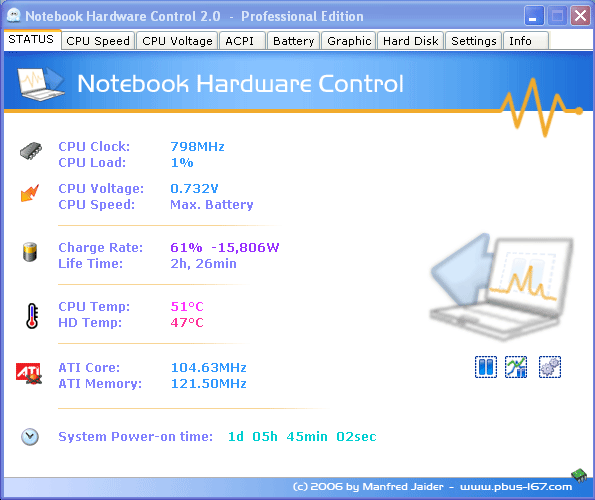
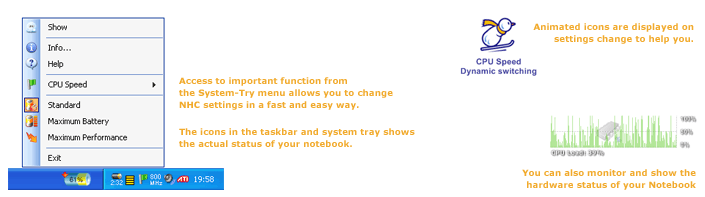
I use Notebook Hardware Control on my laptop for this purpose, and it works well. A simple right click of the tray icon (any of the 1-6 or so that it can show, via settings) gives you quick access to your settings for Max Performance, Batery Optimized, Max Battery, and other options. Great tool, but it looks like the support/development has stopped for it - nonetheless, it gives such a host of options that I plan on using it until it is no longer compatible with my version of Windows (my laptop is going to hold with me for the long haul, Vista upgrade soon :)).

Works with 2k-Vista I believe (tested on XP SP2, XP SP3, Vista, Vista SP1 personally, on desktops and laptops). It runs with all settings enabled on laptops (unless you have some weird hardware), and with some options enabled for desktops. Useful for both types of systems (tablets too I assume, but untested personally).


4wd

  • Pedantic Old Bastard
  • Supporting Member
  • Joined in 2006
  • **
  • Posts: 5,652
    • Coding Snacks
Re: Switch power profile based on which program is active in windows
« Reply #4 on: October 06, 2008, 12:32 AM »
I use Notebook Hardware Control on my laptop for this purpose, and it works well.

Apart from the hardware monitor aspect of it, how is that different from just creating different profiles in Power Options and the clicking on the Battery Icon in the systray to switch between them?

Some interesting links regarding XP's "Max Battery" profile:

Confusing Power Profiles
Using POWERCFG.EXE

Actually, I would have thought that running a program to do what the OS is already doing would be counter-productive.  You're creating a CPU load that otherwise would not be there, thereby using a small amount of energy, thus reducing the battery life by a small, (probably negligible) amount.
"I will not follow where the path may lead, but I will go where there is no path, and I will leave a trail." - Muriel Strode, 1903
« Last Edit: October 06, 2008, 12:37 AM by 4wd »

wreckedcarzz

  • Still lurking. Still an anthro.
  • Charter Member
  • Joined in 2005
  • ***
  • Posts: 1,629
    • Participated in NANY Challenge Twice
    • Coding Snacks
    • Furry Fandom Badge - Furry Fandom
    • Linux User
Re: Switch power profile based on which program is active in windows
« Reply #5 on: October 06, 2008, 01:55 AM »
It allows control of power usage, throttling of CPU voltage and multiplier, hard drive speed (for power and noise), ACPI control (extremely handy - it let me know my laptop's CPU hit 205.15F (thats like... 80C?) and told me it would shutdown in 15 seconds to keep damage from occurring.

It gives you graphs for CPU usage, CPU temp, HDD temp, battery level, battery charge level (as in how much power is being used/added to the battery), etc etc.

It does much more than what Windows (or Ubuntu) does already.

Original address: https://www.donationcoder.com/forum/index.php?topic=15180.0