DonationCoder.com forum
 
Read-only archive. This is a static copy of the DonationCoder.com forum. Reading and searching work as before; logging in, posting and private messages do not.
Archive of 2026-10-21 · About this archive · Main site

Author Topic: Vista style filename editing in XP  (Read 40,533 times)

skrommel

  • Fastest code in the west
  • Developer
  • Joined in 2005
  • ***
  • Posts: 933
    • Participated in NANY Challenge Twice
    • Coding Snacks
Vista style filename editing in XP
« on: September 25, 2008, 01:30 AM »
:) One of the improvements in Vista is that it doesn't select the file type when you edit a filename.
Here's a quick hack to have this behaviour in XP, too!

It's called TheEnd!

TheEnd - Unselect the file type when renaming files in XP.

Features:

- Press F2 to rename a file.
- Or click a filename slowly two times.


You'll find the downloads and more info at 1 Hour Software by Skrommel.

Skrommel
« Last Edit: October 09, 2008, 02:52 AM by skrommel »

lanux128

  • Global Moderator
  • Joined in 2005
  • *****
  • Posts: 6,277
    • Coding Snacks
    • Volunteers/Staff
    • Gathering Badge
    • Participated in NANY Challenge Once
    • Linux User
Re: Vista style filename editing in XP
« Reply #1 on: September 25, 2008, 02:41 AM »
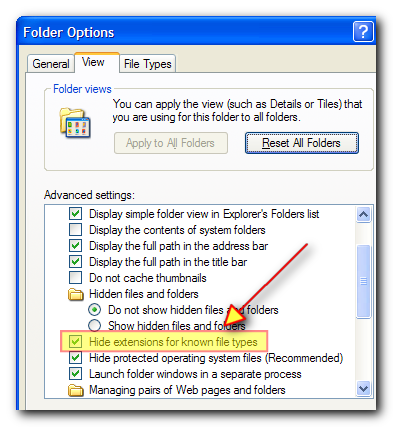
nice script Skrommel. this will come in handy for those who have un-checked the "Hide extensions" option. :up:

sc_08-09-25_001.png

skrommel

  • Fastest code in the west
  • Developer
  • Joined in 2005
  • ***
  • Posts: 933
    • Participated in NANY Challenge Twice
    • Coding Snacks
Re: Vista style filename editing in XP
« Reply #2 on: September 25, 2008, 08:13 AM »
:-[ Thanks for clarifying things, lanux128!

Skrommel

yksyks

  • Supporting Member
  • Joined in 2006
  • **
  • Posts: 476
Re: Vista style filename editing in XP
« Reply #3 on: September 25, 2008, 10:29 AM »
Similar results for people too lazy for AHK (like me) can be achieved using QTTabBar, if I remember correctly, and even more advanced with Pitaschio, where pressing F2 cycles between filename, extension and full filename with extension. The latter also works in open/save dialogs.

dsp

  • Participant
  • Joined in 2008
  • *
  • Posts: 9
Re: Vista style filename editing in XP
« Reply #4 on: October 09, 2008, 01:50 AM »
Any chance of a compiled executable pls. Thanks.

skrommel

  • Fastest code in the west
  • Developer
  • Joined in 2005
  • ***
  • Posts: 933
    • Participated in NANY Challenge Twice
    • Coding Snacks
Re: Vista style filename editing in XP
« Reply #5 on: October 09, 2008, 02:52 AM »
:) Compiled and posted TheEnd above.

Skrommel

f0dder

  • [Well, THAT escalated quickly!]
  • Charter Honorary Member
  • Joined in 2005
  • ***
  • Posts: 9,153
    • Participated in NANY Challenge Once
Re: Vista style filename editing in XP
« Reply #6 on: October 09, 2008, 06:47 AM »
I sincerely hope there's no DonationCoder members who hide file extensions for known types :huh:

Personally I use xplorer2 which does this by default - if I wasn't, I'd buy you a cup of beer, skrommel :)
- carpe noctem

lanux128

  • Global Moderator
  • Joined in 2005
  • *****
  • Posts: 6,277
    • Coding Snacks
    • Volunteers/Staff
    • Gathering Badge
    • Participated in NANY Challenge Once
    • Linux User
Re: Vista style filename editing in XP
« Reply #7 on: October 09, 2008, 09:50 AM »
I sincerely hope there's no DonationCoder members who hide file extensions for known types

i actually leave the 'Hide extensions' on because i hardly use Explorer, using Altap Salamander and Total Commander instead whose behaviours are just like xplorer2. :)

f0dder

  • [Well, THAT escalated quickly!]
  • Charter Honorary Member
  • Joined in 2005
  • ***
  • Posts: 9,153
    • Participated in NANY Challenge Once
Re: Vista style filename editing in XP
« Reply #8 on: October 09, 2008, 09:52 AM »
I sincerely hope there's no DonationCoder members who hide file extensions for known types

i actually leave the 'Hide extensions' on because i hardly use Explorer, using Altap Salamander and Total Commander instead whose behaviours are just like xplorer2. :)
Well, that qualifies as "showing extensions" to me :)
- carpe noctem

lothark

  • Supporting Member
  • Joined in 2007
  • **
  • Posts: 13
Re: Vista style filename editing in XP
« Reply #9 on: October 09, 2008, 01:17 PM »
When I run it, the cursor is at the end of the filename before the extension, but the filename is not selected. Is this the intended behavior?

I also have Explorer2 but use it infrequently so this could be really useful if it selected the filename.

t2

  • Participant
  • Joined in 2005
  • *
  • Posts: 5
Re: Vista style filename editing in XP
« Reply #10 on: October 13, 2008, 03:30 PM »
You don't need visible file extensions with this (see posts on the bottom of the page, it's a work in progress) :Thmbsup:
http://www.codeproject.com/KB/wtl/change_file_ext.aspx
or here
http://www.autohotkey.com/forum/topic30796.html&highlight=change+file+extension

Dacal

  • Participant
  • Joined in 2008
  • *
  • Posts: 1
Re: Vista style filename editing in XP
« Reply #11 on: October 25, 2008, 05:38 AM »
A little problem here :(
I run it and after having renamed a file, I'm not able to open or run anything with the double left click.

EDIT: Another problem. It works only for files on desktop.

Tested on XP home SP2 and XP Professional SP3.

Skrommel help me please :(
Thanks.

Sorry for my poor English.
« Last Edit: October 25, 2008, 09:10 PM by Dacal »

skywalka

  • Member
  • Joined in 2005
  • **
  • Posts: 254
Re: Vista style filename editing in XP
« Reply #12 on: January 23, 2009, 05:47 AM »
Similar results for people too lazy for AHK (like me) can be achieved using QTTabBar, if I remember correctly, and even more advanced with Pitaschio, where pressing F2 cycles between filename, extension and full filename with extension. The latter also works in open/save dialogs.
QTTabBar also allows you to cycle your selection with F2.

AcidPunch

  • Participant
  • Joined in 2010
  • *
  • Posts: 1
Re: Vista style filename editing in XP
« Reply #13 on: May 14, 2010, 07:21 PM »
A little problem here :(
I run it and after having renamed a file, I'm not able to open or run anything with the double left click.

EDIT: Another problem. It works only for files on desktop.

Tested on XP home SP2 and XP Professional SP3.

Skrommel help me please :(
Thanks.

Sorry for my poor English.

I have the same issues as this guy does. Any word on the solution?

skrommel

  • Fastest code in the west
  • Developer
  • Joined in 2005
  • ***
  • Posts: 933
    • Participated in NANY Challenge Twice
    • Coding Snacks
Re: Vista style filename editing in XP
« Reply #14 on: May 15, 2010, 12:10 AM »
:) Try TheEnd v1.1.

Skrommel

lothark

  • Supporting Member
  • Joined in 2007
  • **
  • Posts: 13
Re: Vista style filename editing in XP
« Reply #15 on: September 13, 2010, 08:14 AM »
Tried v1.1 butit still exhibits the same behaviour of not selecting the filename. I have reloaded XP SP3 since my previous post.

edit_check

  • Participant
  • Joined in 2019
  • *
  • Posts: 1
Re: Vista style filename editing in XP
« Reply #16 on: January 04, 2019, 03:38 AM »
Hi, i know it is old, but the aplication is not working propertly (like was reported by another users)

So, i checked the source code and the problem is (on line 44):

Code
ControlSend,%focus%,{Left %length%},ahk_id %active%

So, need add "+" before:

Code
ControlSend,%focus%,+{Left %length%},ahk_id %active%

That is all to fix the problem.

mouser

  • First Author
  • Administrator
  • Joined in 2005
  • *****
  • Posts: 40,931
    • Gathering Badge
    • Plugin Coding Medal
    • Participated in NANY Challenge Seventeen Times
    • Cody Award
    • Coding Snacks
    • Volunteers/Staff
Re: Vista style filename editing in XP
« Reply #17 on: January 04, 2019, 04:02 PM »
Thanks for sharing that fix, edit_check  :up:

Original address: https://www.donationcoder.com/forum/index.php?topic=15100.0