DonationCoder.com forum
 
Read-only archive. This is a static copy of the DonationCoder.com forum. Reading and searching work as before; logging in, posting and private messages do not.
Archive of 2026-10-21 · About this archive · Main site

Author Topic: [How To] Control your computer by voice commands  (Read 25,925 times)

sri

  • Honorary Member
  • Joined in 2006
  • **
  • Posts: 689
[How To] Control your computer by voice commands
« on: September 23, 2008, 07:39 AM »
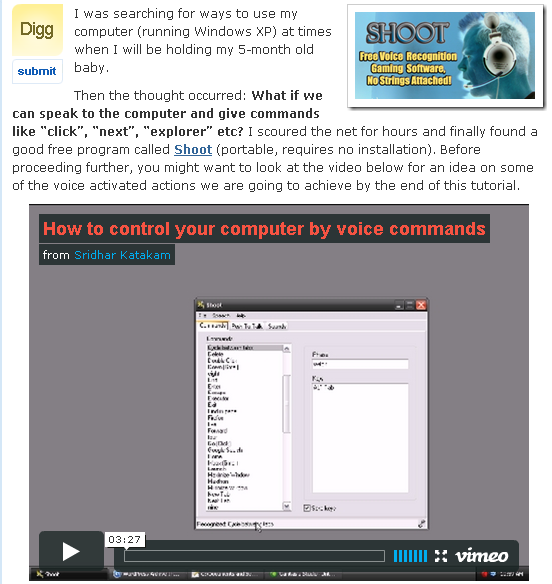
You can control Windows XP computer by using a free program called Shoot. It uses the in-built Microsoft speech technology. I wrote a blog post with a short video where I open browser, search, open and close tabs, switch tabs; run notepad, calculator etc. by issuing voice commands.

For details, visit http://www.howtotuts.com/2008/09/22/how-to-control-your-computer-with-voice/ :D

Below is a screenshot of my blog post. Clicking on it will take you to the above URL from where the video can be watched.
shootblogpostscreenshotgl4.png

Is there any other similar free program that works on XP?


edit by jgpaiva: fixed url link and attached image to post
« Last Edit: September 23, 2008, 11:04 AM by sri »

Paul Keith

  • Member
  • Joined in 2008
  • **
  • Posts: 1,989
Re: [How To] Control your computer by voice commands
« Reply #1 on: September 23, 2008, 11:01 AM »
I feel so stupid for repeatedly clicking the screen and wondering why it was referring me to a broken link instead of playing the video.  :huh:
<reserve space for the day DC can auto-generate your signature from your personal PopUp Wisdom quotes>

sri

  • Honorary Member
  • Joined in 2006
  • **
  • Posts: 689
Re: [How To] Control your computer by voice commands
« Reply #2 on: September 23, 2008, 11:05 AM »
Paul: I have modified my first post in this thread and added this: "Below is a screenshot of my blog post. Clicking on it will take you to the above URL from where the video can be watched."

By the way, someone suggested a alternative program at Neowin forum: http://www.pilfius.com.ar/about.php

I am going to try it out later.

Paul Keith

  • Member
  • Joined in 2008
  • **
  • Posts: 1,989
Re: [How To] Control your computer by voice commands
« Reply #3 on: September 23, 2008, 11:31 AM »
Yeah, that's better. 2nd program looks more promising since it seems it can be used for games based on the command list. Looking forward to your review.
<reserve space for the day DC can auto-generate your signature from your personal PopUp Wisdom quotes>

sri

  • Honorary Member
  • Joined in 2006
  • **
  • Posts: 689
Re: [How To] Control your computer by voice commands
« Reply #4 on: September 23, 2008, 11:33 AM »
Shoot is also primarily aimed at gamers. But then I wouldn't know. The only computer game I ever played was 'Need for speed'.

fenixproductions

  • Honorary Member
  • Joined in 2006
  • **
  • Posts: 1,186
    • Participated in NANY Challenge Four Times
Re: [How To] Control your computer by voice commands
« Reply #5 on: September 23, 2008, 11:38 AM »
2sri
For NfS you could sound like a bad wife on passenger's seat ;)
"Left, Left, Right, Slow down! brake!"
Надо было учиться, а не камни в школу бросать...
--
f0dder is my personal hero :)

40hz

  • Supporting Member
  • Joined in 2007
  • **
  • Posts: 11,861
Re: [How To] Control your computer by voice commands
« Reply #6 on: September 23, 2008, 02:24 PM »
Might be interesting to use in conjunction with FARR... 8)

Paul Keith

  • Member
  • Joined in 2008
  • **
  • Posts: 1,989
Re: [How To] Control your computer by voice commands
« Reply #7 on: September 23, 2008, 11:04 PM »
2sri
For NfS you could sound like a bad wife on passenger's seat ;)
"Left, Left, Right, Slow down! brake!"

Damn it, now you make me want to play NfS  :P
<reserve space for the day DC can auto-generate your signature from your personal PopUp Wisdom quotes>

nite_monkey

  • Member
  • Joined in 2006
  • **
  • Posts: 753
Re: [How To] Control your computer by voice commands
« Reply #8 on: September 24, 2008, 03:35 AM »
So how does either of those programs compare to vista's speech recognition (outside of games), because in the past, I have had good results from vista's speech recognition. Though I may still download shoot and play with it
[Insert really cool signature here]

TomColvin

  • Participant
  • Joined in 2007
  • *
  • Posts: 65
Re: [How To] Control your computer by voice commands
« Reply #9 on: September 26, 2008, 03:47 AM »
As a sight-impaired, aging writer, I trying to build a computer setup that reduces as much as possible reliance on my eyesight.  The program you mention is new to me.  I'll check it out.  THANKS.
www.becoming-a-writer-seriously.com
www.words-sounds-images.com

relipse

  • I love Jesus. Coding in PHP primarily.
  • Charter Honorary Member
  • Joined in 2005
  • ***
  • Posts: 131
    • Participated in NANY Challenge Seven Times
Re: [How To] Control your computer by voice commands
« Reply #10 on: October 09, 2008, 09:52 AM »
i tried it out, much fun, but how exactly do you turn key board keys into clicks?
Ex C++Builder coder, current PHP coder, and noob Qt Coder

Contro

  • Supporting Member
  • Joined in 2007
  • **
  • Posts: 3,947
Re: [How To] Control your computer by voice commands
« Reply #11 on: March 08, 2009, 05:57 PM »
Neowin forum

This link don't goes well : 08.03.2009.....

Contro

  • Supporting Member
  • Joined in 2007
  • **
  • Posts: 3,947
Re: [How To] Control your computer by voice commands
« Reply #12 on: March 08, 2009, 05:58 PM »
Might be interesting to use in conjunction with FARR... 8)

What's FARR.... 8)  ?¿?¿?¿

PhilB66

  • Supporting Member
  • Joined in 2007
  • **
  • Posts: 1,522

Mizraim

  • Supporting Member
  • Joined in 2006
  • **
  • Posts: 155
    • Cody Award
Re: [How To] Control your computer by voice commands
« Reply #14 on: March 08, 2009, 11:54 PM »
Might be interesting to use in conjunction with FARR... 8)

What's FARR.... 8)  ?¿?¿?¿


FARR refers to Find And Run Robot, do a forum search for more info. :)
« Last Edit: March 08, 2009, 11:59 PM by Mizraim »

Mizraim

  • Supporting Member
  • Joined in 2006
  • **
  • Posts: 155
    • Cody Award
Re: [How To] Control your computer by voice commands
« Reply #15 on: March 08, 2009, 11:56 PM »
This is an interesting application, I have several things I would like to try this with. I'll get my results on here later this week for anyone who's interested.  :up:

Sorry about the double post.  :P
« Last Edit: March 08, 2009, 11:58 PM by Mizraim »

Original address: https://www.donationcoder.com/forum/index.php?topic=15070.0