DonationCoder.com forum
 
Read-only archive. This is a static copy of the DonationCoder.com forum. Reading and searching work as before; logging in, posting and private messages do not.
Archive of 2026-10-21 · About this archive · Main site

Last post Author Topic: The New (And Improved?) VLC  (Read 54,253 times)

CleverCat

  • Cat's Are Fun!
  • Supporting Member
  • Joined in 2006
  • **
  • Posts: 1,164
Re: The New (And Improved?) VLC
« Reply #25 on: September 29, 2008, 02:00 PM »
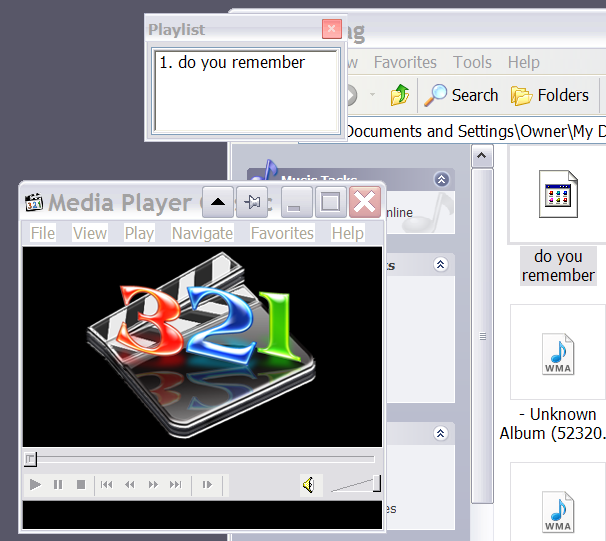
Yes - I just dragged in a few videos and said View/Playlist and it opens at bottom!

:)

I closed it, re opened and list was still there... Right click on any file/save as and it saves as a mpcpl. Just drag onto window to reopen.
If you need help - JUST ASK!
« Last Edit: September 29, 2008, 02:22 PM by CleverCat »

CleverCat

  • Cat's Are Fun!
  • Supporting Member
  • Joined in 2006
  • **
  • Posts: 1,164
Re: The New (And Improved?) VLC
« Reply #26 on: September 29, 2008, 02:15 PM »
Check here too..

http://www.autohotkey.com/forum/topic18393.html
If you need help - JUST ASK!

cmpm

  • Charter Member
  • Joined in 2006
  • ***
  • Posts: 2,026
Re: The New (And Improved?) VLC
« Reply #27 on: September 29, 2008, 02:52 PM »
It's not that hard to do.
Open wmc.
Open the folder with your music.
Click view - playlist in wmc.
Drag and drop the music files into the playlist.
Right click in the playlist box.
Click 'save as'.
Name it and it will be saved in that folder.

cmpm

  • Charter Member
  • Joined in 2006
  • ***
  • Posts: 2,026
Re: The New (And Improved?) VLC
« Reply #28 on: September 29, 2008, 02:56 PM »
Also I have Windows media classic as the default for all it could choose.
It's in 'view'-'options' to make it the default player.

And that playlist method will work with videos as well.
If wmc is the player for them.

siouxdax

  • Lather. Rinse. Repeat.
  • Supporting Member
  • Joined in 2006
  • **
  • Posts: 247
Re: The New (And Improved?) VLC
« Reply #29 on: October 11, 2008, 01:25 AM »
I'm running 0.9.4 on my laptop with no problems. I installed the patch on my desktop to 0.9.4, but it only played audio so I had to roll it back to 0.9.2. Anyone else having this problem. Any fixes?
Kind Regards,
Daniel in Tulsa
AKA siouxdax

Visit my tumblog!

Ehtyar

  • That News Guy
  • Supporting Member
  • Joined in 2007
  • **
  • Posts: 1,237
    • Plugin Coding Medal
    • Gathering Badge
Re: The New (And Improved?) VLC
« Reply #30 on: October 11, 2008, 10:37 AM »
Not me, I upped to 0.9.4 the other day, fixes some UI issues for me.

Ehtyar.

lanux128

  • Global Moderator
  • Joined in 2005
  • *****
  • Posts: 6,277
    • Coding Snacks
    • Volunteers/Staff
    • Gathering Badge
    • Participated in NANY Challenge Once
    • Linux User
Re: The New (And Improved?) VLC
« Reply #31 on: January 31, 2009, 06:06 AM »
is it possible to make vlc play full-screen video on secondary display? i couldn't find any info on this.

Josh

  • Charter Honorary Member
  • Joined in 2005
  • ***
  • Posts: 3,411
    • Gathering Badge
    • Official Forum Clown
    • Coding Snacks
    • Plugin Coding Medal
    • Volunteers/Staff
    • Military Service Badge - US Army
    • Furry Fandom Badge - Furry Fandom
    • Linux User
Re: The New (And Improved?) VLC
« Reply #32 on: January 31, 2009, 07:35 AM »
Perhaps the most annoying bug, which should be easily fixed and has existed since .94, is the fact that the windows version will not remember the last used folder so you have to constantly browse to the last used folder everytime you choose file - open
Strength in Knowledge

Ehtyar

  • That News Guy
  • Supporting Member
  • Joined in 2007
  • **
  • Posts: 1,237
    • Plugin Coding Medal
    • Gathering Badge
Re: The New (And Improved?) VLC
« Reply #33 on: January 31, 2009, 07:46 AM »
Perhaps the most annoying bug, which should be easily fixed and has existed since .94, is the fact that the windows version will not remember the last used folder so you have to constantly browse to the last used folder everytime you choose file - open
Oooooh, yes please!!

Ehtyar.

CleverCat

  • Cat's Are Fun!
  • Supporting Member
  • Joined in 2006
  • **
  • Posts: 1,164
Re: The New (And Improved?) VLC
« Reply #34 on: January 31, 2009, 11:10 AM »
:Thmbsup:
If you need help - JUST ASK!
« Last Edit: January 31, 2009, 11:13 AM by CleverCat »

Crush

  • Hello dude!
  • Member
  • Joined in 2006
  • **
  • Posts: 402
    • Participated in NANY Challenge Three Times
Re: The New (And Improved?) VLC
« Reply #35 on: January 31, 2009, 11:44 AM »
@lanux128: I can send the output to my television with the gfx-card-settings to the fullscreen output of the second device. If you´re using an extended display (2 screens showing the half of a big one) you can pull the vlc-window to the second screen and double-click it to get it fullsized.

lanux128

  • Global Moderator
  • Joined in 2005
  • *****
  • Posts: 6,277
    • Coding Snacks
    • Volunteers/Staff
    • Gathering Badge
    • Participated in NANY Challenge Once
    • Linux User
Re: The New (And Improved?) VLC
« Reply #36 on: January 31, 2009, 02:00 PM »
Perhaps the most annoying bug, which should be easily fixed and has existed since .94, is the fact that the windows version will not remember the last used folder so you have to constantly browse to the last used folder everytime you choose file - open

if it's of any help, you can choose File>Advanced Open File which does retain the last opened folder. :)

lanux128

  • Global Moderator
  • Joined in 2005
  • *****
  • Posts: 6,277
    • Coding Snacks
    • Volunteers/Staff
    • Gathering Badge
    • Participated in NANY Challenge Once
    • Linux User
Re: The New (And Improved?) VLC
« Reply #37 on: January 31, 2009, 02:02 PM »
@lanux128: I can send the output to my television with the gfx-card-settings to the fullscreen output of the second device. If you´re using an extended display (2 screens showing the half of a big one) you can pull the vlc-window to the second screen and double-click it to get it fullsized.

thanks Crush, i have something similar to your setup and KMPlayer does this by default so i was wondering how come vlc can't detect the 2nd display.

Josh

  • Charter Honorary Member
  • Joined in 2005
  • ***
  • Posts: 3,411
    • Gathering Badge
    • Official Forum Clown
    • Coding Snacks
    • Plugin Coding Medal
    • Volunteers/Staff
    • Military Service Badge - US Army
    • Furry Fandom Badge - Furry Fandom
    • Linux User
Re: The New (And Improved?) VLC
« Reply #38 on: January 31, 2009, 02:39 PM »
OK, now the big question comes, can I remap CTRL+O to use that dialog?

Also, when are global hotkeys coming!!!!
Strength in Knowledge

lanux128

  • Global Moderator
  • Joined in 2005
  • *****
  • Posts: 6,277
    • Coding Snacks
    • Volunteers/Staff
    • Gathering Badge
    • Participated in NANY Challenge Once
    • Linux User
Re: The New (And Improved?) VLC
« Reply #39 on: February 01, 2009, 03:18 AM »
is it possible to make vlc play full-screen video on secondary display? i couldn't find any info on this.

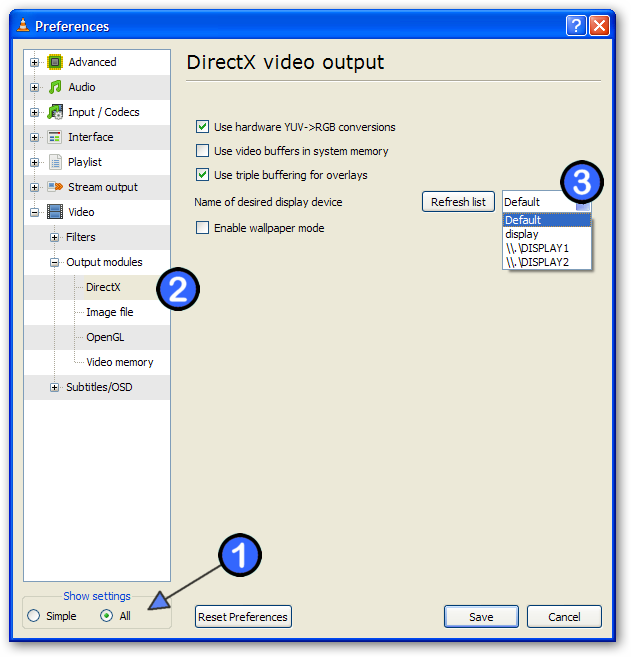
i've managed to find how to do this! the trick was to look in 'all' settings as opposed to 'simple'. :)

ws-vlc-2nd-monitor-1_ver001.png

Nod5

  • Supporting Member
  • Joined in 2006
  • **
  • Posts: 1,175
    • Coding Snacks
    • Participated in NANY Challenge Three Times
    • Plugin Coding Medal
Re: The New (And Improved?) VLC
« Reply #40 on: February 02, 2009, 08:04 PM »
is it possible to make vlc play full-screen video on secondary display? i couldn't find any info on this.
This is a new bug in the latest version. It works in older versions and posts in the videolan forum say that it'll be fixed in v1.0. So if you need it then just revert to an older version temporarily.

lanux128

  • Global Moderator
  • Joined in 2005
  • *****
  • Posts: 6,277
    • Coding Snacks
    • Volunteers/Staff
    • Gathering Badge
    • Participated in NANY Challenge Once
    • Linux User
Re: The New (And Improved?) VLC
« Reply #41 on: February 03, 2009, 02:27 AM »
This is a new bug in the latest version. It works in older versions and posts in the videolan forum say that it'll be fixed in v1.0. So if you need it then just revert to an older version temporarily.

then i must be using an older version because currently vlc plays fine on secondary display. it was just a matter of finding the options. i had assumed that the option would be on 'normal' settings. :)

Nod5

  • Supporting Member
  • Joined in 2006
  • **
  • Posts: 1,175
    • Coding Snacks
    • Participated in NANY Challenge Three Times
    • Plugin Coding Medal
Re: The New (And Improved?) VLC
« Reply #42 on: February 03, 2009, 01:40 PM »
it is a new bug in the sense that there seems to be no way to set VLC (latest version) to always display the fullscreen on the same display as the player window currently is (from my quick test of the options above just now). Or did I miss something?

lanux128

  • Global Moderator
  • Joined in 2005
  • *****
  • Posts: 6,277
    • Coding Snacks
    • Volunteers/Staff
    • Gathering Badge
    • Participated in NANY Challenge Once
    • Linux User

Lashiec

  • Member
  • Joined in 2006
  • **
  • Posts: 2,374
Re: The New (And Improved?) VLC
« Reply #44 on: May 13, 2009, 11:33 PM »
OK, now the big question comes, can I remap CTRL+O to use that dialog?

Also, when are global hotkeys coming!!!!

In 1.0 :)

Josh

  • Charter Honorary Member
  • Joined in 2005
  • ***
  • Posts: 3,411
    • Gathering Badge
    • Official Forum Clown
    • Coding Snacks
    • Plugin Coding Medal
    • Volunteers/Staff
    • Military Service Badge - US Army
    • Furry Fandom Badge - Furry Fandom
    • Linux User
Re: The New (And Improved?) VLC
« Reply #45 on: May 14, 2009, 12:13 AM »
They were supposedly implemented in a nightly but I have yet to see it. That and remembering what BLOODY FOLDER I WAS LAST BROWSING USING THE OPEN FILE DIALOG!!!!!!!!!!!!!!

:wallbash: :wallbash: :wallbash: :wallbash: :wallbash: :wallbash: :wallbash: :wallbash: :wallbash: :wallbash: :wallbash: :wallbash: :wallbash: :wallbash:
Strength in Knowledge

Ehtyar

  • That News Guy
  • Supporting Member
  • Joined in 2007
  • **
  • Posts: 1,237
    • Plugin Coding Medal
    • Gathering Badge
Re: The New (And Improved?) VLC
« Reply #46 on: May 14, 2009, 12:37 AM »
They were supposedly implemented in a nightly but I have yet to see it. That and remembering what BLOODY FOLDER I WAS LAST BROWSING USING THE OPEN FILE DIALOG!!!!!!!!!!!!!!

:wallbash: :wallbash: :wallbash: :wallbash: :wallbash: :wallbash: :wallbash: :wallbash: :wallbash: :wallbash: :wallbash: :wallbash: :wallbash: :wallbash:
+1

Ehtyar.

ak_

  • Supporting Member
  • Joined in 2007
  • **
  • Posts: 223
Re: The New (And Improved?) VLC
« Reply #47 on: May 14, 2009, 12:45 AM »
I think it's a shame that you can't drag & drop subtitle files on VLC to open them.

lanux128

  • Global Moderator
  • Joined in 2005
  • *****
  • Posts: 6,277
    • Coding Snacks
    • Volunteers/Staff
    • Gathering Badge
    • Participated in NANY Challenge Once
    • Linux User
Re: The New (And Improved?) VLC
« Reply #48 on: May 14, 2009, 01:21 AM »
it says something about VLC that despite the shortcomings, it still commands a respectable following.. :)

Ehtyar

  • That News Guy
  • Supporting Member
  • Joined in 2007
  • **
  • Posts: 1,237
    • Plugin Coding Medal
    • Gathering Badge
Re: The New (And Improved?) VLC
« Reply #49 on: May 14, 2009, 01:33 AM »
it says something about VLC that despite the shortcomings, it still commands a respectable following.. :)
Very true, I can't argue that.

I think we bitch about the small things because they would take so little to fix. All-in-all, however, VLC is such a good media player that we use it despite the bugs.

Ehtyar.

Original address: https://www.donationcoder.com/forum/index.php?topic=15067.0