DonationCoder.com forum
 
Read-only archive. This is a static copy of the DonationCoder.com forum. Reading and searching work as before; logging in, posting and private messages do not.
Archive of 2026-10-21 · About this archive · Main site

Author Topic: Looking for a second task holder?  (Read 8,780 times)

justice

  • Solve issues simply.
  • Supporting Member
  • Joined in 2006
  • **
  • Posts: 1,898
    • Participated in NANY Challenge Four Times
    • Cody Award
    • Coding Snacks
    • DJ Badge - DJ
Looking for a second task holder?
« on: September 16, 2008, 12:42 PM »
I've got a lot of tasks running simultaneously, and have moved the task bar to the right of the wide-screen so I can read the window titles better. However when I have over 12 windows open it becomes annoying. I've used hide to system tray software in the past but I've got over 15 system tray icons already. So what I'm looking for is a 'drawer' that can hold my windows out of sight, and a way to hide windows to it and restore them from it.

idea:
taskbar = primary tasks;
taskdrawer = secondary tasks such as winamp, things i'm not working on;
system tray = for the rest.

I've started on a autohotkey script to do this but it's a bit more complicated than i thought (restore individual window, autohotkey is crap with arrays). Any software out there that can fill the gap? Bonus points for keyboard shortcuts. i don't want to use a virtual desktop manager :P

Actually its similar to my PutAside program but I want to hide windows even though i'm working on the same task, not all of them..
« Last Edit: September 16, 2008, 12:45 PM by justice »

cmpm

  • Charter Member
  • Joined in 2006
  • ***
  • Posts: 2,026
Re: Looking for a second task holder?
« Reply #1 on: September 16, 2008, 01:33 PM »
This is what I use when I have a lot running and need to choose one quickly.

http://www.ntwind.com/software/taskswitchxp.html

But this is for actual running programs that are 'up' on the screen rather then minimized.
I'm not sure if there is a setting to show -everything- running, including in the tray.

Paul Keith

  • Member
  • Joined in 2008
  • **
  • Posts: 1,989
Re: Looking for a second task holder?
« Reply #2 on: September 16, 2008, 01:55 PM »
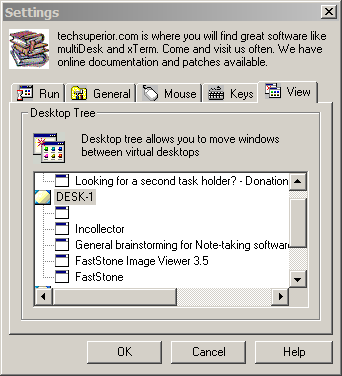
Some virtual desktop software like multidesk possess this function. It's still a virtual desktop, only you get the option to view all the files in all the virtual desktops at the same time.

[attachthumb=#1]

<reserve space for the day DC can auto-generate your signature from your personal PopUp Wisdom quotes>

jgpaiva

  • Artificial Idiocy
  • Global Moderator
  • Joined in 2006
  • *****
  • Posts: 4,727
    • Cody Award
    • Participated in NANY Challenge Once
    • Coding Snacks
    • Portugal Inhabitant
    • Linux User
Re: Looking for a second task holder?
« Reply #3 on: September 16, 2008, 01:57 PM »
Maybe VideoInPicture could help, you could remove the apps you don't want on the taskbar and just have them floating on the desktop.

CleverCat

  • Cat's Are Fun!
  • Supporting Member
  • Joined in 2006
  • **
  • Posts: 1,164
Re: Looking for a second task holder?
« Reply #4 on: September 17, 2008, 07:47 AM »
With object dock http://www.stardock.com/products/objectdock/

You can have a visible or hidden dock and tell it to show open windows.  :Thmbsup:

It can also show the system tray!
If you need help - JUST ASK!
« Last Edit: September 17, 2008, 07:49 AM by CleverCat »

lanux128

  • Global Moderator
  • Joined in 2005
  • *****
  • Posts: 6,277
    • Coding Snacks
    • Volunteers/Staff
    • Gathering Badge
    • Participated in NANY Challenge Once
    • Linux User
Re: Looking for a second task holder?
« Reply #5 on: September 25, 2008, 12:49 PM »
how about WinTabber or Jedi Window Dock? it can be used as a pseudo-container to push less used apps into these programs.

nite_monkey

  • Member
  • Joined in 2006
  • **
  • Posts: 753
Re: Looking for a second task holder?
« Reply #6 on: September 26, 2008, 03:06 AM »
Jedi window dock might work for what you are looking for. You can open multiple copies of the program, and then put winamp,chrome/ff, and calculator in one instance of the program, and then put word,outlook, and something else in the other, then just switch through the programs inside the jedi docks
[Insert really cool signature here]

Deozaan

  • Charter Member
  • Joined in 2006
  • ***
  • Posts: 9,827
    • Participated in NANY Challenge Eight Times
    • Cody Award
Re: Looking for a second task holder?
« Reply #7 on: September 26, 2008, 05:10 AM »
Get two monitors and use UltraMon to show the applications only on the taskbar for the monitor they're on.  :Thmbsup:

Original address: https://www.donationcoder.com/forum/index.php?topic=14971.0