


Hey all. I imagine just about anyone who has ever done a Firefox extension has wished that creating cross-platform desktop applications was that easy. Naturally, Mozilla has had the foresight to make this possible for quite some time, they just suck at marketing 
Meet XULRunner. This application allows programmers do use XUL and JavaScript to create fully featured desktop applications with all the functionality of XPCOM. This makes coding your application that much easier, and that every single Firefox extension potentially contains example code that a developer can leverage to their benefit.
XULRunner itself currently occupies about 20 megabytes on disk, but can be compressed to ~6mb using lzma or bzip2. It is recommended that you package XULRunner with your application, however if you make an update URL available (XULRunner has a built in updater similar to Firefox's) you can use Firefox or Mozilla to run your application in a separate instance and update it should a platform update break your application.
For anyone interested, as an example, let's take Alice Corbin's excellent XUL sample here, and turn it into an XULRunner application. She very kindly makes it available in zip which can be downloaded here. First, we'll need a copy of XULRunner from here (SDK w/ runtime here). To follow certain steps later on, you should execute 'xulrunner --register-user' after extracting it. To start, we'll create a directory called 'top' where you'd like the application to be, and beneath it create a structure like this:
Fairly self explanatory I think. Next we'll open chrome/chrome.manifest. In here we'll tell Gecko where to find the actual content of our application by adding this line:
Next, we open defaults/preferences/prefs.js. In here you can set all your default preferences, but for this application we will need only this line:
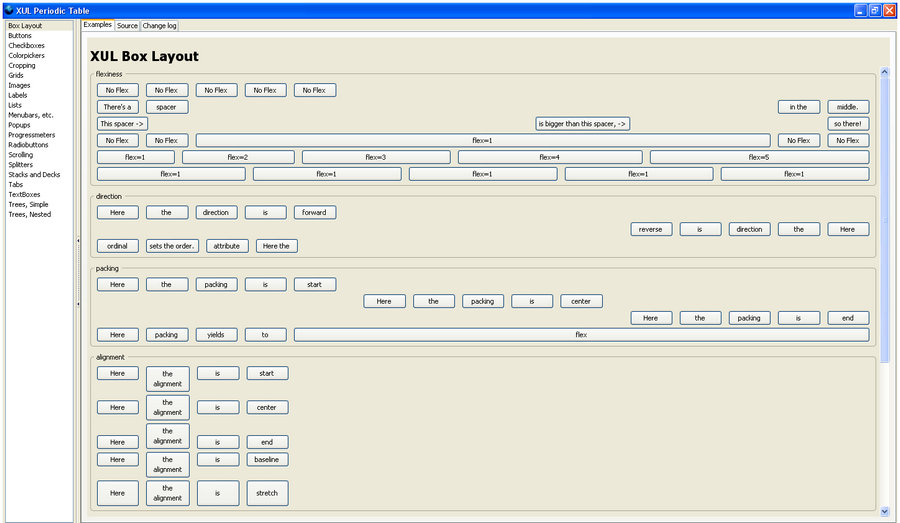
Finally, we'll extract the contents of xulpt.zip into the chrome/content directory. You'll notice the zip contains the top.xul file referenced above. Now we can test out our new application by launching it with XULRunner. To do this, open a command prompt and navigate to the folder where you installed XULRunner. Say you put your application in the 'top' directory beneath your XULRunner directory, you would execute "xulrunner top\application.ini" and you'll see your new application appear on the desktop.
For anyone interested in distributing applications they create, XULRunner harbors the same installer system as Firefox, though it is invoked in a different fashion. What you'll need to do to make use of it is zip up your application into top.zip (with application.ini in the root). Rename top.zip to top.xpi. Then, execute 'xulrunner --install-app C:\path\to\top.xpi C:\path\to\install\to'. This will install your application to the specified path (or the default path if the last parameter is omitted), and XULRunner will create a friendly stub application that users can use to launch your application with requiring a console.

Finally, here are some links for potential developers to peruse:
-XULRunner Hall of Fame Applications
-Chrome Registration
-Installer Bundles
-The Chrome URI
-Mark Finkle's XUL Blog
-Richard Crowley's XULRunner Blog
-XUL Code Snippets
-XUL/JS Example Code
Hope this helps some people, and please leave any constructive criticism in a reply. If anything doesn't work for you leave a comment in the replies and I'll see if i can help.
Ehtyar.
Meet XULRunner. This application allows programmers do use XUL and JavaScript to create fully featured desktop applications with all the functionality of XPCOM. This makes coding your application that much easier, and that every single Firefox extension potentially contains example code that a developer can leverage to their benefit.
XULRunner itself currently occupies about 20 megabytes on disk, but can be compressed to ~6mb using lzma or bzip2. It is recommended that you package XULRunner with your application, however if you make an update URL available (XULRunner has a built in updater similar to Firefox's) you can use Firefox or Mozilla to run your application in a separate instance and update it should a platform update break your application.
For anyone interested, as an example, let's take Alice Corbin's excellent XUL sample here, and turn it into an XULRunner application. She very kindly makes it available in zip which can be downloaded here. First, we'll need a copy of XULRunner from here (SDK w/ runtime here). To follow certain steps later on, you should execute 'xulrunner --register-user' after extracting it. To start, we'll create a directory called 'top' where you'd like the application to be, and beneath it create a structure like this:
Quote
|-application.iniApplication.ini stores your program's metadata, it will look like this (where <GUID> is a globally unique identifier; it can be a guid or your email address etc):
|-chrome
|-chrome.manifest
\-content
|-defaults
|-preferences
\-prefs.js
Quote
[App]
Name=top
Version=1.0
BuildID=20060105
ID=<GUID>
[Gecko]
MinVersion=1.8
MaxVersion=1.9
Fairly self explanatory I think. Next we'll open chrome/chrome.manifest. In here we'll tell Gecko where to find the actual content of our application by adding this line:
Quote
content top content/This tells Gecko that the content of our application can be found in the subdirectory 'content'. The content directive supports full relative paths, so you can place your content in a folder beside application.ini and use "content top ../content/" if you'd prefer. NOTE: The directory you specify *must* end in a slash.
Next, we open defaults/preferences/prefs.js. In here you can set all your default preferences, but for this application we will need only this line:
Quote
pref("toolkit.defaultChromeURI", "chrome://top/content/top.xul");This line tells Gecko which file from the content directory we would like it to create the initial window from (similar in a sense to index.html/default.htm).
Finally, we'll extract the contents of xulpt.zip into the chrome/content directory. You'll notice the zip contains the top.xul file referenced above. Now we can test out our new application by launching it with XULRunner. To do this, open a command prompt and navigate to the folder where you installed XULRunner. Say you put your application in the 'top' directory beneath your XULRunner directory, you would execute "xulrunner top\application.ini" and you'll see your new application appear on the desktop.
For anyone interested in distributing applications they create, XULRunner harbors the same installer system as Firefox, though it is invoked in a different fashion. What you'll need to do to make use of it is zip up your application into top.zip (with application.ini in the root). Rename top.zip to top.xpi. Then, execute 'xulrunner --install-app C:\path\to\top.xpi C:\path\to\install\to'. This will install your application to the specified path (or the default path if the last parameter is omitted), and XULRunner will create a friendly stub application that users can use to launch your application with requiring a console.

Finally, here are some links for potential developers to peruse:
-XULRunner Hall of Fame Applications
-Chrome Registration
-Installer Bundles
-The Chrome URI
-Mark Finkle's XUL Blog
-Richard Crowley's XULRunner Blog
-XUL Code Snippets
-XUL/JS Example Code
Hope this helps some people, and please leave any constructive criticism in a reply. If anything doesn't work for you leave a comment in the replies and I'll see if i can help.
Ehtyar.


