Maybe you can improve the selection modul to use
- hold the Shift-key to make an perfect quadrat or an perfect circle
Tip:
At the moment this works with the Ctrl-key and for circles only.
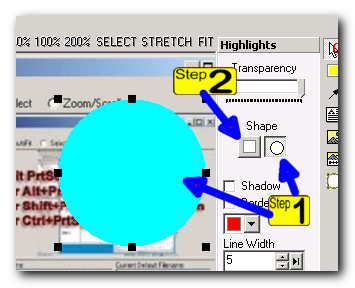
You could make an perfect round circle first and select than the rectangle tool for switch to an quadrat. (see pic)
and maybe
- hold the Ctrl-key to resize an selection at more borders the same time
i.e.
hold the Ctrl-key and resize the selection at the right .... and automaticly from the left too
hold the Ctrl-key and resize the selection at the top ... and automaticly from the botton too
hold the Ctrl-key and resize the selection at the corner ... and resize all four borders the same time
, and vice versa
- hold the Shift-key to make an perfect quadrat or an perfect circle
Tip:
At the moment this works with the Ctrl-key and for circles only.
You could make an perfect round circle first and select than the rectangle tool for switch to an quadrat. (see pic)
and maybe
- hold the Ctrl-key to resize an selection at more borders the same time
i.e.
hold the Ctrl-key and resize the selection at the right .... and automaticly from the left too
hold the Ctrl-key and resize the selection at the top ... and automaticly from the botton too
hold the Ctrl-key and resize the selection at the corner ... and resize all four borders the same time
, and vice versa