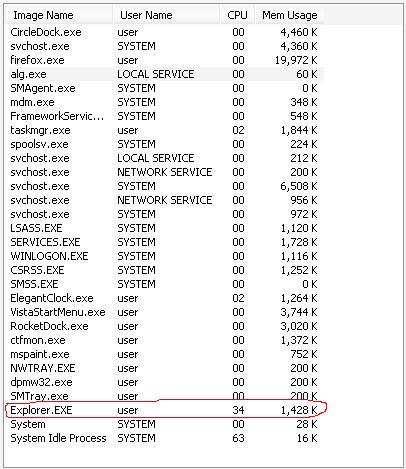
Now I running Circle Dock at whole night and doesn't do anything, CPU usage just is 0%. This issue is sometime on my PC.
Re: Circle Dock 0.9.2 Alpha 7 Discussion
« Reply #25 on: August 26, 2008, 09:15 PM »


 Topic: Circle Dock 0.9.2 Alpha 7 Discussion (Read 118,843 times)


 and if not, could you add this feature

Shadow problem does not bother me since I normally have them turned off anyway.
Why not allow the centre button to be allocated to any keyboard key or combo? It wouldn't give the position by the dock but would increase flexibility. In my case, it would allow the Start Menu to come up even if I have it as the Vista Start Menu - and it covers teh whole screen anyway, so position is not an issue.
Yesterday I open the circle dock and just ran few hours, I doesn't do anything at circle dock but the dock automatically ran the CPU at 50%
Here is the Circle Dock running CPU 50% om my PC.
......

Hi, can CD be used for browsing the file system? The current version supports directories that can contain only shortcuts or other directories, right? But is it possible to have a CD directory that points somewhere to file system and when you click on it, to expand it, it will display all files and directories that are inside that directory. And again, when you click on some directory, CD will show its content. And when you click on some file, CD will open it. So my question is, can CD be used as a fast file browser
just something like Stack docklet (http://www.aqua-soft.org/board/showthread.php?t=46859), if you know it

Right now, I'm making it so that Circle Dock can extract all the default high resolution icons in Vista so that you don't have to replace all the icon images.Of course, I have my Vista Start Menu running on Windows XP
You released Alpha version, could incoming versions have changelog, so we know what was improved, fixed, etc. thanks does CDs homepage - http://circledock.wikidot.com/ - have RSS or something (SVN browser?), so we know that a new version was released without checking the site every day?
I've tried out this great software on Windows XP SP3, and there were no icons in the dock, is it normal?
When I have a folder on the dock and click on it, it replaces the "main dock screen", leaving my mouse in one edge of the dock. It would be nice to have the option to center the dock on the clicked folder, this way you'll be at the same distance from all the folder's shortcuts (maintaining the pie-menu philosophy).
Thanks

Hi,
I am using Circle Dock from yesterday. It is an excellent dock but the only problem I am facing is that when the Circle Dock is running, it taking almost 100% CPU for 1-2 second whenever
1> I open a window
2> I close a window
3> I navigate to a folder
in that time I dont even able to move the mouse cursor.
I am using WinXP SP2 with 512RAM.
Thanks
rittwik

It says “Organize the dock items using dock folders”, but I can not see, how it is supposed to be done. When I drop something on a folder, they both rearrange, as expected. Right click on folder shows only two options, “Remove” and “Change icon”, and those are of no use.
Heeeeelp, I’m stuck
One more thing I just figure out....
As you can see from the screenshot... two other program is running..
RocketDock and Elegant Clock..
After I close those two programs it is not happening anymore...
Just starting using CircleDock and I love it already. I use a laptop with an external screen attached, and being able to pop up CircleDock on whatever screen I happen to be looking at is very useful indeed.
It would be even more amazing for me if it always opened the window on the same screen as the CircleDock was on. Would that be possible?
Hello. Right now, the current way to use dock folders right now is to add a dock folder and then left-click on it to open it.
Original address: https://www.donationcoder.com/forum/index.php?topic=14556.0